
Создание каркаса бота
Для начала создадим проект на Maven и добавим репозиторий «Telegram Bots«:
<dependency> <groupId>org.telegram</groupId> <artifactId>telegrambots</artifactId> <version>4.0.0</version> </dependency> При помощью BotFather регистрируем бота и получаем token:
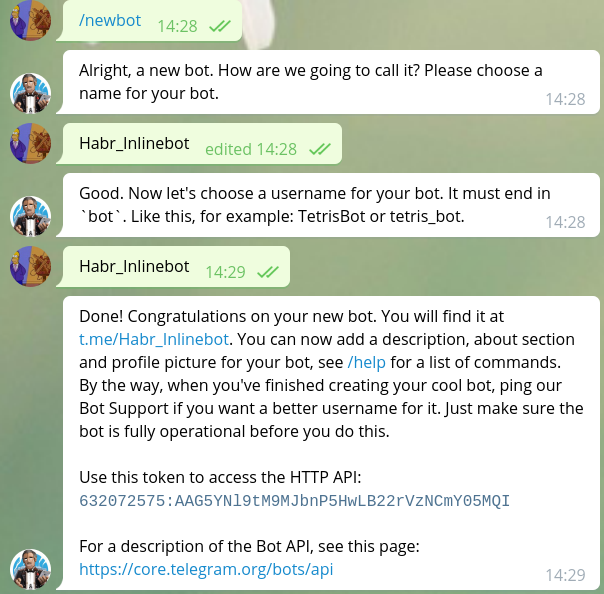
Далее создаем класс Bot, наследуемся от TelegramLongPollingBot и Овверайдим методы:
import org.telegram.telegrambots.bots.TelegramLongPollingBot; import org.telegram.telegrambots.meta.api.objects.Update; public class Bot extends TelegramLongPollingBot { @Override public void onUpdateReceived(Update update) { } @Override public String getBotUsername() { return null; } @Override public String getBotToken() { return null; } }
Создаем final переменные с именем бота и токеном, добавляем в метод getBotUsername() — botUserName, в getBotToken() — token. В методе main регистрируем бота:
import org.telegram.telegrambots.bots.TelegramLongPollingBot; import org.telegram.telegrambots.meta.TelegramBotsApi; import org.telegram.telegrambots.meta.api.objects.Update; import org.telegram.telegrambots.meta.exceptions.TelegramApiRequestException; public class Bot extends TelegramLongPollingBot { private static final String botUserName = "Habr_Inlinebot"; private static final String token = "632072575:AAG5YNl9tM9MJbnP5HwLB22rVzNCmY05MQI"; public static void main(String[] args) { ApiContextInitializer.init(); TelegramBotsApi telegramBotsApi = new TelegramBotsApi(); try { telegramBotsApi.registerBot(new Bot()); } catch (TelegramApiRequestException e) { e.printStackTrace(); } } @Override public void onUpdateReceived(Update update) { } @Override public String getBotUsername() { return botUserName; } @Override public String getBotToken() { return token; } }
Каркас бота готов! Теперь напишем метод с InlineKeyboard.
Работа с InlineKeyboard
Создаем обьект разметки клавиатуры:
InlineKeyboardMarkup inlineKeyboardMarkup =new InlineKeyboardMarkup();Теперь выстраиваем положение кнопок.
Создаем обьект InlineKeyboardButton, у которой есть 2 параметка: Текст (Что будет написано на самой кнопке) и CallBackData (Что будет отсылатся серверу при нажатии на кнопку).
InlineKeyboardButton inlineKeyboardButton = new InlineKeyboardButton(); inlineKeyboardButton.setText("Тык"); inlineKeyboardButton.setCallbackData("Button \"Тык\" has been pressed"); Добавляем его в список, таким образом создавая ряд.
List<InlineKeyboardButton> keyboardButtonsRow1 = new ArrayList<>(); keyboardButtons.add(inlineKeyboardButton);Если желаете создать еще один ряд, просто сделайте еще один список и добавляйте в него новые кнопки.
List<InlineKeyboardButton> keyboardButtonsRow2 = new ArrayList<>(); keyboardButtons.add(inlineKeyboardButton2);После этого нам нужно обьеденить ряды, поэтому создаем список рядов.
List<List<InlineKeyboardButton>> rowList= new ArrayList<>(); rowList.add(keyboardButtonsRow1); rowList.add(keyboardButtonsRow2); Фича
Разработчик позаботился о нас и мы можем сразу записывать кнопки в список не создавая переменную.
keyboardButtonsRow1.add(new InlineKeyboardButton().setText("Fi4a") .setCallbackData("CallFi4a"));Теперь мы можем установить кнопки в обьект разметки клавиатуры.
inlineKeyboardMarkup.setKeyboard(rowList);Если немного не понятно описание работы с созданием клавиатуры, вот вам схема:

Вот и всё! Теперь добавляем разметку в сообщение:
SendMessage message = new SendMessage().setChatId(chatId).setText("Пример") .setReplyMarkup(inlineKeyboardMarkup);Теперь можем отправлять, вот вам готовый метод:
public static SendMessage sendInlineKeyBoardMessage(long chatId) { InlineKeyboardMarkup inlineKeyboardMarkup = new InlineKeyboardMarkup(); InlineKeyboardButton inlineKeyboardButton1 = new InlineKeyboardButton(); InlineKeyboardButton inlineKeyboardButton2 = new InlineKeyboardButton(); inlineKeyboardButton1.setText("Тык"); inlineKeyboardButton1.setCallbackData("Button \"Тык\" has been pressed"); inlineKeyboardButton2.setText("Тык2"); inlineKeyboardButton2.setCallbackData("Button \"Тык2\" has been pressed"); List<InlineKeyboardButton> keyboardButtonsRow1 = new ArrayList<>(); List<InlineKeyboardButton> keyboardButtonsRow2 = new ArrayList<>(); keyboardButtonsRow1.add(inlineKeyboardButton1); keyboardButtonsRow1.add(new InlineKeyboardButton().setText("Fi4a").setCallbackData("CallFi4a")); keyboardButtonsRow2.add(inlineKeyboardButton2); List<List<InlineKeyboardButton>> rowList = new ArrayList<>(); rowList.add(keyboardButtonsRow1); rowList.add(keyboardButtonsRow2); inlineKeyboardMarkup.setKeyboard(rowList); return new SendMessage().setChatId(chatId).setText("Пример").setReplyMarkup(inlineKeyboardMarkup); }
Делаем вариант когда будет вызывается метод в обработчике запросов onUpdateReceived:
@Override public void onUpdateReceived(Update update) { if(update.hasMessage()){ if(update.getMessage().hasText()){ if(update.getMessage().getText().equals("Hello")){ try { execute(sendInlineKeyBoardMessage(update.getMessage().getChatId())); } catch (TelegramApiException e) { e.printStackTrace(); } } } } }
Пробуем!
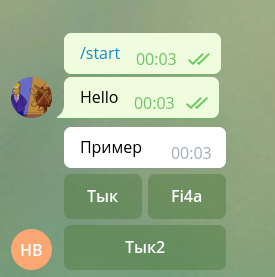
Теперь нам нужно обработать делаем новое ветвление в if и обрабатываем CallbackQuery:
@Override public void onUpdateReceived(Update update) { if(update.hasMessage()){ if(update.getMessage().hasText()){ if(update.getMessage().getText().equals("Hello")){ try { execute(sendInlineKeyBoardMessage(update.getMessage().getChatId())); } catch (TelegramApiException e) { e.printStackTrace(); } } } }else if(update.hasCallbackQuery()){ try { execute(new SendMessage().setText( update.getCallbackQuery().getData()) .setChatId(update.getCallbackQuery().getMessage().getChatId())); } catch (TelegramApiException e) { e.printStackTrace(); } } }
Проверяем!

На этом, пожалуй всё, спасибо за внимание!
Весь исходный код:
import org.telegram.telegrambots.ApiContextInitializer; import org.telegram.telegrambots.bots.TelegramLongPollingBot; import org.telegram.telegrambots.meta.ApiContext; import org.telegram.telegrambots.meta.TelegramBotsApi; import org.telegram.telegrambots.meta.api.methods.send.SendMessage; import org.telegram.telegrambots.meta.api.objects.Update; import org.telegram.telegrambots.meta.api.objects.replykeyboard.InlineKeyboardMarkup; import org.telegram.telegrambots.meta.api.objects.replykeyboard.buttons.InlineKeyboardButton; import org.telegram.telegrambots.meta.api.objects.replykeyboard.buttons.KeyboardButton; import org.telegram.telegrambots.meta.exceptions.TelegramApiException; import org.telegram.telegrambots.meta.exceptions.TelegramApiRequestException; import java.util.ArrayList; import java.util.List; public class Bot extends TelegramLongPollingBot { private static final String botUserName = "Habr_Inlinebot"; private static final String token = "632072575:AAG5YNl9tM9MJbnP5HwLB22rVzNCmY05MQI"; public static void main(String[] args) { ApiContextInitializer.init(); TelegramBotsApi telegramBotsApi = new TelegramBotsApi(); try { telegramBotsApi.registerBot(new Bot()); } catch (TelegramApiRequestException e) { e.printStackTrace(); } } @Override public void onUpdateReceived(Update update) { if(update.hasMessage()){ if(update.getMessage().hasText()){ if(update.getMessage().getText().equals("Hello")){ try { execute(sendInlineKeyBoardMessage(update.getMessage().getChatId())); } catch (TelegramApiException e) { e.printStackTrace(); } } } }else if(update.hasCallbackQuery()){ try { execute(new SendMessage().setText( update.getCallbackQuery().getData()) .setChatId(update.getCallbackQuery().getMessage().getChatId())); } catch (TelegramApiException e) { e.printStackTrace(); } } } @Override public String getBotUsername() { return botUserName; } @Override public String getBotToken() { return token; } public static SendMessage sendInlineKeyBoardMessage(long chatId) { InlineKeyboardMarkup inlineKeyboardMarkup = new InlineKeyboardMarkup(); InlineKeyboardButton inlineKeyboardButton1 = new InlineKeyboardButton(); InlineKeyboardButton inlineKeyboardButton2 = new InlineKeyboardButton(); inlineKeyboardButton1.setText("Тык"); inlineKeyboardButton1.setCallbackData("Button \"Тык\" has been pressed"); inlineKeyboardButton2.setText("Тык2"); inlineKeyboardButton2.setCallbackData("Button \"Тык2\" has been pressed"); List<InlineKeyboardButton> keyboardButtonsRow1 = new ArrayList<>(); List<InlineKeyboardButton> keyboardButtonsRow2 = new ArrayList<>(); keyboardButtonsRow1.add(inlineKeyboardButton1); keyboardButtonsRow1.add(new InlineKeyboardButton().setText("Fi4a").setCallbackData("CallFi4a")); keyboardButtonsRow2.add(inlineKeyboardButton2); List<List<InlineKeyboardButton>> rowList = new ArrayList<>(); rowList.add(keyboardButtonsRow1); rowList.add(keyboardButtonsRow2); inlineKeyboardMarkup.setKeyboard(rowList); return new SendMessage().setChatId(chatId).setText("Пример").setReplyMarkup(inlineKeyboardMarkup); } }
ссылка на оригинал статьи https://habr.com/post/418905/
Добавить комментарий