В настоящее время REST API стал стандартом разработки web-приложений, позволяя разбить разработку на независимые части. Для UI на данный момент используются различные популярные фреймворки типа Angular, React, Vue и другие. Разработчики же backend могут выбрать из большого разнообразия языков и фреймворков. Сегодня я бы хотел поговорить о таком фреймворке как NestJS. Мы в TestMace активно используем его для внутренних проектов. Используя nest и пакет @nestjsx/crud, мы создадим простое CRUD приложение.
Почему NestJS
В последнее время в JavaScript сообществе появилось достаточно много backend фреймворков. И если в плане функционала они предоставляют схожие с Nest возможности, то в одном он точно выигрывает — это архитектура. Следующие возможности NestJS позволяют создавать промышленные приложения и масштабировать разработку на большие команды:
- использование TypeScript в качестве основного языка разработки. Хотя NestJS и поддерживает JavaScript, часть функционала может не работать, особенно если речь идет о сторонних пакетах;
- наличие DI контейнера, что позволяет создавать слабосвязанные компоненты;
- функционал самого фреймворка разбит на независимые взаимозаменяемые компоненты. Например, под капотом в качестве фреймворка может использоваться как express, так и fastify, для работы с БД nest из коробки предоставляет биндинги к typeorm, mongoose, sequelize;
- NestJS не зависит от платформы и поддерживает REST, GraphQL, Websockets, gRPC и т.д.
Сам фреймворк вдохновлен frontend фреймворком Angular и концептуально имеет много общего с ним.
Установка NestJS и развертывание проекта
Nest содержит пакет nest/cli, который позволяет быстро развернуть базовый каркас приложения. Установим глобально данный пакет:
npm install --global @nest/cli
После установки сгенерируем базовый каркас нашего приложения с именем nest-rest. Делается это с использование команды nest new nest-rest.
dmitrii@dmitrii-HP-ZBook-17-G3:~/projects $ nest new nest-rest We will scaffold your app in a few seconds.. CREATE /nest-rest/.prettierrc (51 bytes) CREATE /nest-rest/README.md (3370 bytes) CREATE /nest-rest/nest-cli.json (84 bytes) CREATE /nest-rest/nodemon-debug.json (163 bytes) CREATE /nest-rest/nodemon.json (67 bytes) CREATE /nest-rest/package.json (1805 bytes) CREATE /nest-rest/tsconfig.build.json (97 bytes) CREATE /nest-rest/tsconfig.json (325 bytes) CREATE /nest-rest/tslint.json (426 bytes) CREATE /nest-rest/src/app.controller.spec.ts (617 bytes) CREATE /nest-rest/src/app.controller.ts (274 bytes) CREATE /nest-rest/src/app.module.ts (249 bytes) CREATE /nest-rest/src/app.service.ts (142 bytes) CREATE /nest-rest/src/main.ts (208 bytes) CREATE /nest-rest/test/app.e2e-spec.ts (561 bytes) CREATE /nest-rest/test/jest-e2e.json (183 bytes) ? Which package manager would you ️ to use? yarn Installation in progress... Successfully created project nest-rest Get started with the following commands: $ cd nest-rest $ yarn run start Thanks for installing Nest Please consider donating to our open collective to help us maintain this package. Donate: https://opencollective.com/nest
В качестве пакетного менеджера мы выберем yarn.
На данный момент вы можете запустить сервер командой npm start и пройдя по адресу http://localhost:3000 можете лицезреть главную страницу. Однако мы не для этого здесь собрались и двигаемся дальше.
Настраиваем работу с базой
В качестве СУБД для данной статьи я выбрал PostrgreSQL. О вкусах не спорят, по моему мнению, это наиболее зрелая СУБД, обладающая всеми необходимыми возможностями. Как уже было сказано, для работы с базами данных Nest предоставляет интеграцию с различными пакетами. Т.к. мой выбор пал на PostgreSQL, то логично будет выбрать TypeORM в качестве ORM. Установим необходимые пакеты для интеграции с базой данных:
yarn add typeorm @nestjs/typeorm pg
По порядку, для чего нужен каждый пакет:
- typeorm — пакет непосредственно с самой ORM;
- @nestjs/typeorm — TypeORM пакет для NestJS. Добавляет модули для импортирования в модули проекта, а также набор декораторов-хелперов;
- pg — драйвер для работы с PostgreSQL.
Окей, пакеты установлены, теперь необходимо запустить саму базу. Для развертывания базы я буду использовать docker-compose.yml следующего содержания:
version: '3.1' services: db: image: postgres:11.2 restart: always environment: POSTGRES_PASSWORD: example volumes: - ../db:/var/lib/postgresql/data - ./postgresql.conf:/etc/postgresql/postgresql.conf ports: - 5432:5432 adminer: image: adminer restart: always ports: - 8080:8080
Как можно видеть, данный файл конфигурирует запуск 2 контейнеров:
- db — это контейнер непосредственно с базой данных. В нашем случае используется postgresql версии 11.2;
- adminer — менеджер работы с базой данных. Предоставляет web-интерфейс для просмотра и управления базой.
Для работы с подключениям по tcp я добавил конфиг следующего содержания.
# ----------------------------- # PostgreSQL configuration file # ----------------------------- # # This file consists of lines of the form: # # name = value # # (The "=" is optional.) Whitespace may be used. Comments are introduced with # "#" anywhere on a line. The complete list of parameter names and allowed # values can be found in the PostgreSQL documentation. # # The commented-out settings shown in this file represent the default values. # Re-commenting a setting is NOT sufficient to revert it to the default value; # you need to reload the server. # # This file is read on server startup and when the server receives a SIGHUP # signal. If you edit the file on a running system, you have to SIGHUP the # server for the changes to take effect, run "pg_ctl reload", or execute # "SELECT pg_reload_conf()". Some parameters, which are marked below, # require a server shutdown and restart to take effect. # # Any parameter can also be given as a command-line option to the server, e.g., # "postgres -c log_connections=on". Some parameters can be changed at run time # with the "SET" SQL command. # # Memory units: kB = kilobytes Time units: ms = milliseconds # MB = megabytes s = seconds # GB = gigabytes min = minutes # TB = terabytes h = hours # d = days #------------------------------------------------------------------------------ # FILE LOCATIONS #------------------------------------------------------------------------------ # The default values of these variables are driven from the -D command-line # option or PGDATA environment variable, represented here as ConfigDir. #data_directory = 'ConfigDir' # use data in another directory # (change requires restart) #hba_file = 'ConfigDir/pg_hba.conf' # host-based authentication file # (change requires restart) #ident_file = 'ConfigDir/pg_ident.conf' # ident configuration file # (change requires restart) # If external_pid_file is not explicitly set, no extra PID file is written. #external_pid_file = '' # write an extra PID file # (change requires restart) #------------------------------------------------------------------------------ # CONNECTIONS AND AUTHENTICATION #------------------------------------------------------------------------------ # - Connection Settings - listen_addresses = '*' #listen_addresses = 'localhost' # what IP address(es) to listen on; # comma-separated list of addresses; # defaults to 'localhost'; use '*' for all # (change requires restart) #port = 5432 # (change requires restart) #max_connections = 100 # (change requires restart) #superuser_reserved_connections = 3 # (change requires restart) #unix_socket_directories = '/tmp' # comma-separated list of directories # (change requires restart) #unix_socket_group = '' # (change requires restart) #unix_socket_permissions = 0777 # begin with 0 to use octal notation # (change requires restart) #bonjour = off # advertise server via Bonjour # (change requires restart) #bonjour_name = '' # defaults to the computer name # (change requires restart) # - TCP Keepalives - # see "man 7 tcp" for details #tcp_keepalives_idle = 0 # TCP_KEEPIDLE, in seconds; # 0 selects the system default #tcp_keepalives_interval = 0 # TCP_KEEPINTVL, in seconds; # 0 selects the system default #tcp_keepalives_count = 0 # TCP_KEEPCNT; # 0 selects the system default # - Authentication - #authentication_timeout = 1min # 1s-600s #password_encryption = md5 # md5 or scram-sha-256 #db_user_namespace = off # GSSAPI using Kerberos #krb_server_keyfile = '' #krb_caseins_users = off # - SSL - #ssl = off #ssl_ca_file = '' #ssl_cert_file = 'server.crt' #ssl_crl_file = '' #ssl_key_file = 'server.key' #ssl_ciphers = 'HIGH:MEDIUM:+3DES:!aNULL' # allowed SSL ciphers #ssl_prefer_server_ciphers = on #ssl_ecdh_curve = 'prime256v1' #ssl_min_protocol_version = 'TLSv1' #ssl_max_protocol_version = '' #ssl_dh_params_file = '' #ssl_passphrase_command = '' #ssl_passphrase_command_supports_reload = off #------------------------------------------------------------------------------ # RESOURCE USAGE (except WAL) #------------------------------------------------------------------------------ # - Memory - #shared_buffers = 32MB # min 128kB # (change requires restart) #huge_pages = try # on, off, or try # (change requires restart) #temp_buffers = 8MB # min 800kB #max_prepared_transactions = 0 # zero disables the feature # (change requires restart) # Caution: it is not advisable to set max_prepared_transactions nonzero unless # you actively intend to use prepared transactions. #work_mem = 4MB # min 64kB #maintenance_work_mem = 64MB # min 1MB #autovacuum_work_mem = -1 # min 1MB, or -1 to use maintenance_work_mem #max_stack_depth = 2MB # min 100kB #shared_memory_type = mmap # the default is the first option # supported by the operating system: # mmap # sysv # windows # (change requires restart) #dynamic_shared_memory_type = posix # the default is the first option # supported by the operating system: # posix # sysv # windows # mmap # (change requires restart) # - Disk - #temp_file_limit = -1 # limits per-process temp file space # in kB, or -1 for no limit # - Kernel Resources - #max_files_per_process = 1000 # min 25 # (change requires restart) # - Cost-Based Vacuum Delay - #vacuum_cost_delay = 0 # 0-100 milliseconds (0 disables) #vacuum_cost_page_hit = 1 # 0-10000 credits #vacuum_cost_page_miss = 10 # 0-10000 credits #vacuum_cost_page_dirty = 20 # 0-10000 credits #vacuum_cost_limit = 200 # 1-10000 credits # - Background Writer - #bgwriter_delay = 200ms # 10-10000ms between rounds #bgwriter_lru_maxpages = 100 # max buffers written/round, 0 disables #bgwriter_lru_multiplier = 2.0 # 0-10.0 multiplier on buffers scanned/round #bgwriter_flush_after = 0 # measured in pages, 0 disables # - Asynchronous Behavior - #effective_io_concurrency = 1 # 1-1000; 0 disables prefetching #max_worker_processes = 8 # (change requires restart) #max_parallel_maintenance_workers = 2 # taken from max_parallel_workers #max_parallel_workers_per_gather = 2 # taken from max_parallel_workers #parallel_leader_participation = on #max_parallel_workers = 8 # maximum number of max_worker_processes that # can be used in parallel operations #old_snapshot_threshold = -1 # 1min-60d; -1 disables; 0 is immediate # (change requires restart) #backend_flush_after = 0 # measured in pages, 0 disables #------------------------------------------------------------------------------ # WRITE-AHEAD LOG #------------------------------------------------------------------------------ # - Settings - #wal_level = replica # minimal, replica, or logical # (change requires restart) #fsync = on # flush data to disk for crash safety # (turning this off can cause # unrecoverable data corruption) #synchronous_commit = on # synchronization level; # off, local, remote_write, remote_apply, or on #wal_sync_method = fsync # the default is the first option # supported by the operating system: # open_datasync # fdatasync (default on Linux) # fsync # fsync_writethrough # open_sync #full_page_writes = on # recover from partial page writes #wal_compression = off # enable compression of full-page writes #wal_log_hints = off # also do full page writes of non-critical updates # (change requires restart) #wal_buffers = -1 # min 32kB, -1 sets based on shared_buffers # (change requires restart) #wal_writer_delay = 200ms # 1-10000 milliseconds #wal_writer_flush_after = 1MB # measured in pages, 0 disables #commit_delay = 0 # range 0-100000, in microseconds #commit_siblings = 5 # range 1-1000 # - Checkpoints - #checkpoint_timeout = 5min # range 30s-1d #max_wal_size = 1GB #min_wal_size = 80MB #checkpoint_completion_target = 0.5 # checkpoint target duration, 0.0 - 1.0 #checkpoint_flush_after = 0 # measured in pages, 0 disables #checkpoint_warning = 30s # 0 disables # - Archiving - #archive_mode = off # enables archiving; off, on, or always # (change requires restart) #archive_command = '' # command to use to archive a logfile segment # placeholders: %p = path of file to archive # %f = file name only # e.g. 'test ! -f /mnt/server/archivedir/%f && cp %p /mnt/server/archivedir/%f' #archive_timeout = 0 # force a logfile segment switch after this # number of seconds; 0 disables # - Archive Recovery - # These are only used in recovery mode. #restore_command = '' # command to use to restore an archived logfile segment # placeholders: %p = path of file to restore # %f = file name only # e.g. 'cp /mnt/server/archivedir/%f %p' # (change requires restart) #archive_cleanup_command = '' # command to execute at every restartpoint #recovery_end_command = '' # command to execute at completion of recovery # - Recovery Target - # Set these only when performing a targeted recovery. #recovery_target = '' # 'immediate' to end recovery as soon as a # consistent state is reached # (change requires restart) #recovery_target_name = '' # the named restore point to which recovery will proceed # (change requires restart) #recovery_target_time = '' # the time stamp up to which recovery will proceed # (change requires restart) #recovery_target_xid = '' # the transaction ID up to which recovery will proceed # (change requires restart) #recovery_target_lsn = '' # the WAL LSN up to which recovery will proceed # (change requires restart) #recovery_target_inclusive = on # Specifies whether to stop: # just after the specified recovery target (on) # just before the recovery target (off) # (change requires restart) #recovery_target_timeline = 'latest' # 'current', 'latest', or timeline ID # (change requires restart) #recovery_target_action = 'pause' # 'pause', 'promote', 'shutdown' # (change requires restart) #------------------------------------------------------------------------------ # REPLICATION #------------------------------------------------------------------------------ # - Sending Servers - # Set these on the master and on any standby that will send replication data. #max_wal_senders = 10 # max number of walsender processes # (change requires restart) #wal_keep_segments = 0 # in logfile segments; 0 disables #wal_sender_timeout = 60s # in milliseconds; 0 disables #max_replication_slots = 10 # max number of replication slots # (change requires restart) #track_commit_timestamp = off # collect timestamp of transaction commit # (change requires restart) # - Master Server - # These settings are ignored on a standby server. #synchronous_standby_names = '' # standby servers that provide sync rep # method to choose sync standbys, number of sync standbys, # and comma-separated list of application_name # from standby(s); '*' = all #vacuum_defer_cleanup_age = 0 # number of xacts by which cleanup is delayed # - Standby Servers - # These settings are ignored on a master server. #primary_conninfo = '' # connection string to sending server # (change requires restart) #primary_slot_name = '' # replication slot on sending server # (change requires restart) #promote_trigger_file = '' # file name whose presence ends recovery #hot_standby = on # "off" disallows queries during recovery # (change requires restart) #max_standby_archive_delay = 30s # max delay before canceling queries # when reading WAL from archive; # -1 allows indefinite delay #max_standby_streaming_delay = 30s # max delay before canceling queries # when reading streaming WAL; # -1 allows indefinite delay #wal_receiver_status_interval = 10s # send replies at least this often # 0 disables #hot_standby_feedback = off # send info from standby to prevent # query conflicts #wal_receiver_timeout = 60s # time that receiver waits for # communication from master # in milliseconds; 0 disables #wal_retrieve_retry_interval = 5s # time to wait before retrying to # retrieve WAL after a failed attempt #recovery_min_apply_delay = 0 # minimum delay for applying changes during recovery # - Subscribers - # These settings are ignored on a publisher. #max_logical_replication_workers = 4 # taken from max_worker_processes # (change requires restart) #max_sync_workers_per_subscription = 2 # taken from max_logical_replication_workers #------------------------------------------------------------------------------ # QUERY TUNING #------------------------------------------------------------------------------ # - Planner Method Configuration - #enable_bitmapscan = on #enable_hashagg = on #enable_hashjoin = on #enable_indexscan = on #enable_indexonlyscan = on #enable_material = on #enable_mergejoin = on #enable_nestloop = on #enable_parallel_append = on #enable_seqscan = on #enable_sort = on #enable_tidscan = on #enable_partitionwise_join = off #enable_partitionwise_aggregate = off #enable_parallel_hash = on #enable_partition_pruning = on # - Planner Cost Constants - #seq_page_cost = 1.0 # measured on an arbitrary scale #random_page_cost = 4.0 # same scale as above #cpu_tuple_cost = 0.01 # same scale as above #cpu_index_tuple_cost = 0.005 # same scale as above #cpu_operator_cost = 0.0025 # same scale as above #parallel_tuple_cost = 0.1 # same scale as above #parallel_setup_cost = 1000.0 # same scale as above #jit_above_cost = 100000 # perform JIT compilation if available # and query more expensive than this; # -1 disables #jit_inline_above_cost = 500000 # inline small functions if query is # more expensive than this; -1 disables #jit_optimize_above_cost = 500000 # use expensive JIT optimizations if # query is more expensive than this; # -1 disables #min_parallel_table_scan_size = 8MB #min_parallel_index_scan_size = 512kB #effective_cache_size = 4GB # - Genetic Query Optimizer - #geqo = on #geqo_threshold = 12 #geqo_effort = 5 # range 1-10 #geqo_pool_size = 0 # selects default based on effort #geqo_generations = 0 # selects default based on effort #geqo_selection_bias = 2.0 # range 1.5-2.0 #geqo_seed = 0.0 # range 0.0-1.0 # - Other Planner Options - #default_statistics_target = 100 # range 1-10000 #constraint_exclusion = partition # on, off, or partition #cursor_tuple_fraction = 0.1 # range 0.0-1.0 #from_collapse_limit = 8 #join_collapse_limit = 8 # 1 disables collapsing of explicit # JOIN clauses #force_parallel_mode = off #jit = on # allow JIT compilation #plan_cache_mode = auto # auto, force_generic_plan or # force_custom_plan #------------------------------------------------------------------------------ # REPORTING AND LOGGING #------------------------------------------------------------------------------ # - Where to Log - #log_destination = 'stderr' # Valid values are combinations of # stderr, csvlog, syslog, and eventlog, # depending on platform. csvlog # requires logging_collector to be on. # This is used when logging to stderr: #logging_collector = off # Enable capturing of stderr and csvlog # into log files. Required to be on for # csvlogs. # (change requires restart) # These are only used if logging_collector is on: #log_directory = 'log' # directory where log files are written, # can be absolute or relative to PGDATA #log_filename = 'postgresql-%Y-%m-%d_%H%M%S.log' # log file name pattern, # can include strftime() escapes #log_file_mode = 0600 # creation mode for log files, # begin with 0 to use octal notation #log_truncate_on_rotation = off # If on, an existing log file with the # same name as the new log file will be # truncated rather than appended to. # But such truncation only occurs on # time-driven rotation, not on restarts # or size-driven rotation. Default is # off, meaning append to existing files # in all cases. #log_rotation_age = 1d # Automatic rotation of logfiles will # happen after that time. 0 disables. #log_rotation_size = 10MB # Automatic rotation of logfiles will # happen after that much log output. # 0 disables. # These are relevant when logging to syslog: #syslog_facility = 'LOCAL0' #syslog_ident = 'postgres' #syslog_sequence_numbers = on #syslog_split_messages = on # This is only relevant when logging to eventlog (win32): # (change requires restart) #event_source = 'PostgreSQL' # - When to Log - #log_min_messages = warning # values in order of decreasing detail: # debug5 # debug4 # debug3 # debug2 # debug1 # info # notice # warning # error # log # fatal # panic #log_min_error_statement = error # values in order of decreasing detail: # debug5 # debug4 # debug3 # debug2 # debug1 # info # notice # warning # error # log # fatal # panic (effectively off) #log_min_duration_statement = -1 # logs statements and their durations # according to log_statement_sample_rate. -1 is disabled, # 0 logs all statement, > 0 logs only statements running at # least this number of milliseconds. #log_statement_sample_rate = 1 # Fraction of logged statements over # log_min_duration_statement. 1.0 logs all statements, # 0 never logs. # - What to Log - #debug_print_parse = off #debug_print_rewritten = off #debug_print_plan = off #debug_pretty_print = on #log_checkpoints = off #log_connections = off #log_disconnections = off #log_duration = off #log_error_verbosity = default # terse, default, or verbose messages #log_hostname = off #log_line_prefix = '%m [%p] ' # special values: # %a = application name # %u = user name # %d = database name # %r = remote host and port # %h = remote host # %p = process ID # %t = timestamp without milliseconds # %m = timestamp with milliseconds # %n = timestamp with milliseconds (as a Unix epoch) # %i = command tag # %e = SQL state # %c = session ID # %l = session line number # %s = session start timestamp # %v = virtual transaction ID # %x = transaction ID (0 if none) # %q = stop here in non-session # processes # %% = '%' # e.g. '<%u%%%d> ' #log_lock_waits = off # log lock waits >= deadlock_timeout #log_statement = 'none' # none, ddl, mod, all #log_replication_commands = off #log_temp_files = -1 # log temporary files equal or larger # than the specified size in kilobytes; # -1 disables, 0 logs all temp files #log_timezone = 'GMT' #------------------------------------------------------------------------------ # PROCESS TITLE #------------------------------------------------------------------------------ #cluster_name = '' # added to process titles if nonempty # (change requires restart) #update_process_title = on #------------------------------------------------------------------------------ # STATISTICS #------------------------------------------------------------------------------ # - Query and Index Statistics Collector - #track_activities = on #track_counts = on #track_io_timing = off #track_functions = none # none, pl, all #track_activity_query_size = 1024 # (change requires restart) #stats_temp_directory = 'pg_stat_tmp' # - Monitoring - #log_parser_stats = off #log_planner_stats = off #log_executor_stats = off #log_statement_stats = off #------------------------------------------------------------------------------ # AUTOVACUUM #------------------------------------------------------------------------------ #autovacuum = on # Enable autovacuum subprocess? 'on' # requires track_counts to also be on. #log_autovacuum_min_duration = -1 # -1 disables, 0 logs all actions and # their durations, > 0 logs only # actions running at least this number # of milliseconds. #autovacuum_max_workers = 3 # max number of autovacuum subprocesses # (change requires restart) #autovacuum_naptime = 1min # time between autovacuum runs #autovacuum_vacuum_threshold = 50 # min number of row updates before # vacuum #autovacuum_analyze_threshold = 50 # min number of row updates before # analyze #autovacuum_vacuum_scale_factor = 0.2 # fraction of table size before vacuum #autovacuum_analyze_scale_factor = 0.1 # fraction of table size before analyze #autovacuum_freeze_max_age = 200000000 # maximum XID age before forced vacuum # (change requires restart) #autovacuum_multixact_freeze_max_age = 400000000 # maximum multixact age # before forced vacuum # (change requires restart) #autovacuum_vacuum_cost_delay = 2ms # default vacuum cost delay for # autovacuum, in milliseconds; # -1 means use vacuum_cost_delay #autovacuum_vacuum_cost_limit = -1 # default vacuum cost limit for # autovacuum, -1 means use # vacuum_cost_limit #------------------------------------------------------------------------------ # CLIENT CONNECTION DEFAULTS #------------------------------------------------------------------------------ # - Statement Behavior - #client_min_messages = notice # values in order of decreasing detail: # debug5 # debug4 # debug3 # debug2 # debug1 # log # notice # warning # error #search_path = '"$user", public' # schema names #row_security = on #default_tablespace = '' # a tablespace name, '' uses the default #temp_tablespaces = '' # a list of tablespace names, '' uses # only default tablespace #check_function_bodies = on #default_transaction_isolation = 'read committed' #default_transaction_read_only = off #default_transaction_deferrable = off #session_replication_role = 'origin' #statement_timeout = 0 # in milliseconds, 0 is disabled #lock_timeout = 0 # in milliseconds, 0 is disabled #idle_in_transaction_session_timeout = 0 # in milliseconds, 0 is disabled #vacuum_freeze_min_age = 50000000 #vacuum_freeze_table_age = 150000000 #vacuum_multixact_freeze_min_age = 5000000 #vacuum_multixact_freeze_table_age = 150000000 #vacuum_cleanup_index_scale_factor = 0.1 # fraction of total number of tuples # before index cleanup, 0 always performs # index cleanup #bytea_output = 'hex' # hex, escape #xmlbinary = 'base64' #xmloption = 'content' #gin_fuzzy_search_limit = 0 #gin_pending_list_limit = 4MB # - Locale and Formatting - #datestyle = 'iso, mdy' #intervalstyle = 'postgres' #timezone = 'GMT' #timezone_abbreviations = 'Default' # Select the set of available time zone # abbreviations. Currently, there are # Default # Australia (historical usage) # India # You can create your own file in # share/timezonesets/. #extra_float_digits = 1 # min -15, max 3; any value >0 actually # selects precise output mode #client_encoding = sql_ascii # actually, defaults to database # encoding # These settings are initialized by initdb, but they can be changed. #lc_messages = 'C' # locale for system error message # strings #lc_monetary = 'C' # locale for monetary formatting #lc_numeric = 'C' # locale for number formatting #lc_time = 'C' # locale for time formatting # default configuration for text search #default_text_search_config = 'pg_catalog.simple' # - Shared Library Preloading - #shared_preload_libraries = '' # (change requires restart) #local_preload_libraries = '' #session_preload_libraries = '' #jit_provider = 'llvmjit' # JIT library to use # - Other Defaults - #dynamic_library_path = '$libdir' #------------------------------------------------------------------------------ # LOCK MANAGEMENT #------------------------------------------------------------------------------ #deadlock_timeout = 1s #max_locks_per_transaction = 64 # min 10 # (change requires restart) #max_pred_locks_per_transaction = 64 # min 10 # (change requires restart) #max_pred_locks_per_relation = -2 # negative values mean # (max_pred_locks_per_transaction # / -max_pred_locks_per_relation) - 1 #max_pred_locks_per_page = 2 # min 0 #------------------------------------------------------------------------------ # VERSION AND PLATFORM COMPATIBILITY #------------------------------------------------------------------------------ # - Previous PostgreSQL Versions - #array_nulls = on #backslash_quote = safe_encoding # on, off, or safe_encoding #escape_string_warning = on #lo_compat_privileges = off #operator_precedence_warning = off #quote_all_identifiers = off #standard_conforming_strings = on #synchronize_seqscans = on # - Other Platforms and Clients - #transform_null_equals = off #------------------------------------------------------------------------------ # ERROR HANDLING #------------------------------------------------------------------------------ #exit_on_error = off # terminate session on any error? #restart_after_crash = on # reinitialize after backend crash? #data_sync_retry = off # retry or panic on failure to fsync # data? # (change requires restart) #------------------------------------------------------------------------------ # CONFIG FILE INCLUDES #------------------------------------------------------------------------------ # These options allow settings to be loaded from files other than the # default postgresql.conf. #include_dir = 'conf.d' # include files ending in '.conf' from # directory 'conf.d' #include_if_exists = 'exists.conf' # include file only if it exists #include = 'special.conf' # include file #------------------------------------------------------------------------------ # CUSTOMIZED OPTIONS #------------------------------------------------------------------------------ # Add settings for extensions here
На этом все, можно запустить контейнеры командой docker-compose up -d. Либо в отдельной консоли командой docker-compose up.
Итак, пакеты установили, базу запустили, осталось их друг с другом подружить. Для этого нужно в корень проекта добавить файл ormconfig.js следующего содержания:
const process = require('process'); const username = process.env.POSTGRES_USER || "postgres"; const password = process.env.POSTGRES_PASSWORD || "example"; module.exports = { "type": "postgres", "host": "localhost", "port": 5432, username, password, "database": "postgres", "synchronize": true, "dropSchema": false, "logging": true, "entities": [__dirname + "/src/**/*.entity.ts", __dirname + "/dist/**/*.entity.js"], "migrations": ["migrations/**/*.ts"], "subscribers": ["subscriber/**/*.ts", "dist/subscriber/**/.js"], "cli": { "entitiesDir": "src", "migrationsDir": "migrations", "subscribersDir": "subscriber" } }
Данная конфигурация будет использоваться для cli typeorm.
Остановимся на данной конфигурации подробнее. В строках 3 и 4 мы получаем имя пользователя и пароль из переменных окружения. Это удобно, когда у вас есть несколько окружений (dev, stage, prod, etc). По умолчанию имя пользователя postgres, пароль — example. В остальном конфиг тривиален, поэтому остановимся только на самых интересных параметрах:
- synchronize — указывает, должна ли схема базы данных автоматически создаваться при запуске приложения. Будьте внимательны с данной опцией и не используйте ее в production, в противном случае вы потеряете данные. Данная опция удобна при разработке и отладке приложения. Как альтернатива данной опции, вы можете использовать команду
schema:syncиз CLI TypeORM. - dropSchema — сбрасывать схему каждый раз, когда устанавливается соединение. Также, как и предыдущую, данную опцию следует использовать только в процессе разработки и отладки приложения.
- entities — по каким путям искать описание моделей. Обратите внимание, что поддерживается поиск по маске.
- cli.entitiesDir — директория, куда по умолчанию должны складываться модели, созданные из CLI TypeORM.
Для того, чтобы мы могли использовать все возможности TypeORM в нашем Nest приложении, необходимо импортировать модуль TypeOrmModule в AppModule. Т.е. ваш AppModule будет выглядеть следующим образом:
import { Module } from '@nestjs/common'; import { AppController } from './app.controller'; import { AppService } from './app.service'; import { TypeOrmModule } from '@nestjs/typeorm'; import * as process from "process"; const username = process.env.POSTGRES_USER || 'postgres'; const password = process.env.POSTGRES_PASSWORD || 'example'; @Module({ imports: [ TypeOrmModule.forRoot({ type: 'postgres', host: 'localhost', port: 5432, username, password, database: 'postgres', entities: [__dirname + '/**/*.entity{.ts,.js}'], synchronize: true, }), ], controllers: [AppController], providers: [AppService], }) export class AppModule {}
Как вы успели заметить, в метод forRoot передается та же конфигурация для работы с базой, что и в файле ormconfig.ts
Остался финальный штрих — добавить несколько тасков для работы с TypeORM в package.json. Дело в том, что CLI написана на javascript и запускается в среде nodejs. Однако все наши модели и миграции будут написаны на typescript. Поэтому необходимо провести транспиляцию наших миграций и моделей до использования CLI. Для этого нам понадобится пакет ts-node:
yarn add -D ts-node
После этого добавим необходимые команды в package.json:
"typeorm": "ts-node -r tsconfig-paths/register ./node_modules/typeorm/cli.js", "migration:generate": "yarn run typeorm migration:generate -n", "migration:create": "yarn run typeorm migration:create -n", "migration:run": "yarn run typeorm migration:run"
Первая команда, typeorm, добавляет обертку в виде ts-node для запуска cli TypeORM. Остальные команды — это удобные сокращения, которыми вы как разработчик будете пользоваться практически каждый день:
migration:generate — создание миграции на основе изменений в ваших моделях.
migration:create — создание пустой миграции.
migration:run — запуск миграций.
Ну теперь точно все, мы добавили необходимые пакеты, сконфигурировали приложение для работы с базой как с cli, так и с самого приложения а также запустили СУБД. Пришло время добавить логику в наше приложение.
Установка пакетов для создания CRUD
Используя только Nest можно создать API, позволяющий создавать, читать, обновлять и удалять сущность. Такое решение будет максимально гибким однако для некоторых случаев избыточным. К примеру, если вам нужно быстро создать прототип, то зачастую можно пожертвовать гибкостью ради скорости разработки. Многие фреймворки предоставляют функционал генерации CRUD по описанию модели данных определенной сущности. И Nest не исключение! Данную функциональность предоставляет пакет @nestjsx/crud. Возможности его весьма интересны:
- легкая установка и настройка;
- независимость от СУБД;
- мощный язык запросов с возможностью фильтрации, пагинации, сортировки, загрузки связей и вложенных сущностей, кеширование и т.д.;
- пакет для формирования запросов на front-end;
- легкое переопределение методов контроллера;
- небольшой конфиг;
- поддержка swagger документации.
Функциональность разбита на несколько пакетов:
- @nestjsx/crud — базовый пакет, который предоставляет декоратор Crud() для генерации роутов, конфигурирования и валидации;
- @nestjsx/crud-request — пакет, предоставляющий билдер/парсер запросов для использования на стороне frontend;
- @nestjsx/crud-typeorm — пакет для интеграции с TypeORM, предоставляющий базовый сервис TypeOrmCrudService с CRUD методами работы с сущностями в БД.
В данном руководстве нам понадобятся пакеты nestjsx/crud и nestjsx/crud-typeorm. Для начала, поставим их
yarn add @nestjsx/crud class-transformer class-validator
Пакеты class-transformer и class-validator в данном приложении требуются для декларативного описания правил трансформирования экземпляров моделей и валидации входящих запросов соответственно. Данные пакеты от одного автора, поэтому интерфейсы схожи.
Непосредственная реализация CRUD
В качестве примера модели мы возьмем список пользователей. У пользователей будут следующие поля: id, username, displayName, email. id — автоинкрементное поле, email и username — уникальные поля. Все просто! Осталось воплотить нашу задумку в виде Nest приложения.
Для начала необходимо создать модуль users, который будет отвечать за работу с пользователями. Воспользуемся cli от NestJS, и в корневой директории нашего проекта выполним команду nest g module users.
dmitrii@dmitrii-HP-ZBook-17-G3:~/projects/nest-rest git:(master*)$ nest g module users CREATE /src/users/users.module.ts (82 bytes) UPDATE /src/app.module.ts (312 bytes)
В данном модуле добавим папку entities, где у нас будут лежать модели данного модуля. В частности, добавим сюда файл user.entity.ts с описанием модели пользователей:
import { Column, Entity, PrimaryGeneratedColumn } from 'typeorm'; @Entity() export class User { @PrimaryGeneratedColumn() id: string; @Column({unique: true}) email: string; @Column({unique: true}) username: string; @Column({nullable: true}) displayName: string; }
Чтобы данную модель «увидело» наше приложение, необходимо в модуль UsersModule импортировать TypeOrmModule следующего содержания:
import { Module } from '@nestjs/common'; import { UsersController } from './controllers/users/users.controller'; import { UsersService } from './services/users/users.service'; import { TypeOrmModule } from '@nestjs/typeorm'; import { User } from './entities/user.entity'; @Module({ controllers: [UsersController], providers: [UsersService], imports: [ TypeOrmModule.forFeature([User]) ] }) export class UsersModule {}
Т.е здесь мы импортируем TypeOrmModule, где в качестве параметра метода forFeature указываем список моделей, относящихся к данному модулю.
Остается создать соответствующую сущность в базе данных. Для этих целей служит механизм миграций. Чтобы создать миграцию на основе изменений в моделях, необходимо выполнить команду npm run migration:generate -- CreateUserTable:
$ npm run migration:generate -- CreateUserTable Migration /home/dmitrii/projects/nest-rest/migrations/1563346135367-CreateUserTable.ts has been generated successfully. Done in 1.96s.
Нам не пришлось писать миграцию вручную, все произошло магическим образом. Это ли не чудо! Однако и это еще не все. Взглянем на созданный файл с миграцией:
import {MigrationInterface, QueryRunner} from "typeorm"; export class CreateUserTable1563346816726 implements MigrationInterface { public async up(queryRunner: QueryRunner): Promise<any> { await queryRunner.query(`CREATE TABLE "user" ("id" SERIAL NOT NULL, "email" character varying NOT NULL, "username" character varying NOT NULL, "displayName" character varying, CONSTRAINT "UQ_e12875dfb3b1d92d7d7c5377e22" UNIQUE ("email"), CONSTRAINT "UQ_78a916df40e02a9deb1c4b75edb" UNIQUE ("username"), CONSTRAINT "PK_cace4a159ff9f2512dd42373760" PRIMARY KEY ("id"))`); } public async down(queryRunner: QueryRunner): Promise<any> { await queryRunner.query(`DROP TABLE "user"`); } }
Как можно заметить, был автоматически сгенерирован не только метод для запуска миграции, но и метод для ее отката. Фантастика!
Остается только накатить данную миграцию. Делается это следующей командой:
npm run migration:run.
Все, теперь изменения схемы перекочевали в базу данных.
Далее создадим сервис, который будет отвечать за работу с пользователями и отнаследуем его от TypeOrmCrudService. В параметр родительского конструктора необходимо передать репозиторий интересующей сущности, в нашем случае User репозиторий.
import { Injectable } from '@nestjs/common'; import { TypeOrmCrudService } from '@nestjsx/crud-typeorm'; import { User } from '../../entities/user.entity'; import { InjectRepository } from '@nestjs/typeorm'; import { Repository } from 'typeorm'; @Injectable() export class UsersService extends TypeOrmCrudService<User>{ constructor(@InjectRepository(User) usersRepository: Repository<User>){ super(usersRepository); } }
Данный сервис нам понадобится в контроллере users. Для создания контроллера наберите в консоли nest g controller users/controllers/users
dmitrii@dmitrii-HP-ZBook-17-G3:~/projects/nest-rest git:(master*)$ nest g controller users/controllers/users CREATE /src/users/controllers/users/users.controller.spec.ts (486 bytes) CREATE /src/users/controllers/users/users.controller.ts (99 bytes) UPDATE /src/users/users.module.ts (188 bytes)
Откроем данный контроллер и отредактируем, чтобы добавить немного магии nestjsx/crud. На класс UsersController добавим декоратор следующего вида:
@Crud({ model: { type: User } })
Crud — это декоратор, добавляющий в контроллер необходимые методы для работы с моделью. Тип модели указывается в поле model.type конфигурации декоратора.
Второй шаг — необходимо реализовать интерфейс CrudController<User>. «В сборе» код контроллера выглядит следующим образом:
import { Controller } from '@nestjs/common'; import { Crud, CrudController } from '@nestjsx/crud'; import { User } from '../../entities/user.entity'; import { UsersService } from '../../services/users/users.service'; @Crud({ model: { type: User } }) @Controller('users') export class UsersController implements CrudController<User>{ constructor(public service: UsersService){} }
И это все! Теперь контроллер поддерживает весь набор операций с моделью! Не верите? Давайте попробуем наше приложение в деле!
Создание сценария запросов в TestMace
Для тестирования нашего сервиса мы будем использовать IDE для работы с API TestMace. Почему TestMace? По сравнению с аналогичными продуктами, он имеет следующие преимущества:
- мощная работа с переменными. На данный момент существует несколько видов переменных, каждый из которых выполняет определенную роль: встроенные переменные, динамические переменные, переменные окружения. Каждая переменная принадлежит какому-либо узлу с поддержкой механизма наследования;
- легкое создание сценариев без программирования. Об этом речь пойдет ниже;
- человекочитаемый формат, позволяющий сохранять проект в системах контроля версий;
- автодополнение, подсветка синтаксиса, подсветка значений переменных;
- поддержка описания API с возможностью импорта из Swagger.
Давайте запустим наш сервер командой npm start и попробуем обратиться к списку пользователей. Список пользователей, судя по нашей конфигурации контроллера, можно получить по url localhost:3000/users. Сделаем запрос на данный url.
После запуска TestMace вы можете увидеть такой интерфейс:
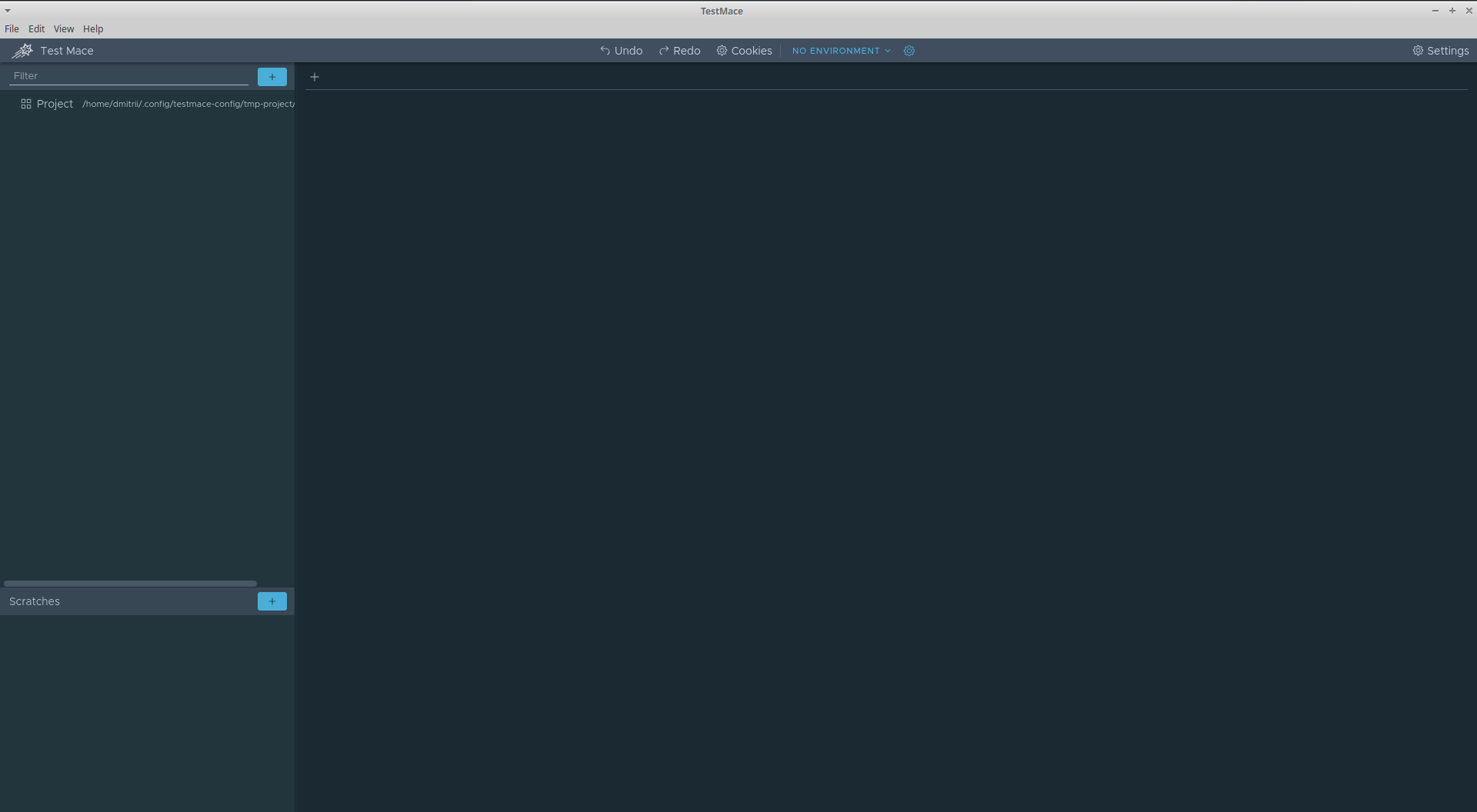
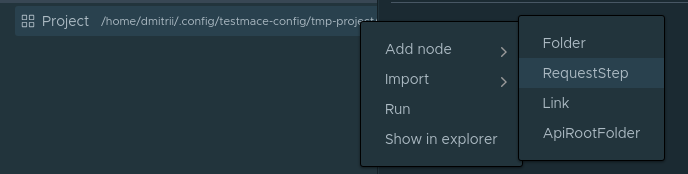
Слева сверху находится дерево проектов с корневым узлом Project. Давайте попробуем создать первый запрос на получение списка пользователей. Для этого создадим RequestStep узел. Делается это в контекстном меню Project узла Add node -> RequestStep.
В поле URL вставьте localhost:3000/users и выполните запрос. Получим 200 код с пустым массивом в теле ответа. Оно и понятно, мы еще никого не добавляли.
Давайте создадим сценарий который будет включать в себя следующие шаги:
- cоздание пользователя;
- запрос по id только что созданного пользователя;
- удаление по id пользователя, созданного на шаге 1.
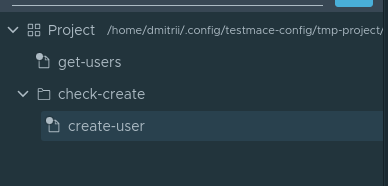
Итак, поехали. Для удобства создадим узел типа Folder. По сути это просто папка, в которой сохраним весь сценарий. Для создания Folder узла необходимо в контекстном меню Project узла выбрать Add node -> Folder. Назовем узел check-create. Внутри узла check-create создадим наш первый запрос на создание пользователя. Назовем вновь созданный узел create-user. То есть на данный момент иерархия узлов будет выглядеть следующим образом:
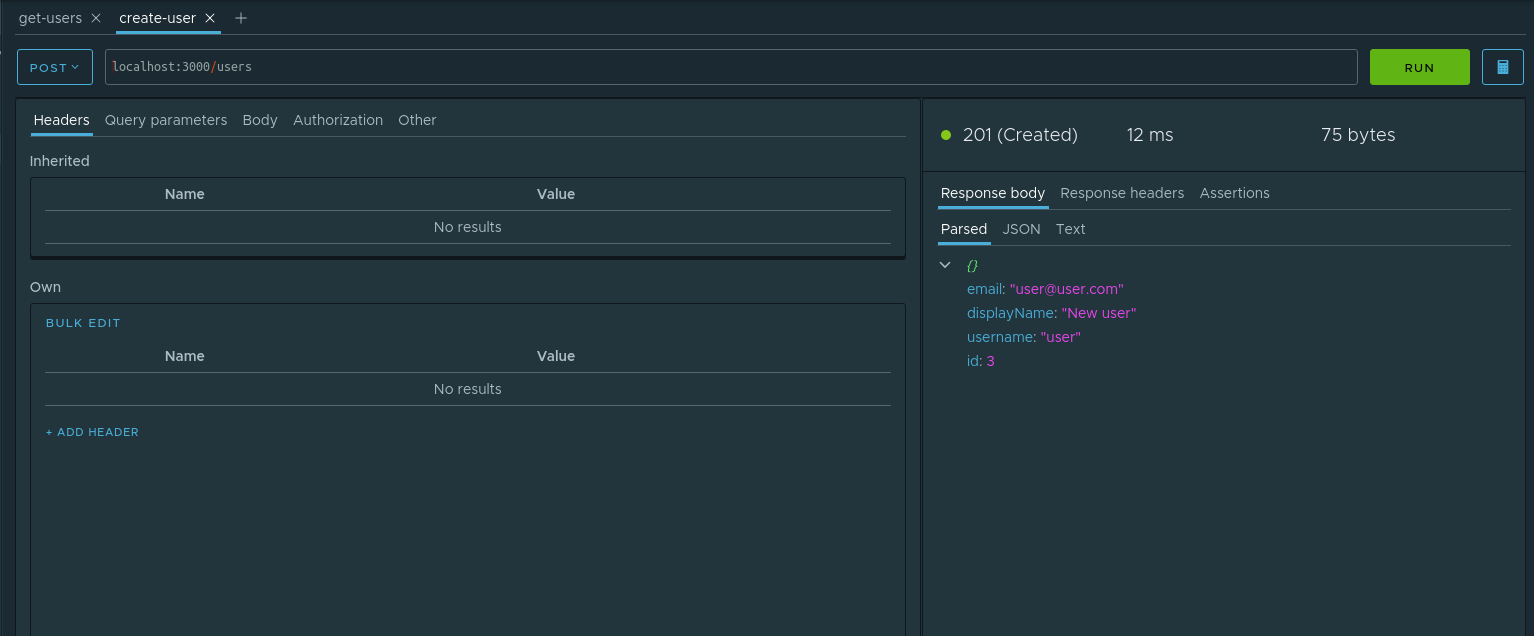
Давайте перейдем к вкладке открытого create-user узла. Введем следующие параметры для запроса:
- Тип запроса — POST
- URL — localhost:3000/users
- Body — JSON со значением
{"email": "user@user.com", "displayName": "New user", "username": "user"}
Выполним данный запрос. Наше приложение говорит, что запись создана.
Что ж, давайте проверим данный факт. Чтобы в последующих шагах оперировать с id созданного пользователя, данный параметр необходимо сохранить. Для этого отлично подходит механизм динамических переменных. Давайте на нашем примере рассмотрим, как происходит работа с ними. Во вкладке parsed ответа у узла id в контекстном меню необходимо выбрать пункт Assign to variable. В диалоговом окне необходимо задать следующие параметры:
- Node — в каком из предков создавать динамическую переменную. Выберем check-create
- Variable name — название этой переменной. Назовем
userId.
Вот как выглядит процесс создания динамической переменной:
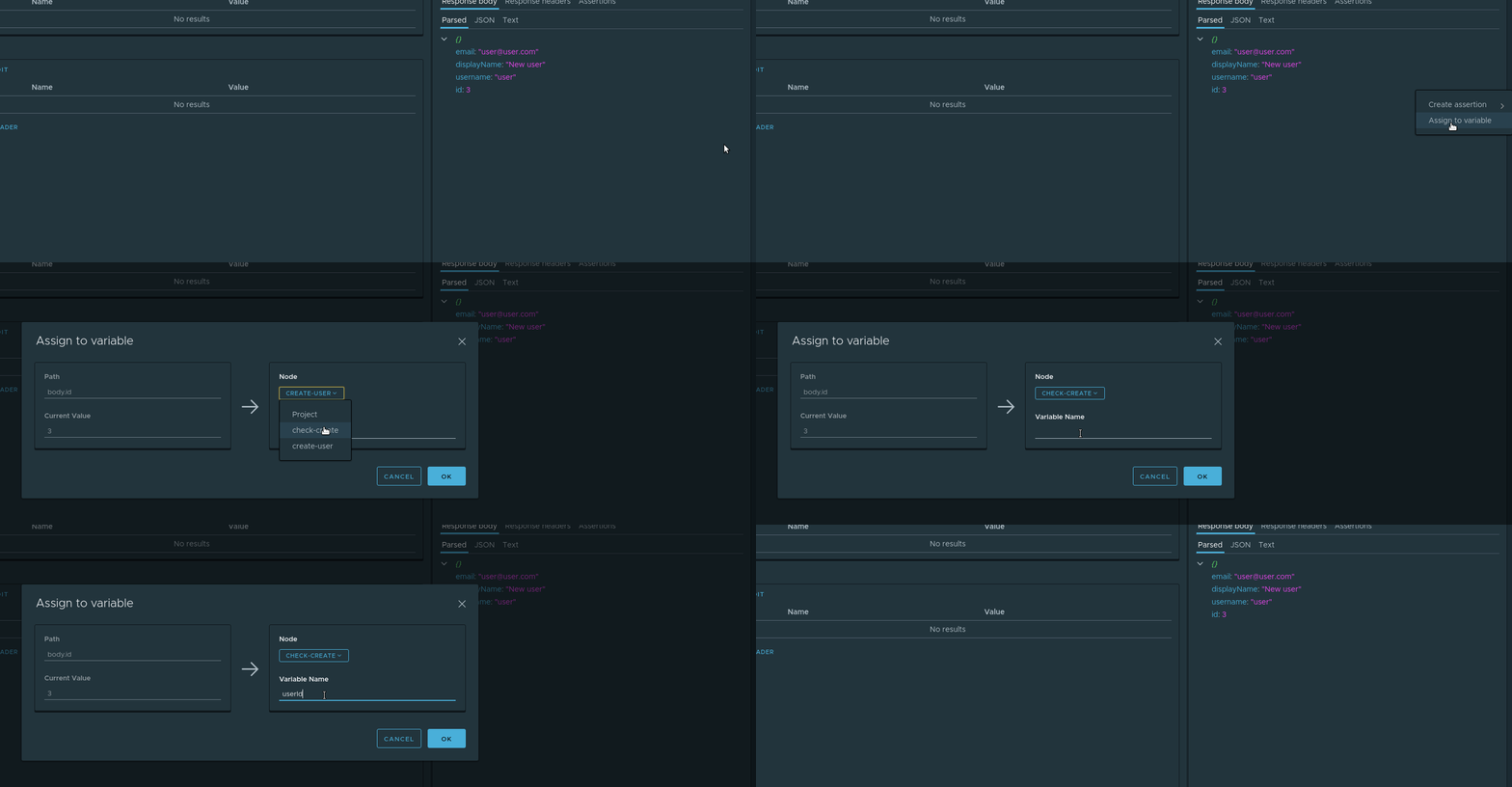
Теперь при каждом выполнении данного запроса значение динамической переменной будет обновляться. А т.к. динамические переменные поддерживают механизм иерархического наследования, переменная userId будет доступна в потомках check-create узла любого уровня вложенности.
В следующем запросе данная переменная нам пригодится. А именно, мы запросим вновь созданного пользователя. В качестве потомка узла check-create мы создадим запрос check-if exists с параметром url равным localhost:3000/users/${$dynamicVar.userId}. Конструкция вида ${variable_name} это получение значения переменной. Т.к. у нас динамическая переменная, то чтобы получить ее необходимо обратиться к объекту $dynamicVar, т.е полностью обращение к динамической переменной userId будет выглядеть следующим образом ${$dynamicVar.userId}. Выполним запрос и убедимся, что данные запрашиваются корректно.
Остался последний штрих — сделать запрос на удаление. Он нам нужен не только для того, чтобы проверить работу удаления, но и, так сказать, подчистить за собой в базе, т.к. поля email и username уникальны. Итак, в узле check-create создадим запрос delete-user со следующими параметрами
- Тип запроса — DELETE
- URL —
localhost:3000/users/${$dynamicVar.userId}
Запускаем. Ждем. Наслаждаемся результатом)
Ну и теперь мы можем в любой момент запустить полностью данный сценарий. Чтобы запустить сценарий необходимо выбрать в контекстном меню check-create узла пункт Run.
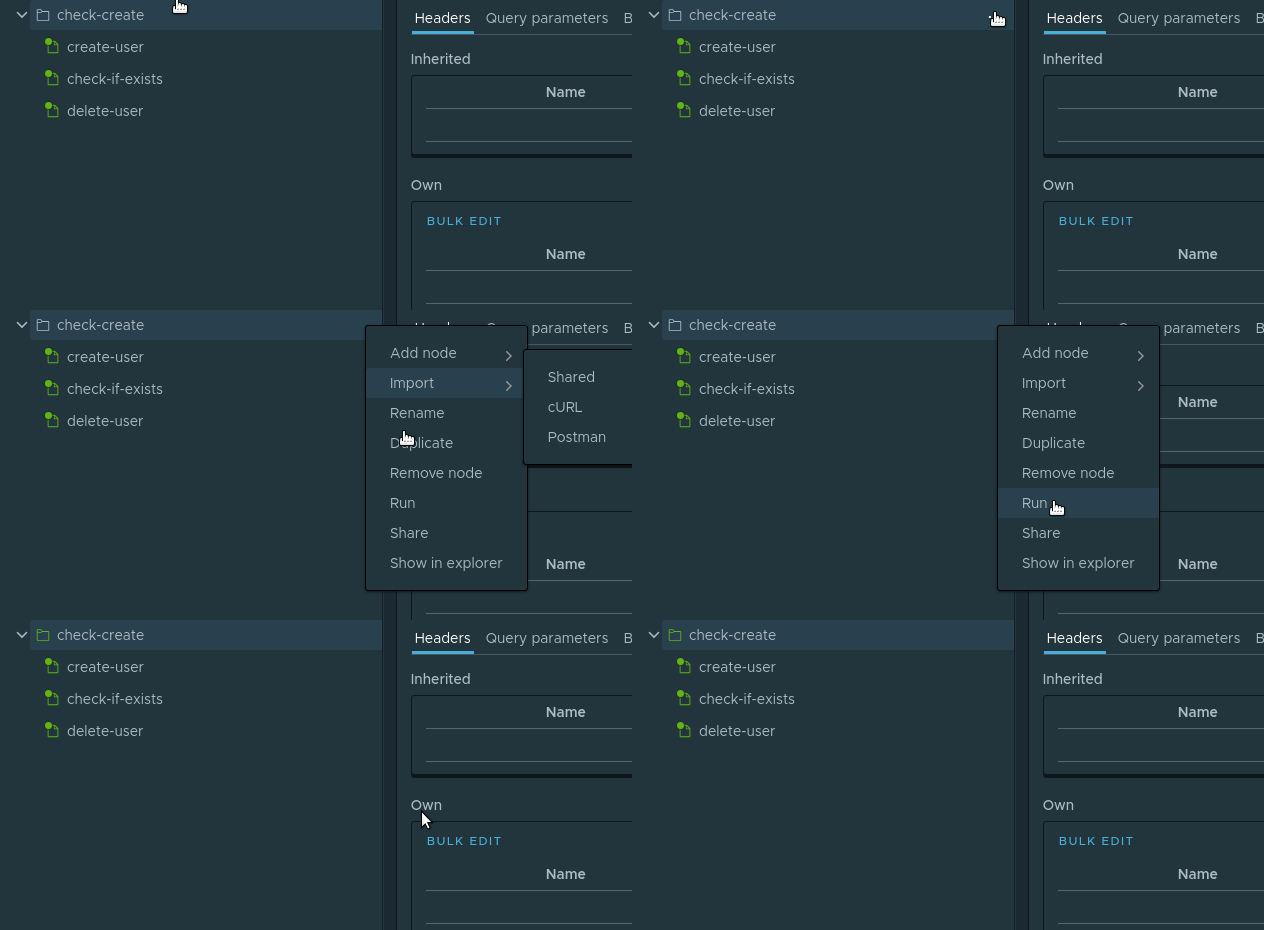
Узлы в сценарии выполнятся друг за другом
Данный сценарий вы можете сохранить к себе в проект, выполнив File -> Save project.
Заключение
В формат данной статьи просто не смогли уместиться все фишки использованных инструментов. Что касается основного виновника — пакета nestjsx/crud — неосвещенными остались следующие темы:
- кастомная валидация и трансформация моделей;
- мощный язык запросов и удобное его использование на фронте;
- переопределение и добавление новых методов в crud-контроллеры;
- поддержка swagger;
- управление кэшированием.
Однако даже описанного в статье достаточно, чтобы понять, что даже такой энтерпрайсный фреймворк как NestJS имеет в загашнике инструменты для быстрого прототипирования приложений. А такая классная IDE как TestMace позволяет поддержать заданный темп.
Исходный код данной статьи, вместе с проектом TestMace, доступен в репозитории https://github.com/TestMace/nest-rest. Для открытия проекта TestMace достаточно в приложении выполнить File -> Open project.
ссылка на оригинал статьи https://habr.com/ru/post/462585/
Добавить комментарий