Много людей хотели бы начать программировать на андроид, но Android Studio и Java их отпугивают. Почему? Потому, что это в некотором смысле из пушки по воробьям. «Я лишь хочу сделать змейку, и все!»
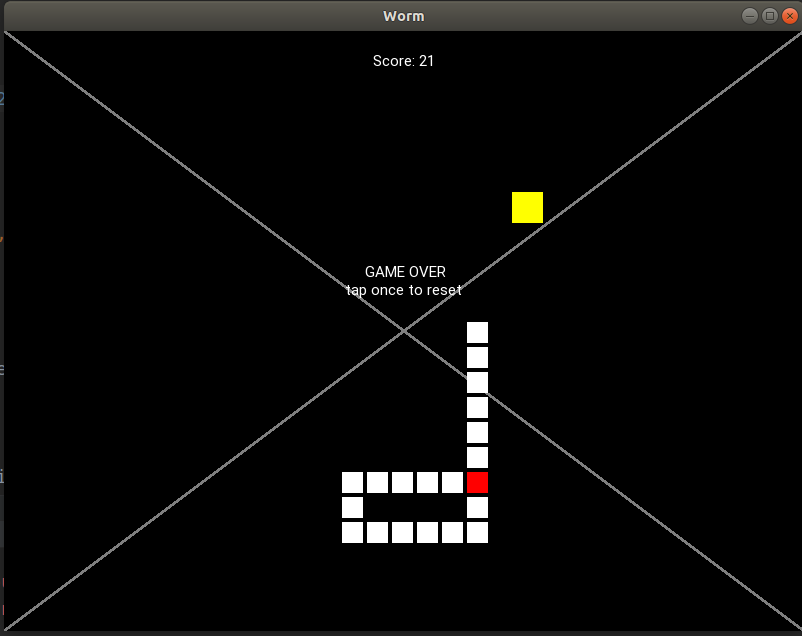
Плохой код
Мелкие недостатки:
- Использование «хвоста» и «головы» по отдельности. В этом нет необходимости, так как в змее голова — первая часть хвоста. Не стоит для этого всю змею делить на две части, для которых код пишется отдельно.
- Clock.schedule от self.update вызван из… self.update.
- Класс второго уровня (условно точка входа из первого класса) Playground объявлен в начале, но класс первого уровня SnakeApp объявлен в конце файла.
- Названия для направлений («up», «down», …) вместо векторов ( (0, 1), (1, 0)… ).
Серьезные недостатки:
- Динамичные объекты (к примеру, фрукт) прикреплены к файлу kv, так что вы не можете создать более одного яблока не переписав половину кода
- Чудная логика перемещения змеи вместо клетка-за-клеткой.
- 350 строк — слишком длинный код.
Статья неочевидна для новичков
Это мое ЛИЧНОЕ мнение. Более того, я не гарантирую, что моя статья будет более интересной и понятной. Но постараюсь, а еще гарантирую:
- Код будет коротким
- Змейка красивой (относительно)
- Туториал будет иметь поэтапное развитие
Результат не комильфо

Нет расстояния между клетками, чудной треугольник, дергающаяся змейка.
Знакомство
Первое приложение
Пожалуйста, удостовертесь в том, что уже установили Kivy (если нет, следуйте инструкциям) и запустите
buildozer init в папке проекта.
Запустим первую программу:
main.py
from kivy.app import App from kivy.uix.widget import Widget class WormApp(App): def build(self): return Widget() if __name__ == '__main__': WormApp().run() 
Мы создали виджет. Аналогично, мы можем создать кнопку или любой другой элемент графического интерфейса:
from kivy.app import App from kivy.uix.widget import Widget from kivy.uix.button import Button class WormApp(App): def build(self): self.but = Button() self.but.pos = (100, 100) self.but.size = (200, 200) self.but.text = "Hello, cruel world" self.form = Widget() self.form.add_widget(self.but) return self.form if __name__ == '__main__': WormApp().run() 
Ура! Поздравляю! Вы создали кнопку!
Файлы .kv
Однако, есть другой способ создавать такие элементы. Сначала объявим нашу форму:
from kivy.app import App from kivy.uix.widget import Widget from kivy.uix.button import Button class Form(Widget): def __init__(self): super().__init__() self.but1 = Button() self.but1.pos = (100, 100) self.add_widget(self.but1) class WormApp(App): def build(self): self.form = Form() return self.form if __name__ == '__main__': WormApp().run() Затем создаем «worm.kv» файл.
worm.kv
<Form>: but2: but_id Button: id: but_id pos: (200, 200) Что произошло? Мы создали еще одну кнопку и присвоим id but_id. Теперь but_id ассоциировано с but2 формы. Это означает, что мы button с помощью but2:
class Form(Widget): def __init__(self): super().__init__() self.but1 = Button() self.but1.pos = (100, 100) self.add_widget(self.but1) # self.but2.text = "OH MY" 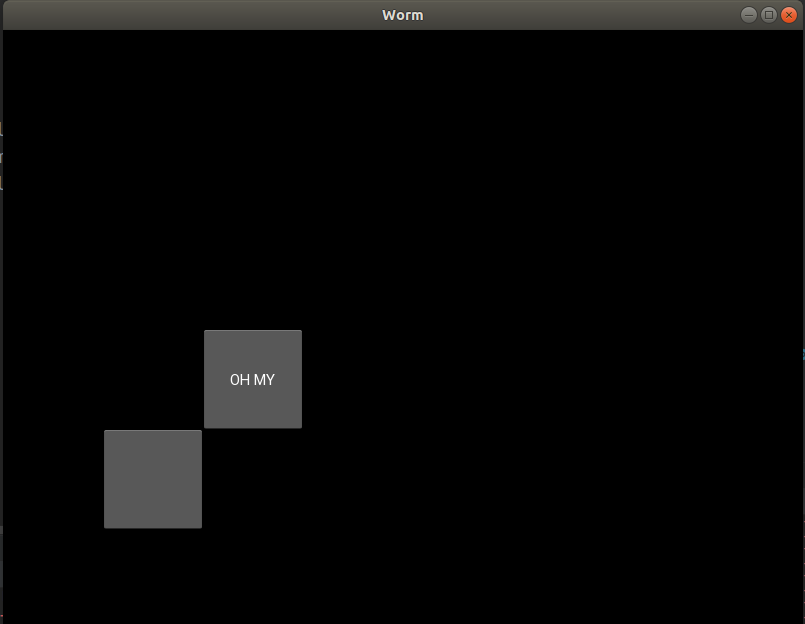
Графика
Далее создадим графический элемент. Сначала объявим его в worm.kv:
<Form>: <Cell>: canvas: Rectangle: size: self.size pos: self.pos Мы связали позицию прямоугольника с self.pos и его размер с self.size. Так что теперь эти свойства доступны из Cell, например, как только мы создаем клетку, мы менять ее размер и позицию:
class Cell(Widget): def __init__(self, x, y, size): super().__init__() self.size = (size, size) # Как можно заметить, мы можем поменять self.size который есть свойство "size" прямоугольника self.pos = (x, y) class Form(Widget): def __init__(self): super().__init__() self.cell = Cell(100, 100, 30) self.add_widget(self.cell) 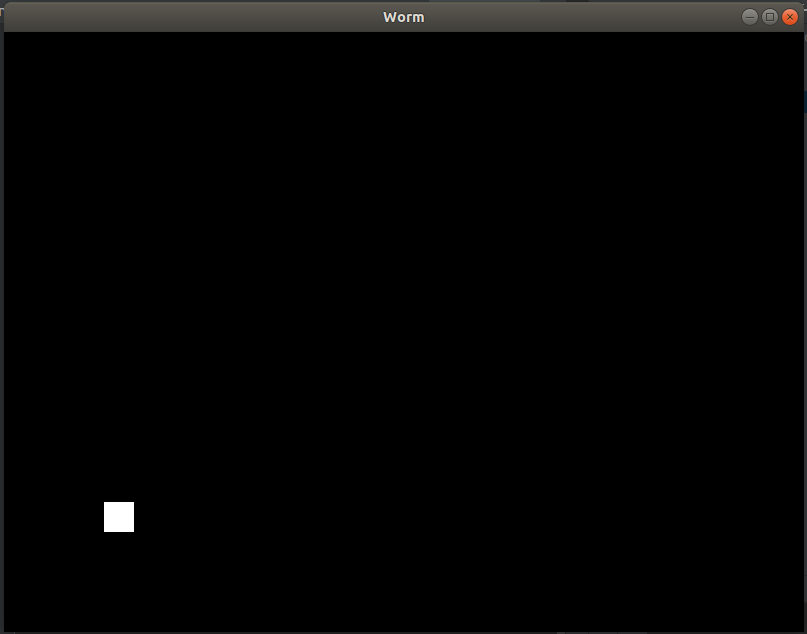
Окей, мы создали клетку.
Необходимые методы
Давайте попробуем двигать змею. Чтобы это сделать, мы можем добавить функцию Form.update и привязать к расписанию с помощью Clock.schedule.
from kivy.app import App from kivy.uix.widget import Widget from kivy.clock import Clock class Cell(Widget): def __init__(self, x, y, size): super().__init__() self.size = (size, size) self.pos = (x, y) class Form(Widget): def __init__(self): super().__init__() self.cell = Cell(100, 100, 30) self.add_widget(self.cell) def start(self): Clock.schedule_interval(self.update, 0.01) def update(self, _): self.cell.pos = (self.cell.pos[0] + 2, self.cell.pos[1] + 3) class WormApp(App): def build(self): self.form = Form() self.form.start() return self.form if __name__ == '__main__': WormApp().run() Клетка будет двигаться по форме. Как вы можете видеть, мы можем поставить таймер на любую функцию с помощью Clock.
Далее, создадим событие нажатия (touch event). Перепишем Form:
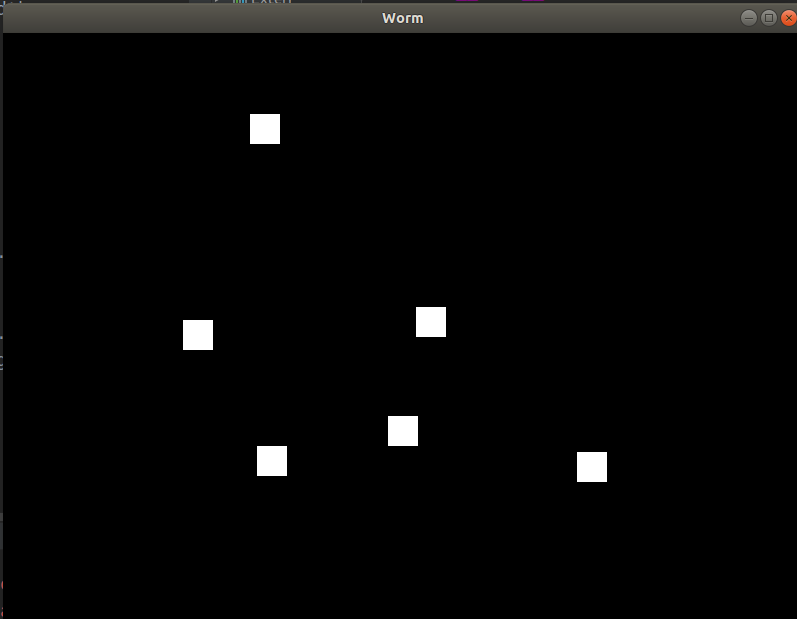
class Form(Widget): def __init__(self): super().__init__() self.cells = [] def start(self): Clock.schedule_interval(self.update, 0.01) def update(self, _): for cell in self.cells: cell.pos = (cell.pos[0] + 2, cell.pos[1] + 3) def on_touch_down(self, touch): cell = Cell(touch.x, touch.y, 30) self.add_widget(cell) self.cells.append(cell) Каждый touch_down создает клетку с координатами = (touch.x, touch.y) и размером = 30. Затем, мы добавим ее как виджет формы И в наш собственный массив (чтобы позднее обращаться к нему).
Теперь каждое нажатие на форму генерирует клетку.
Няшные настройки
Так как мы хотим сделать красивую змейку, мы должны логически разделить графическую и настоящую позиции.
P. S. Мы бы этим не парились если бы имели дело с on_draw. Но теперь мы не обязаны перерисовать форму лапками.
Давайте изменим файл worm.kv:
<Form>: <Cell>: canvas: Rectangle: size: self.graphical_size pos: self.graphical_pos и main.py:
... from kivy.properties import * ... class Cell(Widget): graphical_size = ListProperty([1, 1]) graphical_pos = ListProperty([1, 1]) def __init__(self, x, y, size, margin=4): super().__init__() self.actual_size = (size, size) self.graphical_size = (size - margin, size - margin) self.margin = margin self.actual_pos = (x, y) self.graphical_pos_attach() def graphical_pos_attach(self): self.graphical_pos = (self.actual_pos[0] - self.graphical_size[0] / 2, self.actual_pos[1] - self.graphical_size[1] / 2) ... class Form(Widget): def __init__(self): super().__init__() self.cell1 = Cell(100, 100, 30) self.cell2 = Cell(130, 100, 30) self.add_widget(self.cell1) self.add_widget(self.cell2) ... 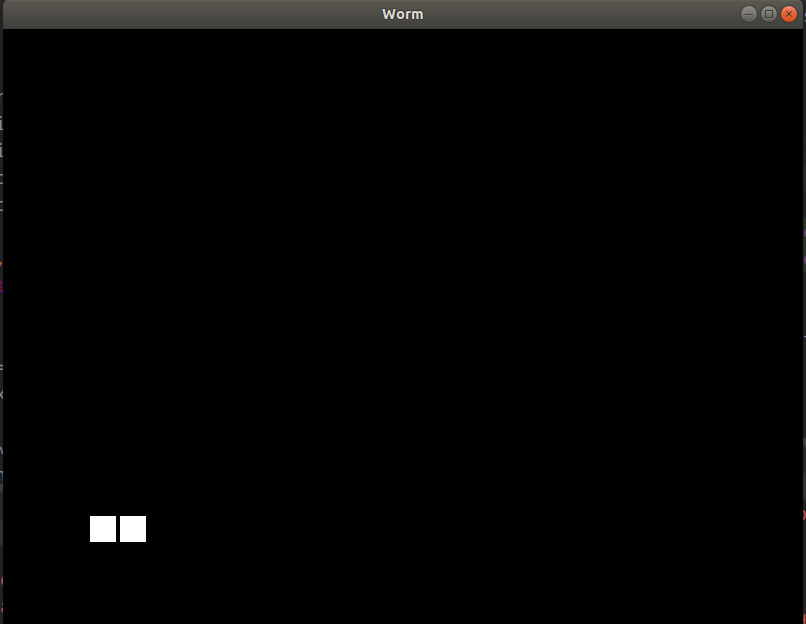
Появился отступ, так что это выглядит лучше не смотря на то, что мы создали вторую клетку с X = 130 вместо 132. Позже мы будем делать мягкое передвижение, основанное на расстоянии между actual_pos и graphical_pos.
Программирование червяка
Объявление
Инициализируем config в main.py
class Config: DEFAULT_LENGTH = 20 CELL_SIZE = 25 APPLE_SIZE = 35 MARGIN = 4 INTERVAL = 0.2 DEAD_CELL = (1, 0, 0, 1) APPLE_COLOR = (1, 1, 0, 1) (Поверьте, вы это полюбите!)
Затем присвойте config приложению:
class WormApp(App): def __init__(self): super().__init__() self.config = Config() self.form = Form(self.config) def build(self): self.form.start() return self.form Перепишите init и start:
class Form(Widget): def __init__(self, config): super().__init__() self.config = config self.worm = None def start(self): self.worm = Worm(self.config) self.add_widget(self.worm) Clock.schedule_interval(self.update, self.config.INTERVAL) Затем, Cell:
class Cell(Widget): graphical_size = ListProperty([1, 1]) graphical_pos = ListProperty([1, 1]) def __init__(self, x, y, size, margin=4): super().__init__() self.actual_size = (size, size) self.graphical_size = (size - margin, size - margin) self.margin = margin self.actual_pos = (x, y) self.graphical_pos_attach() def graphical_pos_attach(self): self.graphical_pos = (self.actual_pos[0] - self.graphical_size[0] / 2, self.actual_pos[1] - self.graphical_size[1] / 2) def move_to(self, x, y): self.actual_pos = (x, y) self.graphical_pos_attach() def move_by(self, x, y, **kwargs): self.move_to(self.actual_pos[0] + x, self.actual_pos[1] + y, **kwargs) def get_pos(self): return self.actual_pos def step_by(self, direction, **kwargs): self.move_by(self.actual_size[0] * direction[0], self.actual_size[1] * direction[1], **kwargs) Надеюсь, это было более менее понятно.
И наконец Worm:
class Worm(Widget): def __init__(self, config): super().__init__() self.cells = [] self.config = config self.cell_size = config.CELL_SIZE self.head_init((100, 100)) for i in range(config.DEFAULT_LENGTH): self.lengthen() def destroy(self): for i in range(len(self.cells)): self.remove_widget(self.cells[i]) self.cells = [] def lengthen(self, pos=None, direction=(0, 1)): # Если позиция установлена, мы перемещаем клетку туда, иначе - в соответствии с данным направлением if pos is None: px = self.cells[-1].get_pos()[0] + direction[0] * self.cell_size py = self.cells[-1].get_pos()[1] + direction[1] * self.cell_size pos = (px, py) self.cells.append(Cell(*pos, self.cell_size, margin=self.config.MARGIN)) self.add_widget(self.cells[-1]) def head_init(self, pos): self.lengthen(pos=pos) Давайте создадим нашего червячка.

Движение
Теперь подвигаем ЭТО.
Тут просто:
class Worm(Widget): ... def move(self, direction): for i in range(len(self.cells) - 1, 0, -1): self.cells[i].move_to(*self.cells[i - 1].get_pos()) self.cells[0].step_by(direction)
class Form(Widget): def __init__(self, config): super().__init__() self.config = config self.worm = None self.cur_dir = (0, 0) def start(self): self.worm = Worm(self.config) self.add_widget(self.worm) self.cur_dir = (1, 0) Clock.schedule_interval(self.update, self.config.INTERVAL) def update(self, _): self.worm.move(self.cur_dir) 
Оно живое! Оно живое!
Управление
Как вы могли судить по первой картинке, управление змеи будет таким:
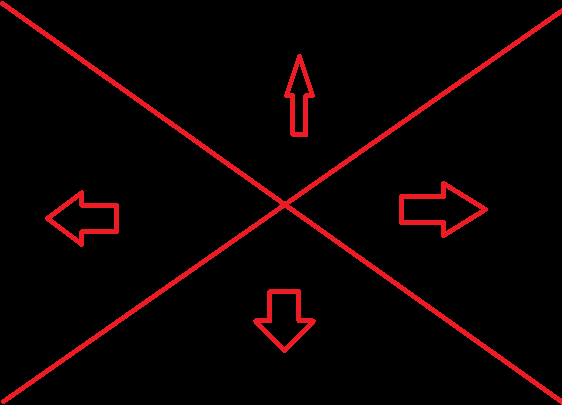
class Form(Widget): ... def on_touch_down(self, touch): ws = touch.x / self.size[0] hs = touch.y / self.size[1] aws = 1 - ws if ws > hs and aws > hs: cur_dir = (0, -1) # Вниз elif ws > hs >= aws: cur_dir = (1, 0) # Вправо elif ws <= hs < aws: cur_dir = (-1, 0) # Влево else: cur_dir = (0, 1) # Вверх self.cur_dir = cur_dir 
Здорово.
Создание фрукта
Сначала объявим.
class Form(Widget): ... def __init__(self, config): super().__init__() self.config = config self.worm = None self.cur_dir = (0, 0) self.fruit = None ... def random_cell_location(self, offset): x_row = self.size[0] // self.config.CELL_SIZE x_col = self.size[1] // self.config.CELL_SIZE return random.randint(offset, x_row - offset), random.randint(offset, x_col - offset) def random_location(self, offset): x_row, x_col = self.random_cell_location(offset) return self.config.CELL_SIZE * x_row, self.config.CELL_SIZE * x_col def fruit_dislocate(self): x, y = self.random_location(2) self.fruit.move_to(x, y) ... def start(self): self.fruit = Cell(0, 0, self.config.APPLE_SIZE, self.config.MARGIN) self.worm = Worm(self.config) self.fruit_dislocate() self.add_widget(self.worm) self.add_widget(self.fruit) self.cur_dir = (1, 0) Clock.schedule_interval(self.update, self.config.INTERVAL) Текущий результат:

Теперь мы должны объявить несколько методов Worm:
class Worm(Widget): ... # Тут соберем позиции всех клеток def gather_positions(self): return [cell.get_pos() for cell in self.cells] # Проверка пересекается ли голова с другим объектом def head_intersect(self, cell): return self.cells[0].get_pos() == cell.get_pos()
class Form(Widget): def fruit_dislocate(self): x, y = self.random_location(2) while (x, y) in self.worm.gather_positions(): x, y = self.random_location(2) self.fruit.move_to(x, y) На этот моменте позиция яблока не сможет совпадать с позиции хвоста
… и добавим проверку в update()
class Form(Widget): ... def update(self, _): self.worm.move(self.cur_dir) if self.worm.head_intersect(self.fruit): directions = [(0, 1), (0, -1), (1, 0), (-1, 0)] self.worm.lengthen(direction=random.choice(directions)) self.fruit_dislocate()
Определение пересечения головы и хвоста
Мы хотим узнать та же ли позиция у головы, что у какой-то клетки хвоста.
class Form(Widget): ... def __init__(self, config): super().__init__() self.config = config self.worm = None self.cur_dir = (0, 0) self.fruit = None self.game_on = True def update(self, _): if not self.game_on: return self.worm.move(self.cur_dir) if self.worm.head_intersect(self.fruit): directions = [(0, 1), (0, -1), (1, 0), (-1, 0)] self.worm.lengthen(direction=random.choice(directions)) self.fruit_dislocate() if self.worm_bite_self(): self.game_on = False def worm_bite_self(self): for cell in self.worm.cells[1:]: if self.worm.head_intersect(cell): return cell return False 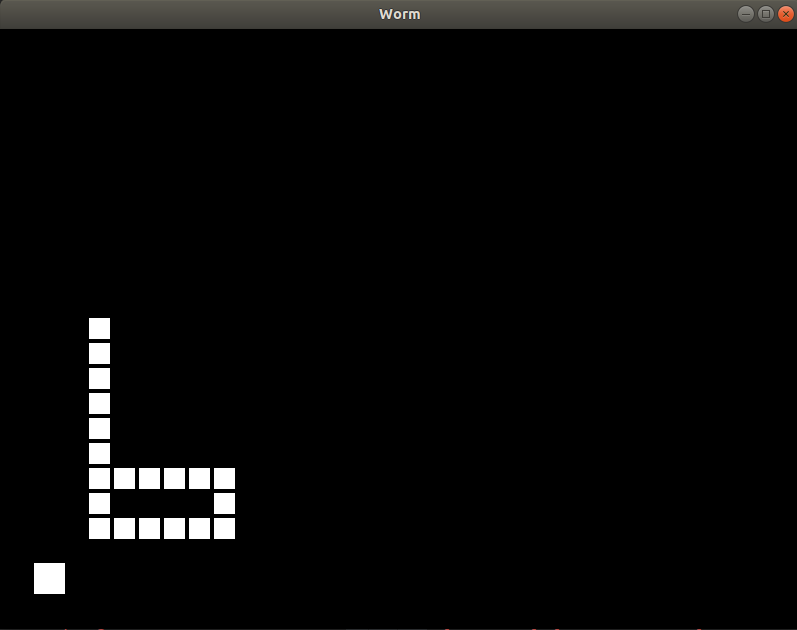
Раскрашивание, декорирование, рефакторинг кода
Начнем с рефакторинга.
Перепишем и добавим
class Form(Widget): ... def start(self): self.worm = Worm(self.config) self.add_widget(self.worm) if self.fruit is not None: self.remove_widget(self.fruit) self.fruit = Cell(0, 0, self.config.APPLE_SIZE) self.fruit_dislocate() self.add_widget(self.fruit) Clock.schedule_interval(self.update, self.config.INTERVAL) self.game_on = True self.cur_dir = (0, -1) def stop(self): self.game_on = False Clock.unschedule(self.update) def game_over(self): self.stop() ... def on_touch_down(self, touch): if not self.game_on: self.worm.destroy() self.start() return ... Теперь если червяк мертв (заморожен), если вы нажмете на экран, игра будет начата заново.
Теперь перейдим к декорированию и раскрашиванию.
worm.kv
<Form>: popup_label: popup_label score_label: score_label canvas: Color: rgba: (.5, .5, .5, 1.0) Line: width: 1.5 points: (0, 0), self.size Line: width: 1.5 points: (self.size[0], 0), (0, self.size[1]) Label: id: score_label text: "Score: " + str(self.parent.worm_len) width: self.width Label: id: popup_label width: self.width <Worm>: <Cell>: canvas: Color: rgba: self.color Rectangle: size: self.graphical_size pos: self.graphical_pos Перепишем WormApp:
class WormApp(App): def build(self): self.config = Config() self.form = Form(self.config) return self.form def on_start(self): self.form.start() 
Раскрасим. Перепишем Cell in .kv:
<Cell>: canvas: Color: rgba: self.color Rectangle: size: self.graphical_size pos: self.graphical_pos Добавим это к Cell.__init__:
self.color = (0.2, 1.0, 0.2, 1.0) # и это к Form.start
self.fruit.color = (1.0, 0.2, 0.2, 1.0) Превосходно, наслаждайтесь змейкой

Наконец, мы создадим надпись «game over»
class Form(Widget): ... def __init__(self, config): ... self.popup_label.text = "" ... def stop(self, text=""): self.game_on = False self.popup_label.text = text Clock.unschedule(self.update) def game_over(self): self.stop("GAME OVER" + " " * 5 + "\ntap to reset") И зададим «раненой» клетке красный цвет:
вместо
def update(self, _): ... if self.worm_bite_self(): self.game_over() ... напишите
def update(self, _): cell = self.worm_bite_self() if cell: cell.color = (1.0, 0.2, 0.2, 1.0) self.game_over() 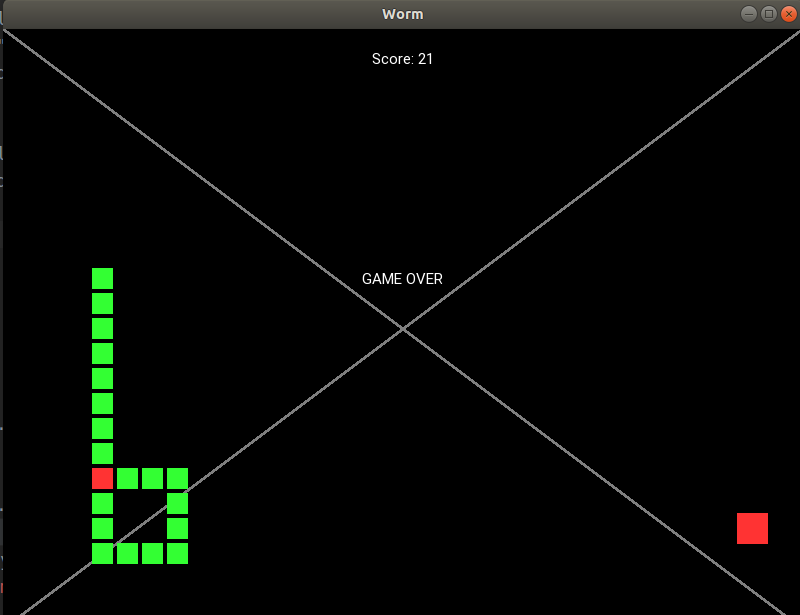
Вы еще тут? Самая интересная часть впереди!
Бонус — плавное жвижение
Так как шаг червячка равен cell_size, выглядит не очень плавно. Но мы бы хотели шагать как можно чаще без полного переписывания логики игры. Таким образом, нам нужен механизм, который двигал бы наши графические позиции (graphical_pos) но не влиял бы на настоящие (actual_pos). Я написал следующий код:
smooth.py
from kivy.clock import Clock import time class Timing: @staticmethod def linear(x): return x class Smooth: def __init__(self, interval=1.0/60.0): self.objs = [] self.running = False self.interval = interval def run(self): if self.running: return self.running = True Clock.schedule_interval(self.update, self.interval) def stop(self): if not self.running: return self.running = False Clock.unschedule(self.update) def setattr(self, obj, attr, value): exec("obj." + attr + " = " + str(value)) def getattr(self, obj, attr): return float(eval("obj." + attr)) def update(self, _): cur_time = time.time() for line in self.objs: obj, prop_name_x, prop_name_y, from_x, from_y, to_x, to_y, start_time, period, timing = line time_gone = cur_time - start_time if time_gone >= period: self.setattr(obj, prop_name_x, to_x) self.setattr(obj, prop_name_y, to_y) self.objs.remove(line) else: share = time_gone / period acs = timing(share) self.setattr(obj, prop_name_x, from_x * (1 - acs) + to_x * acs) self.setattr(obj, prop_name_y, from_y * (1 - acs) + to_y * acs) if len(self.objs) == 0: self.stop() def move_to(self, obj, prop_name_x, prop_name_y, to_x, to_y, t, timing=Timing.linear): self.objs.append((obj, prop_name_x, prop_name_y, self.getattr(obj, prop_name_x), self.getattr(obj, prop_name_y), to_x, to_y, time.time(), t, timing)) self.run() class XSmooth(Smooth): def __init__(self, props, timing=Timing.linear, *args, **kwargs): super().__init__(*args, **kwargs) self.props = props self.timing = timing def move_to(self, obj, to_x, to_y, t): super().move_to(obj, *self.props, to_x, to_y, t, timing=self.timing)
Так, вы лишь создаете smooth.py and и копируете код в файл.
Наконец, заставим ЭТО работать!
class Form(Widget): ... def __init__(self, config): ... self.smooth = smooth.XSmooth(["graphical_pos[0]", "graphical_pos[1]"]) Заменим self.worm.move() с
class Form(Widget): ... def update(self, _): ... self.worm.move(self.cur_dir, smooth_motion=(self.smooth, self.config.INTERVAL)) А это как методы Cell должны выглядить
class Cell(Widget): ... def graphical_pos_attach(self, smooth_motion=None): to_x, to_y = self.actual_pos[0] - self.graphical_size[0] / 2, self.actual_pos[1] - self.graphical_size[1] / 2 if smooth_motion is None: self.graphical_pos = to_x, to_y else: smoother, t = smooth_motion smoother.move_to(self, to_x, to_y, t) def move_to(self, x, y, **kwargs): self.actual_pos = (x, y) self.graphical_pos_attach(**kwargs) def move_by(self, x, y, **kwargs): self.move_to(self.actual_pos[0] + x, self.actual_pos[1] + y, **kwargs) Ну вот и все, спасибо за ваше внимание! Код снизу.
Демонстрационное видео как работает результат:
from kivy.app import App from kivy.uix.widget import Widget from kivy.clock import Clock from kivy.properties import * import random import smooth class Cell(Widget): graphical_size = ListProperty([1, 1]) graphical_pos = ListProperty([1, 1]) color = ListProperty([1, 1, 1, 1]) def __init__(self, x, y, size, margin=4): super().__init__() self.actual_size = (size, size) self.graphical_size = (size - margin, size - margin) self.margin = margin self.actual_pos = (x, y) self.graphical_pos_attach() self.color = (0.2, 1.0, 0.2, 1.0) def graphical_pos_attach(self, smooth_motion=None): to_x, to_y = self.actual_pos[0] - self.graphical_size[0] / 2, self.actual_pos[1] - self.graphical_size[1] / 2 if smooth_motion is None: self.graphical_pos = to_x, to_y else: smoother, t = smooth_motion smoother.move_to(self, to_x, to_y, t) def move_to(self, x, y, **kwargs): self.actual_pos = (x, y) self.graphical_pos_attach(**kwargs) def move_by(self, x, y, **kwargs): self.move_to(self.actual_pos[0] + x, self.actual_pos[1] + y, **kwargs) def get_pos(self): return self.actual_pos def step_by(self, direction, **kwargs): self.move_by(self.actual_size[0] * direction[0], self.actual_size[1] * direction[1], **kwargs) class Worm(Widget): def __init__(self, config): super().__init__() self.cells = [] self.config = config self.cell_size = config.CELL_SIZE self.head_init((100, 100)) for i in range(config.DEFAULT_LENGTH): self.lengthen() def destroy(self): for i in range(len(self.cells)): self.remove_widget(self.cells[i]) self.cells = [] def lengthen(self, pos=None, direction=(0, 1)): if pos is None: px = self.cells[-1].get_pos()[0] + direction[0] * self.cell_size py = self.cells[-1].get_pos()[1] + direction[1] * self.cell_size pos = (px, py) self.cells.append(Cell(*pos, self.cell_size, margin=self.config.MARGIN)) self.add_widget(self.cells[-1]) def head_init(self, pos): self.lengthen(pos=pos) def move(self, direction, **kwargs): for i in range(len(self.cells) - 1, 0, -1): self.cells[i].move_to(*self.cells[i - 1].get_pos(), **kwargs) self.cells[0].step_by(direction, **kwargs) def gather_positions(self): return [cell.get_pos() for cell in self.cells] def head_intersect(self, cell): return self.cells[0].get_pos() == cell.get_pos() class Form(Widget): worm_len = NumericProperty(0) def __init__(self, config): super().__init__() self.config = config self.worm = None self.cur_dir = (0, 0) self.fruit = None self.game_on = True self.smooth = smooth.XSmooth(["graphical_pos[0]", "graphical_pos[1]"]) def random_cell_location(self, offset): x_row = self.size[0] // self.config.CELL_SIZE x_col = self.size[1] // self.config.CELL_SIZE return random.randint(offset, x_row - offset), random.randint(offset, x_col - offset) def random_location(self, offset): x_row, x_col = self.random_cell_location(offset) return self.config.CELL_SIZE * x_row, self.config.CELL_SIZE * x_col def fruit_dislocate(self): x, y = self.random_location(2) while (x, y) in self.worm.gather_positions(): x, y = self.random_location(2) self.fruit.move_to(x, y) def start(self): self.worm = Worm(self.config) self.add_widget(self.worm) if self.fruit is not None: self.remove_widget(self.fruit) self.fruit = Cell(0, 0, self.config.APPLE_SIZE) self.fruit.color = (1.0, 0.2, 0.2, 1.0) self.fruit_dislocate() self.add_widget(self.fruit) self.game_on = True self.cur_dir = (0, -1) Clock.schedule_interval(self.update, self.config.INTERVAL) self.popup_label.text = "" def stop(self, text=""): self.game_on = False self.popup_label.text = text Clock.unschedule(self.update) def game_over(self): self.stop("GAME OVER" + " " * 5 + "\ntap to reset") def align_labels(self): try: self.popup_label.pos = ((self.size[0] - self.popup_label.width) / 2, self.size[1] / 2) self.score_label.pos = ((self.size[0] - self.score_label.width) / 2, self.size[1] - 80) except: print(self.__dict__) assert False def update(self, _): if not self.game_on: return self.worm.move(self.cur_dir, smooth_motion=(self.smooth, self.config.INTERVAL)) if self.worm.head_intersect(self.fruit): directions = [(0, 1), (0, -1), (1, 0), (-1, 0)] self.worm.lengthen(direction=random.choice(directions)) self.fruit_dislocate() cell = self.worm_bite_self() if cell: cell.color = (1.0, 0.2, 0.2, 1.0) self.game_over() self.worm_len = len(self.worm.cells) self.align_labels() def on_touch_down(self, touch): if not self.game_on: self.worm.destroy() self.start() return ws = touch.x / self.size[0] hs = touch.y / self.size[1] aws = 1 - ws if ws > hs and aws > hs: cur_dir = (0, -1) elif ws > hs >= aws: cur_dir = (1, 0) elif ws <= hs < aws: cur_dir = (-1, 0) else: cur_dir = (0, 1) self.cur_dir = cur_dir def worm_bite_self(self): for cell in self.worm.cells[1:]: if self.worm.head_intersect(cell): return cell return False class Config: DEFAULT_LENGTH = 20 CELL_SIZE = 25 APPLE_SIZE = 35 MARGIN = 4 INTERVAL = 0.3 DEAD_CELL = (1, 0, 0, 1) APPLE_COLOR = (1, 1, 0, 1) class WormApp(App): def build(self): self.config = Config() self.form = Form(self.config) return self.form def on_start(self): self.form.start() if __name__ == '__main__': WormApp().run()
from kivy.clock import Clock import time class Timing: @staticmethod def linear(x): return x class Smooth: def __init__(self, interval=1.0/60.0): self.objs = [] self.running = False self.interval = interval def run(self): if self.running: return self.running = True Clock.schedule_interval(self.update, self.interval) def stop(self): if not self.running: return self.running = False Clock.unschedule(self.update) def setattr(self, obj, attr, value): exec("obj." + attr + " = " + str(value)) def getattr(self, obj, attr): return float(eval("obj." + attr)) def update(self, _): cur_time = time.time() for line in self.objs: obj, prop_name_x, prop_name_y, from_x, from_y, to_x, to_y, start_time, period, timing = line time_gone = cur_time - start_time if time_gone >= period: self.setattr(obj, prop_name_x, to_x) self.setattr(obj, prop_name_y, to_y) self.objs.remove(line) else: share = time_gone / period acs = timing(share) self.setattr(obj, prop_name_x, from_x * (1 - acs) + to_x * acs) self.setattr(obj, prop_name_y, from_y * (1 - acs) + to_y * acs) if len(self.objs) == 0: self.stop() def move_to(self, obj, prop_name_x, prop_name_y, to_x, to_y, t, timing=Timing.linear): self.objs.append((obj, prop_name_x, prop_name_y, self.getattr(obj, prop_name_x), self.getattr(obj, prop_name_y), to_x, to_y, time.time(), t, timing)) self.run() class XSmooth(Smooth): def __init__(self, props, timing=Timing.linear, *args, **kwargs): super().__init__(*args, **kwargs) self.props = props self.timing = timing def move_to(self, obj, to_x, to_y, t): super().move_to(obj, *self.props, to_x, to_y, t, timing=self.timing)
<Form>: popup_label: popup_label score_label: score_label canvas: Color: rgba: (.5, .5, .5, 1.0) Line: width: 1.5 points: (0, 0), self.size Line: width: 1.5 points: (self.size[0], 0), (0, self.size[1]) Label: id: score_label text: "Score: " + str(self.parent.worm_len) width: self.width Label: id: popup_label width: self.width <Worm>: <Cell>: canvas: Color: rgba: self.color Rectangle: size: self.graphical_size pos: self.graphical_pos
from kivy.app import App from kivy.uix.widget import Widget from kivy.clock import Clock from kivy.properties import * import random import smooth class Cell: def __init__(self, x, y): self.actual_pos = (x, y) def move_to(self, x, y): self.actual_pos = (x, y) def move_by(self, x, y): self.move_to(self.actual_pos[0] + x, self.actual_pos[1] + y) def get_pos(self): return self.actual_pos class Fruit(Cell): def __init__(self, x, y): super().__init__(x, y) class Worm(Widget): margin = NumericProperty(4) graphical_poses = ListProperty() inj_pos = ListProperty([-1000, -1000]) graphical_size = NumericProperty(0) def __init__(self, config, **kwargs): super().__init__(**kwargs) self.cells = [] self.config = config self.cell_size = config.CELL_SIZE self.head_init((self.config.CELL_SIZE * random.randint(3, 5), self.config.CELL_SIZE * random.randint(3, 5))) self.margin = config.MARGIN self.graphical_size = self.cell_size - self.margin for i in range(config.DEFAULT_LENGTH): self.lengthen() def destroy(self): self.cells = [] self.graphical_poses = [] self.inj_pos = [-1000, -1000] def cell_append(self, pos): self.cells.append(Cell(*pos)) self.graphical_poses.extend([0, 0]) self.cell_move_to(len(self.cells) - 1, pos) def lengthen(self, pos=None, direction=(0, 1)): if pos is None: px = self.cells[-1].get_pos()[0] + direction[0] * self.cell_size py = self.cells[-1].get_pos()[1] + direction[1] * self.cell_size pos = (px, py) self.cell_append(pos) def head_init(self, pos): self.lengthen(pos=pos) def cell_move_to(self, i, pos, smooth_motion=None): self.cells[i].move_to(*pos) to_x, to_y = pos[0], pos[1] if smooth_motion is None: self.graphical_poses[i * 2], self.graphical_poses[i * 2 + 1] = to_x, to_y else: smoother, t = smooth_motion smoother.move_to(self, "graphical_poses[" + str(i * 2) + "]", "graphical_poses[" + str(i * 2 + 1) + "]", to_x, to_y, t) def move(self, direction, **kwargs): for i in range(len(self.cells) - 1, 0, -1): self.cell_move_to(i, self.cells[i - 1].get_pos(), **kwargs) self.cell_move_to(0, (self.cells[0].get_pos()[0] + self.cell_size * direction[0], self.cells[0].get_pos()[1] + self.cell_size * direction[1]), **kwargs) def gather_positions(self): return [cell.get_pos() for cell in self.cells] def head_intersect(self, cell): return self.cells[0].get_pos() == cell.get_pos() class Form(Widget): worm_len = NumericProperty(0) fruit_pos = ListProperty([0, 0]) fruit_size = NumericProperty(0) def __init__(self, config, **kwargs): super().__init__(**kwargs) self.config = config self.worm = None self.cur_dir = (0, 0) self.fruit = None self.game_on = True self.smooth = smooth.Smooth() def random_cell_location(self, offset): x_row = self.size[0] // self.config.CELL_SIZE x_col = self.size[1] // self.config.CELL_SIZE return random.randint(offset, x_row - offset), random.randint(offset, x_col - offset) def random_location(self, offset): x_row, x_col = self.random_cell_location(offset) return self.config.CELL_SIZE * x_row, self.config.CELL_SIZE * x_col def fruit_dislocate(self, xy=None): if xy is not None: x, y = xy else: x, y = self.random_location(2) while (x, y) in self.worm.gather_positions(): x, y = self.random_location(2) self.fruit.move_to(x, y) self.fruit_pos = (x, y) def start(self): self.worm = Worm(self.config) self.add_widget(self.worm) self.fruit = Fruit(0, 0) self.fruit_size = self.config.APPLE_SIZE self.fruit_dislocate() self.game_on = True self.cur_dir = (0, -1) Clock.schedule_interval(self.update, self.config.INTERVAL) self.popup_label.text = "" def stop(self, text=""): self.game_on = False self.popup_label.text = text Clock.unschedule(self.update) def game_over(self): self.stop("GAME OVER" + " " * 5 + "\ntap to reset") def align_labels(self): self.popup_label.pos = ((self.size[0] - self.popup_label.width) / 2, self.size[1] / 2) self.score_label.pos = ((self.size[0] - self.score_label.width) / 2, self.size[1] - 80) def update(self, _): if not self.game_on: return self.worm.move(self.cur_dir, smooth_motion=(self.smooth, self.config.INTERVAL)) if self.worm.head_intersect(self.fruit): directions = [(0, 1), (0, -1), (1, 0), (-1, 0)] self.worm.lengthen(direction=random.choice(directions)) self.fruit_dislocate() cell = self.worm_bite_self() if cell is not None: self.worm.inj_pos = cell.get_pos() self.game_over() self.worm_len = len(self.worm.cells) self.align_labels() def on_touch_down(self, touch): if not self.game_on: self.worm.destroy() self.start() return ws = touch.x / self.size[0] hs = touch.y / self.size[1] aws = 1 - ws if ws > hs and aws > hs: cur_dir = (0, -1) elif ws > hs >= aws: cur_dir = (1, 0) elif ws <= hs < aws: cur_dir = (-1, 0) else: cur_dir = (0, 1) self.cur_dir = cur_dir def worm_bite_self(self): for cell in self.worm.cells[1:]: if self.worm.head_intersect(cell): return cell return None class Config: DEFAULT_LENGTH = 20 CELL_SIZE = 26 # НЕ ЗАБУДЬТЕ, ЧТО CELL_SIZE - MARGIN ДОЛЖНО ДЕЛИТЬСЯ НА 4 APPLE_SIZE = 36 MARGIN = 2 INTERVAL = 0.3 DEAD_CELL = (1, 0, 0, 1) APPLE_COLOR = (1, 1, 0, 1) class WormApp(App): def __init__(self, **kwargs): super().__init__(**kwargs) self.form = None def build(self, **kwargs): self.config = Config() self.form = Form(self.config, **kwargs) return self.form def on_start(self): self.form.start() if __name__ == '__main__': WormApp().run()
from kivy.clock import Clock import time class Timing: @staticmethod def linear(x): return x class Smooth: def __init__(self, interval=1.0/60.0): self.objs = [] self.running = False self.interval = interval def run(self): if self.running: return self.running = True Clock.schedule_interval(self.update, self.interval) def stop(self): if not self.running: return self.running = False Clock.unschedule(self.update) def set_attr(self, obj, attr, value): exec("obj." + attr + " = " + str(value)) def get_attr(self, obj, attr): return float(eval("obj." + attr)) def update(self, _): cur_time = time.time() for line in self.objs: obj, prop_name_x, prop_name_y, from_x, from_y, to_x, to_y, start_time, period, timing = line time_gone = cur_time - start_time if time_gone >= period: self.set_attr(obj, prop_name_x, to_x) self.set_attr(obj, prop_name_y, to_y) self.objs.remove(line) else: share = time_gone / period acs = timing(share) self.set_attr(obj, prop_name_x, from_x * (1 - acs) + to_x * acs) self.set_attr(obj, prop_name_y, from_y * (1 - acs) + to_y * acs) if len(self.objs) == 0: self.stop() def move_to(self, obj, prop_name_x, prop_name_y, to_x, to_y, t, timing=Timing.linear): self.objs.append((obj, prop_name_x, prop_name_y, self.get_attr(obj, prop_name_x), self.get_attr(obj, prop_name_y), to_x, to_y, time.time(), t, timing)) self.run() class XSmooth(Smooth): def __init__(self, props, timing=Timing.linear, *args, **kwargs): super().__init__(*args, **kwargs) self.props = props self.timing = timing def move_to(self, obj, to_x, to_y, t): super().move_to(obj, *self.props, to_x, to_y, t, timing=self.timing)
<Form>: popup_label: popup_label score_label: score_label canvas: Color: rgba: (.5, .5, .5, 1.0) Line: width: 1.5 points: (0, 0), self.size Line: width: 1.5 points: (self.size[0], 0), (0, self.size[1]) Color: rgba: (1.0, 0.2, 0.2, 1.0) Point: points: self.fruit_pos pointsize: self.fruit_size / 2 Label: id: score_label text: "Score: " + str(self.parent.worm_len) width: self.width Label: id: popup_label width: self.width <Worm>: canvas: Color: rgba: (0.2, 1.0, 0.2, 1.0) Point: points: self.graphical_poses pointsize: self.graphical_size / 2 Color: rgba: (1.0, 0.2, 0.2, 1.0) Point: points: self.inj_pos pointsize: self.graphical_size / 2
Задавайте любые вопросы.
ссылка на оригинал статьи https://habr.com/ru/post/466249/
Добавить комментарий