В примере будет реализован простой терминал, в который можно вводить команды. Результат выполнения команд будет отображаться в этом же терминале. Пользовательский интерфейс будет реализован на QML.
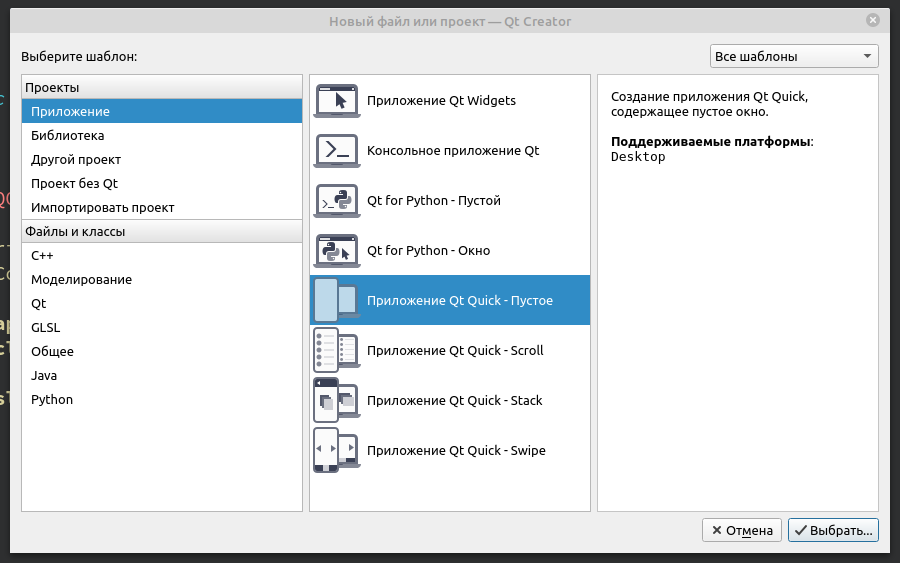
Создадим проект Qt Quick
import QtQuick 2.12 import QtQuick.Window 2.12 import QtQuick.Controls 2.0 Window { id: window visible: true width: Screen.width/2 height: Screen.height/2 title: qsTr("Тест jsEnjine") property string consoleFontFamily: "Consolas" property int fontPixelSize: 14 TextArea { id: textAreaLog anchors.bottom: rectangle.top anchors.bottomMargin: 3 anchors.right: parent.right anchors.rightMargin: 3 anchors.left: parent.left anchors.leftMargin: 3 anchors.top: parent.top anchors.topMargin: 3 readOnly: true } Rectangle { id: rectangle height: 25 anchors.right: parent.right anchors.rightMargin: 3 anchors.left: parent.left anchors.leftMargin: 3 anchors.bottom: parent.bottom anchors.bottomMargin: 3 border.color: "#0c0a0a" TextEdit { id: textEditInput anchors.right: parent.right anchors.rightMargin: 5 anchors.left: parent.left anchors.leftMargin: 5 anchors.bottom: parent.bottom anchors.bottomMargin: 5 anchors.top: parent.top anchors.topMargin: 5 font.pixelSize: fontPixelSize } } }Форма

Добавим в проект классы AppCore и Console, немного допишем main.c
#include <QGuiApplication> #include <QQmlApplicationEngine> #include <QQmlContext> #include "appcore.h" int main(int argc, char *argv[]) { QCoreApplication::setAttribute(Qt::AA_EnableHighDpiScaling); QGuiApplication app(argc, argv); AppCore appCore; QQmlApplicationEngine engine; QQmlContext *context = engine.rootContext();//Создаем корневой контекст //Загружаем объект в контекст для установки соединения, а //так же определяем имя //по которому будет происходить соединение context->setContextProperty("appCore",&appCore); engine.load(QUrl(QStringLiteral("qrc:/main.qml"))); if(engine.rootObjects().isEmpty()) return -1; return app.exec(); } appcore.h
#ifndef APPCORE_H #define APPCORE_H #include <QObject> #include <QJSEngine> #include "console.h" class AppCore : public QObject { Q_OBJECT public: explicit AppCore(QObject *parent = nullptr); private: QJSEngine appScriptEngine; Console *userConsole; signals: Q_INVOKABLE void appEndTextArea(const QString& text); Q_INVOKABLE void clearTextArea(); public slots: Q_INVOKABLE void slotEvaluate(const QString& code); }; #endif // APPCORE_H appcore.c
#include "appcore.h" AppCore::AppCore(QObject *parent) : QObject(parent) { userConsole = new Console(this); QJSValue val = appScriptEngine.newQObject(userConsole); appScriptEngine.globalObject().setProperty("console",val); connect(userConsole, SIGNAL(appEndTextArea(QString)),this,SIGNAL(appEndTextArea(QString))); connect(userConsole, SIGNAL(clearTextArea()),this,SIGNAL(clearTextArea())); } void AppCore::slotEvaluate(const QString& code) { QJSValue result = appScriptEngine.evaluate(code); if(result.isError()){ QString er = QString("Ошибка в строке %1: %2").arg(result.property("lineNumber").toInt()).arg(result.toString()); emit appEndTextArea(er); } } console.h
#ifndef CONSOLE_H #define CONSOLE_H #include <QObject> class Console : public QObject { Q_OBJECT public: explicit Console(QObject *parent = nullptr); Q_INVOKABLE void log(const QString& message); Q_INVOKABLE void clear(); signals: Q_INVOKABLE void appEndTextArea(const QString& text); Q_INVOKABLE void clearTextArea(); }; #endif // CONSOLE_H console.cpp
#include "console.h" Console::Console(QObject *parent) : QObject(parent) { } void Console::log(const QString& message) { emit appEndTextArea(message); } void Console::clear() { emit clearTextArea(); } В конструкторе класса AppCore мы добавили экземпляр класса Console в QJSEngine, так же мы определили что будем обращаться к методам этого класса через «console»
QJSValue val = appScriptEngine.newQObject(userConsole); appScriptEngine.globalObject().setProperty("console",val); Сигнал appEndTextArea(const QString& text) — добавление текста в textAreaLog в
main.qml.
Сигнал clearTextArea() — очистить область вывода текста textAreaLog в main.qml.
Слот slotEvaluate(const QString& code) — выполнение js кода, введенного в textEditInput в main.qml.
Допишем в main.qml обработчики сигналов:
Connections{ target: appCore onAppEndTextArea:{ textAreaLog.cursorPosition = textAreaLog.length; textAreaLog.append(text); } onClearTextArea:{ textAreaLog.cursorPosition=0; textAreaLog.text = ""; } } Так же допишем в textEditInput сигнал, вызова слота void slotEvaluate(const QString& code):
TextEdit { id: textEditInput anchors.right: parent.right anchors.rightMargin: 5 anchors.left: parent.left anchors.leftMargin: 5 anchors.bottom: parent.bottom anchors.bottomMargin: 5 anchors.top: parent.top anchors.topMargin: 5 font.pixelSize: fontPixelSize Keys.onReturnPressed:{ if(textEditInput.text == "")return; appCore.slotEvaluate(text) clear() } Keys.onEscapePressed: clear() } Теперь при вводе команды в textEditInput и нажатии Enter команда будет передана в slotEvaluate в AppCore. При нажатии ESC поле textEditInput очистится.
При запуске приложения, если мы введем в textEditInput команду console.log(«Hello world»), то в поле textAreaLog увидим Hello world. Если ввести команду неизвестную QJSEngine, то в терминале высветится ошибка.
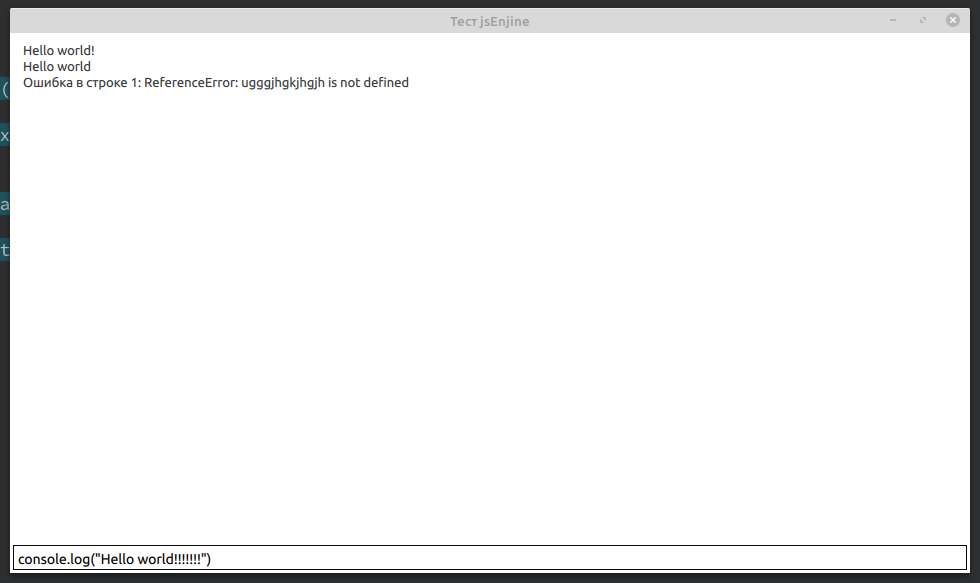
Таким образом, мы написали приложение, в котором мы можем вызывать методы подключенных к QJSEngine классов и выводить результаты выполнения этих методов. Кто то скажет «А при чем тут JS? Ведь классы написаны на С++?», но это уже другая история…
ссылка на оригинал статьи https://habr.com/ru/post/481142/
Добавить комментарий