
Данная статья продолжает тему с Kata Containers, поднятую в прошлый раз. Сегодня я буду настраивать Kubernetes для работы с Kata Containers.
Начиная с Kubernetes 1.12 существует возможность RuntimeClass, с помощью которой можно выбрать среду выполнения контейнера. До версии 1.12 Kubernetes не знал о различных средах исполнения, но существовала необходимость запуска доверенных pod’ов (запускаемые с помощью runc) и не доверенных (запускаемые, к примеру, в изолированной среде, например те же Kata Containers). Различные реализации CRI (CRI-O, containerd, оба поддерживаются Kata Containers) были расширены для того, чтобы соответствовать этим требованиям, а для того, чтобы исключить сложности с конфигурацией, и был принят RuntimeClass. Это дает пользователям возможность задания различных сред исполнения без модификации сервисов CRI. Пример настройки на основе Vagrant + CRIO + Kata Containers
В этой статье я буду использовать containerd, который умеет обрабатывать RuntimeClass начиная с версии 1.2.0. Настраивать будем три сервера, используемая операционная система Centos 7.
Кратко остановлюсь на Containerd Runtime V2, который был реализован начиная с Kata Containers 1.5.0, разницу между V1 и V2 можно увидеть на изображении ниже.
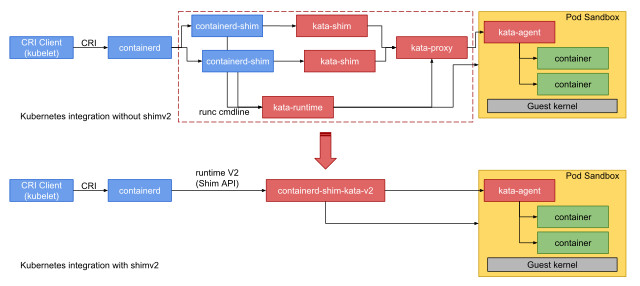
Архитектура Kata Containers runtime v2 по сравнению с v1
Проводим работу со всеми тремя серверами, если не сказано иначе, имена серверов kata-node1, kata-node2, kata-node3.
Установка
Устанавливаем Kata Containers на чистый сервер с Centos 7, ставим все аналогично предыдущей статье. установку Docker проводить не нужно.
Далее устанавливаем зависимости для containerd:
# yum -y install unzip tar btrfs-progs libseccomp util-linux socat libselinux-python
Качаем и ставим containerd (можно установить чуть более старую версию из репозитория docker, надо 1.2.0+ — в принципе должно работать тоже, но я не проверял):
# VERSION=1.3.3 # curl https://storage.googleapis.com/cri-containerd-release/cri-containerd-${VERSION}.linux-amd64.tar.gz -o cri-containerd-${VERSION}.linux-amd64.tar.gz # curl https://storage.googleapis.com/cri-containerd-release/cri-containerd-${VERSION}.linux-amd64.tar.gz.sha256 # sha256sum cri-containerd-${VERSION}.linux-amd64.tar.gz # сравниваем с выводом предыдущей команды, если все ок - переходим на следующую строчку # tar --no-overwrite-dir -C / -xzvf cri-containerd-${VERSION}.linux-amd64.tar.gz # systemctl daemon-reload && systemctl start containerd
Ставим пакеты для k8s:
# cat <<EOF > /etc/yum.repos.d/kubernetes.repo [kubernetes] name=Kubernetes baseurl=https://packages.cloud.google.com/yum/repos/kubernetes-el7-x86_64 enabled=1 gpgcheck=1 repo_gpgcheck=1 gpgkey=https://packages.cloud.google.com/yum/doc/yum-key.gpg https://packages.cloud.google.com/yum/doc/rpm-package-key.gpg EOF # yum install -y kubelet kubeadm kubectl --disableexcludes=kubernetes # systemctl enable --now kubelet
Настройка containerd
Создаем конфигурационные файлы для containerd:
mkdir -p /etc/containerd containerd config default > /etc/containerd/config.toml
Подключаем Kata Containers в containerd, для этого в секции [plugins."io.containerd.grpc.v1.cri".containerd.untrusted_workload_runtime] выставляем значение runtime_type в "io.containerd.kata.v2", после секции [plugins."io.containerd.grpc.v1.cri".containerd.runtimes] добавляем следующие секции:
[plugins."io.containerd.grpc.v1.cri".containerd.runtimes.kata] runtime_type = "io.containerd.kata.v2" [plugins."io.containerd.grpc.v1.cri".containerd.runtimes.kata.options] ConfigPath = "/etc/kata-containers/config.toml" [plugins."io.containerd.grpc.v1.cri".containerd.runtimes.katacli] runtime_type = "io.containerd.runc.v1" [plugins."io.containerd.grpc.v1.cri".containerd.runtimes.katacli.options] NoPivotRoot = false NoNewKeyring = false ShimCgroup = "" IoUid = 0 IoGid = 0 BinaryName = "/usr/bin/kata-runtime" Root = "" CriuPath = "" SystemdCgroup = false
version = 2 root = "/var/lib/containerd" state = "/run/containerd" plugin_dir = "" disabled_plugins = [] required_plugins = [] oom_score = 0 [grpc] address = "/run/containerd/containerd.sock" tcp_address = "" tcp_tls_cert = "" tcp_tls_key = "" uid = 0 gid = 0 max_recv_message_size = 16777216 max_send_message_size = 16777216 [ttrpc] address = "" uid = 0 gid = 0 [debug] address = "" uid = 0 gid = 0 level = "" [metrics] address = "" grpc_histogram = false [cgroup] path = "" [timeouts] "io.containerd.timeout.shim.cleanup" = "5s" "io.containerd.timeout.shim.load" = "5s" "io.containerd.timeout.shim.shutdown" = "3s" "io.containerd.timeout.task.state" = "2s" [plugins] [plugins."io.containerd.gc.v1.scheduler"] pause_threshold = 0.02 deletion_threshold = 0 mutation_threshold = 100 schedule_delay = "0s" startup_delay = "100ms" [plugins."io.containerd.grpc.v1.cri"] disable_tcp_service = true stream_server_address = "127.0.0.1" stream_server_port = "0" stream_idle_timeout = "4h0m0s" enable_selinux = false sandbox_image = "k8s.gcr.io/pause:3.1" stats_collect_period = 10 systemd_cgroup = false enable_tls_streaming = false max_container_log_line_size = 16384 disable_cgroup = false disable_apparmor = false restrict_oom_score_adj = false max_concurrent_downloads = 3 disable_proc_mount = false [plugins."io.containerd.grpc.v1.cri".containerd] snapshotter = "overlayfs" default_runtime_name = "runc" no_pivot = false [plugins."io.containerd.grpc.v1.cri".containerd.default_runtime] runtime_type = "" runtime_engine = "" runtime_root = "" privileged_without_host_devices = false [plugins."io.containerd.grpc.v1.cri".containerd.untrusted_workload_runtime] runtime_type = "io.containerd.kata.v2" runtime_engine = "" runtime_root = "" privileged_without_host_devices = false [plugins."io.containerd.grpc.v1.cri".containerd.runtimes] [plugins."io.containerd.grpc.v1.cri".containerd.runtimes.runc] runtime_type = "io.containerd.runc.v1" runtime_engine = "" runtime_root = "" privileged_without_host_devices = false [plugins."io.containerd.grpc.v1.cri".containerd.runtimes.kata] runtime_type = "io.containerd.kata.v2" [plugins."io.containerd.grpc.v1.cri".containerd.runtimes.kata.options] ConfigPath = "/etc/kata-containers/config.toml" [plugins."io.containerd.grpc.v1.cri".containerd.runtimes.katacli] runtime_type = "io.containerd.runc.v1" [plugins."io.containerd.grpc.v1.cri".containerd.runtimes.katacli.options] NoPivotRoot = false NoNewKeyring = false ShimCgroup = "" IoUid = 0 IoGid = 0 BinaryName = "/usr/bin/kata-runtime" Root = "" CriuPath = "" SystemdCgroup = false [plugins."io.containerd.grpc.v1.cri".cni] bin_dir = "/opt/cni/bin" conf_dir = "/etc/cni/net.d" max_conf_num = 1 conf_template = "" [plugins."io.containerd.grpc.v1.cri".registry] [plugins."io.containerd.grpc.v1.cri".registry.mirrors] [plugins."io.containerd.grpc.v1.cri".registry.mirrors."docker.io"] endpoint = ["https://registry-1.docker.io"] [plugins."io.containerd.grpc.v1.cri".x509_key_pair_streaming] tls_cert_file = "" tls_key_file = "" [plugins."io.containerd.internal.v1.opt"] path = "/opt/containerd" [plugins."io.containerd.internal.v1.restart"] interval = "10s" [plugins."io.containerd.metadata.v1.bolt"] content_sharing_policy = "shared" [plugins."io.containerd.monitor.v1.cgroups"] no_prometheus = false [plugins."io.containerd.runtime.v1.linux"] shim = "containerd-shim" runtime = "runc" runtime_root = "" no_shim = false shim_debug = false [plugins."io.containerd.runtime.v2.task"] platforms = ["linux/amd64"] [plugins."io.containerd.service.v1.diff-service"] default = ["walking"] [plugins."io.containerd.snapshotter.v1.devmapper"] root_path = "" pool_name = "" base_image_size = ""
Перезапускаем containerd:
# service containerd restart
Проверка containerd
Смотрим, что все верно подключили:
# crictl version Version: 0.1.0 RuntimeName: containerd RuntimeVersion: v1.3.3 RuntimeApiVersion: v1alpha2
Скачиваем образ busybox и запускаем, вводим команду uname -a:
# uname -a Linux kata-node1 3.10.0-1062.12.1.el7.x86_64 #1 SMP Tue Feb 4 23:02:59 UTC 2020 x86_64 x86_64 x86_64 GNU/Linux # ctr image pull docker.io/library/busybox:latest docker.io/library/busybox:latest: resolved |++++++++++++++++++++++++++++++++++++++| index-sha256:6915be4043561d64e0ab0f8f098dc2ac48e077fe23f488ac24b665166898115a: done |++++++++++++++++++++++++++++++++++++++| manifest-sha256:edafc0a0fb057813850d1ba44014914ca02d671ae247107ca70c94db686e7de6: done |++++++++++++++++++++++++++++++++++++++| layer-sha256:bdbbaa22dec6b7fe23106d2c1b1f43d9598cd8fc33706cc27c1d938ecd5bffc7: done |++++++++++++++++++++++++++++++++++++++| config-sha256:6d5fcfe5ff170471fcc3c8b47631d6d71202a1fd44cf3c147e50c8de21cf0648: done |++++++++++++++++++++++++++++++++++++++| elapsed: 2.8 s total: 746.9 (266.5 KiB/s) unpacking linux/amd64 sha256:6915be4043561d64e0ab0f8f098dc2ac48e077fe23f488ac24b665166898115a... done # ctr run --runtime io.containerd.run.kata.v2 -t --rm docker.io/library/busybox:latest hello sh / # uname -a Linux clr-d8eb8b3fbe2e44a295900b931f3a11c3 4.19.86-6.1.container #1 SMP Thu Jan 1 00:00:00 UTC 1970 x86_64 GNU/Linux
Настройка Kubernetes
Подключаем containerd в k8s:
# echo "KUBELET_EXTRA_ARGS=--container-runtime=remote --container-runtime-endpoint=unix:///run/containerd/containerd.sock" > /etc/sysconfig/kubelet
Создаем кластер, команду вводим на kata-node1:
# kubeadm init W0302 07:30:35.064267 15873 validation.go:28] Cannot validate kube-proxy config - no validator is available W0302 07:30:35.064379 15873 validation.go:28] Cannot validate kubelet config - no validator is available [init] Using Kubernetes version: v1.17.3 [preflight] Running pre-flight checks [preflight] Pulling images required for setting up a Kubernetes cluster [preflight] This might take a minute or two, depending on the speed of your internet connection [preflight] You can also perform this action in beforehand using 'kubeadm config images pull' [kubelet-start] Writing kubelet environment file with flags to file "/var/lib/kubelet/kubeadm-flags.env" [kubelet-start] Writing kubelet configuration to file "/var/lib/kubelet/config.yaml" [kubelet-start] Starting the kubelet [certs] Using certificateDir folder "/etc/kubernetes/pki" [certs] Generating "ca" certificate and key [certs] Generating "apiserver" certificate and key [certs] apiserver serving cert is signed for DNS names [kata-node1 kubernetes kubernetes.default kubernetes.default.svc kubernetes.default.svc.cluster.local] and IPs [10.96.0.1 XXXXXXXXX] [certs] Generating "apiserver-kubelet-client" certificate and key [certs] Generating "front-proxy-ca" certificate and key [certs] Generating "front-proxy-client" certificate and key [certs] Generating "etcd/ca" certificate and key [certs] Generating "etcd/server" certificate and key [certs] etcd/server serving cert is signed for DNS names [kata-node1 localhost] and IPs [XXXXXXXXX 127.0.0.1 ::1] [certs] Generating "etcd/peer" certificate and key [certs] etcd/peer serving cert is signed for DNS names [kata-node1 localhost] and IPs [XXXXXXXXX 127.0.0.1 ::1] [certs] Generating "etcd/healthcheck-client" certificate and key [certs] Generating "apiserver-etcd-client" certificate and key [certs] Generating "sa" key and public key [kubeconfig] Using kubeconfig folder "/etc/kubernetes" [kubeconfig] Writing "admin.conf" kubeconfig file [kubeconfig] Writing "kubelet.conf" kubeconfig file [kubeconfig] Writing "controller-manager.conf" kubeconfig file [kubeconfig] Writing "scheduler.conf" kubeconfig file [control-plane] Using manifest folder "/etc/kubernetes/manifests" [control-plane] Creating static Pod manifest for "kube-apiserver" [control-plane] Creating static Pod manifest for "kube-controller-manager" W0302 07:30:38.966500 15873 manifests.go:214] the default kube-apiserver authorization-mode is "Node,RBAC"; using "Node,RBAC" [control-plane] Creating static Pod manifest for "kube-scheduler" W0302 07:30:38.968393 15873 manifests.go:214] the default kube-apiserver authorization-mode is "Node,RBAC"; using "Node,RBAC" [etcd] Creating static Pod manifest for local etcd in "/etc/kubernetes/manifests" [wait-control-plane] Waiting for the kubelet to boot up the control plane as static Pods from directory "/etc/kubernetes/manifests". This can take up to 4m0s [apiclient] All control plane components are healthy after 15.502727 seconds [upload-config] Storing the configuration used in ConfigMap "kubeadm-config" in the "kube-system" Namespace [kubelet] Creating a ConfigMap "kubelet-config-1.17" in namespace kube-system with the configuration for the kubelets in the cluster [upload-certs] Skipping phase. Please see --upload-certs [mark-control-plane] Marking the node kata-node1 as control-plane by adding the label "node-role.kubernetes.io/master=''" [mark-control-plane] Marking the node kata-node1 as control-plane by adding the taints [node-role.kubernetes.io/master:NoSchedule] [bootstrap-token] Using token: qrk86x.ue30l5fhydrdgkx2 [bootstrap-token] Configuring bootstrap tokens, cluster-info ConfigMap, RBAC Roles [bootstrap-token] configured RBAC rules to allow Node Bootstrap tokens to post CSRs in order for nodes to get long term certificate credentials [bootstrap-token] configured RBAC rules to allow the csrapprover controller automatically approve CSRs from a Node Bootstrap Token [bootstrap-token] configured RBAC rules to allow certificate rotation for all node client certificates in the cluster [bootstrap-token] Creating the "cluster-info" ConfigMap in the "kube-public" namespace [kubelet-finalize] Updating "/etc/kubernetes/kubelet.conf" to point to a rotatable kubelet client certificate and key [addons] Applied essential addon: CoreDNS [addons] Applied essential addon: kube-proxy Your Kubernetes control-plane has initialized successfully! To start using your cluster, you need to run the following as a regular user: mkdir -p $HOME/.kube sudo cp -i /etc/kubernetes/admin.conf $HOME/.kube/config sudo chown $(id -u):$(id -g) $HOME/.kube/config You should now deploy a pod network to the cluster. Run "kubectl apply -f [podnetwork].yaml" with one of the options listed at: https://kubernetes.io/docs/concepts/cluster-administration/addons/ Then you can join any number of worker nodes by running the following on each as root: kubeadm join XXXXXXXXX:6443 --token qrk86x.ue30l5fhydrdgkx2 \ --discovery-token-ca-cert-hash sha256:2364d351d6afbcc21b439719b6b00c9468e926a906eeb81d96061e15fdfb8f2e
Подключаем сеть:
# export KUBECONFIG=/etc/kubernetes/admin.conf # kubectl apply -f https://raw.githubusercontent.com/coreos/flannel/master/Documentation/kube-flannel.yml podsecuritypolicy.policy/psp.flannel.unprivileged created clusterrole.rbac.authorization.k8s.io/flannel created clusterrolebinding.rbac.authorization.k8s.io/flannel created serviceaccount/flannel created configmap/kube-flannel-cfg created daemonset.apps/kube-flannel-ds-amd64 created daemonset.apps/kube-flannel-ds-arm64 created daemonset.apps/kube-flannel-ds-arm created daemonset.apps/kube-flannel-ds-ppc64le created daemonset.apps/kube-flannel-ds-s390x created
Команду kubeadm join копируем с параметрами и запускаем на остальных серверах.
Копируем к себе в $HOME/.kube/config содержимое файла /etc/kubernetes/admin.conf с kata-node1.
Проверка kubernetes
На локальной машине должен быть установлен kubectl, дальнейшая работа будет именно с ним
$ kubectl get nodes NAME STATUS ROLES AGE VERSION kata-node1 Ready master 12m45s v1.17.3 kata-node2 Ready node 3m12s v1.17.3 kata-node3 Ready node 4m56s v1.17.3 $ kubectl get pods --all-namespaces NAMESPACE NAME READY STATUS RESTARTS AGE kube-system coredns-6955765f44-j7pd6 1/1 Running 0 5m35s kube-system coredns-6955765f44-w7h9w 1/1 Running 0 5m35s kube-system etcd-kata-node1 1/1 Running 0 5m49s kube-system kube-apiserver-kata-node1 1/1 Running 0 5m48s kube-system kube-controller-manager-kata-node1 1/1 Running 0 5m49s kube-system kube-flannel-ds-amd64-g7wv2 1/1 Running 0 3m26s kube-system kube-proxy-k8mmb 1/1 Running 0 5m35s kube-system kube-scheduler-kata-node1 1/1 Running 0 5m48s
Пробуем создать untrusted сервис:
$ cat << EOT | tee nginx-untrusted.yaml apiVersion: v1 kind: Pod metadata: name: nginx-untrusted annotations: io.kubernetes.cri.untrusted-workload: "true" spec: containers: - name: nginx image: nginx EOT $ kubectl apply -f nginx-untrusted.yaml pod/nginx-untrusted created $ kubectl get pods NAME READY STATUS RESTARTS AGE nginx-untrusted 1/1 Running 0 31s
Смотрим на серверах, появился ли процесс от Kata Containers:
# ps aux | grep qemu root 5814 2.0 0.4 2871472 145096 ? Sl 07:51 0:00 /usr/bin/qemu-vanilla-system-x86_64 -name sandbox-11b2a0d00fb1948c379aad0d599ce74e1c0be6183bac43e19448401f2bc5b91e -uuid a7395bac-0a2c-4a16-b931-2fd181f3978e -machine pc,accel=kvm,kernel_irqchip,nvdimm -cpu host -qmp unix:/run/vc/vm/11b2a0d00fb1948c379aad0d599ce74e1c0be6183bac43e19448401f2bc5b91e/qmp.sock,server,nowait -m 2048M,slots=10,maxmem=32725M -device pci-bridge,bus=pci.0,id=pci-bridge-0,chassis_nr=1,shpc=on,addr=2,romfile= -device virtio-serial-pci,disable-modern=false,id=serial0,romfile= -device virtconsole,chardev=charconsole0,id=console0 -chardev socket,id=charconsole0,path=/run/vc/vm/11b2a0d00fb1948c379aad0d599ce74e1c0be6183bac43e19448401f2bc5b91e/console.sock,server,nowait -device nvdimm,id=nv0,memdev=mem0 -object memory-backend-file,id=mem0,mem-path=/usr/share/kata-containers/kata-containers-image_clearlinux_1.10.1_agent_599ef22499.img,size=134217728 -device virtio-scsi-pci,id=scsi0,disable-modern=false,romfile= -object rng-random,id=rng0,filename=/dev/urandom -device virtio-rng,rng=rng0,romfile= -device virtserialport,chardev=charch0,id=channel0,name=agent.channel.0 -chardev socket,id=charch0,path=/run/vc/vm/11b2a0d00fb1948c379aad0d599ce74e1c0be6183bac43e19448401f2bc5b91e/kata.sock,server,nowait -device virtio-9p-pci,disable-modern=false,fsdev=extra-9p-kataShared,mount_tag=kataShared,romfile= -fsdev local,id=extra-9p-kataShared,path=/run/kata-containers/shared/sandboxes/11b2a0d00fb1948c379aad0d599ce74e1c0be6183bac43e19448401f2bc5b91e,security_model=none -netdev tap,id=network-0,vhost=on,vhostfds=3,fds=4 -device driver=virtio-net-pci,netdev=network-0,mac=f2:dc:cf:85:fa:39,disable-modern=false,mq=on,vectors=4,romfile= -global kvm-pit.lost_tick_policy=discard -vga none -no-user-config -nodefaults -nographic -daemonize -object memory-backend-ram,id=dimm1,size=2048M -numa node,memdev=dimm1 -kernel /usr/share/kata-containers/vmlinuz-4.19.86.60-6.1.container -append tsc=reliable no_timer_check rcupdate.rcu_expedited=1 i8042.direct=1 i8042.dumbkbd=1 i8042.nopnp=1 i8042.noaux=1 noreplace-smp reboot=k console=hvc0 console=hvc1 iommu=off cryptomgr.notests net.ifnames=0 pci=lastbus=0 root=/dev/pmem0p1 rootflags=dax,data=ordered,errors=remount-ro ro rootfstype=ext4 quiet systemd.show_status=false panic=1 nr_cpus=8 agent.use_vsock=false systemd.unit=kata-containers.target systemd.mask=systemd-networkd.service systemd.mask=systemd-networkd.socket -pidfile /run/vc/vm/11b2a0d00fb1948c379aad0d599ce74e1c0be6183bac43e19448401f2bc5b91e/pid -smp 1,cores=1,threads=1,sockets=8,maxcpus=8 # mount | grep 11b2a0d00fb1948c379aad0d599ce74e1c0be6183bac43e19448401f2bc5b91e shm on /run/containerd/io.containerd.grpc.v1.cri/sandboxes/11b2a0d00fb1948c379aad0d599ce74e1c0be6183bac43e19448401f2bc5b91e/shm type tmpfs (rw,nosuid,nodev,noexec,relatime,size=65536k) overlay on /run/containerd/io.containerd.runtime.v2.task/k8s.io/11b2a0d00fb1948c379aad0d599ce74e1c0be6183bac43e19448401f2bc5b91e/rootfs type overlay (rw,relatime,lowerdir=/var/lib/containerd/io.containerd.snapshotter.v1.overlayfs/snapshots/14/fs,upperdir=/var/lib/containerd/io.containerd.snapshotter.v1.overlayfs/snapshots/2586/fs,workdir=/var/lib/containerd/io.containerd.snapshotter.v1.overlayfs/snapshots/2586/work) overlay on /run/kata-containers/shared/sandboxes/11b2a0d00fb1948c379aad0d599ce74e1c0be6183bac43e19448401f2bc5b91e/11b2a0d00fb1948c379aad0d599ce74e1c0be6183bac43e19448401f2bc5b91e/rootfs type overlay (rw,relatime,lowerdir=/var/lib/containerd/io.containerd.snapshotter.v1.overlayfs/snapshots/14/fs,upperdir=/var/lib/containerd/io.containerd.snapshotter.v1.overlayfs/snapshots/2586/fs,workdir=/var/lib/containerd/io.containerd.snapshotter.v1.overlayfs/snapshots/2586/work) overlay on /run/kata-containers/shared/sandboxes/11b2a0d00fb1948c379aad0d599ce74e1c0be6183bac43e19448401f2bc5b91e/58a6261df753edd9be35f41db0ba901489198359bdbd9541ab7c7247f46a76b7/rootfs type overlay (rw,relatime,lowerdir=/var/lib/containerd/io.containerd.snapshotter.v1.overlayfs/snapshots/2589/fs:/var/lib/containerd/io.containerd.snapshotter.v1.overlayfs/snapshots/2588/fs:/var/lib/containerd/io.containerd.snapshotter.v1.overlayfs/snapshots/2587/fs,upperdir=/var/lib/containerd/io.containerd.snapshotter.v1.overlayfs/snapshots/2590/fs,workdir=/var/lib/containerd/io.containerd.snapshotter.v1.overlayfs/snapshots/2590/work) /dev/mapper/vg0-root on /run/kata-containers/shared/sandboxes/11b2a0d00fb1948c379aad0d599ce74e1c0be6183bac43e19448401f2bc5b91e/58a6261df753edd9be35f41db0ba901489198359bdbd9541ab7c7247f46a76b7-2d597d0df0adc62b-hosts type ext4 (rw,relatime,data=ordered) /dev/mapper/vg0-root on /run/kata-containers/shared/sandboxes/11b2a0d00fb1948c379aad0d599ce74e1c0be6183bac43e19448401f2bc5b91e/58a6261df753edd9be35f41db0ba901489198359bdbd9541ab7c7247f46a76b7-86eb496cb8644f03-termination-log type ext4 (rw,relatime,data=ordered) /dev/mapper/vg0-root on /run/kata-containers/shared/sandboxes/11b2a0d00fb1948c379aad0d599ce74e1c0be6183bac43e19448401f2bc5b91e/58a6261df753edd9be35f41db0ba901489198359bdbd9541ab7c7247f46a76b7-4d8cdf8b39958670-hostname type ext4 (rw,relatime,data=ordered) /dev/mapper/vg0-root on /run/kata-containers/shared/sandboxes/11b2a0d00fb1948c379aad0d599ce74e1c0be6183bac43e19448401f2bc5b91e/58a6261df753edd9be35f41db0ba901489198359bdbd9541ab7c7247f46a76b7-20f62afd0d08f52d-resolv.conf type ext4 (rw,relatime,data=ordered) tmpfs on /run/kata-containers/shared/sandboxes/11b2a0d00fb1948c379aad0d599ce74e1c0be6183bac43e19448401f2bc5b91e/58a6261df753edd9be35f41db0ba901489198359bdbd9541ab7c7247f46a76b7-1af9d7ef02716752-serviceaccount type tmpfs (rw,relatime)
Выводы
Kata Containers являются важнейшим этапом развития облачных технологий, предоставляя безопасность виртуальных машин вместе со скоростью контейнеров. Также можно без особых затрат перейти на использование Kata Containers в Kubernetes, поскольку обеспечивается бесшовная миграция сервисов благодаря стандартизации.
ссылка на оригинал статьи https://habr.com/ru/company/southbridge/blog/490648/
Добавить комментарий