Прошлым летом, в процессе подготовки статьи для Хабра, я не поленился упаковать свой шаблон для бэкэнд-приложений на Node.js в npm-пакет, сделав из него cli-утилиту для быстрого старта.
Никаких надежд на то, что этим пакетом будет пользоваться кто-то, кроме меня, не было изначально. Однако, когда я решил обновить шаблон, внедрив в него нужные мне фичи, я обратил внимание на то, что у npm-пакета есть несколько десятков скачиваний в неделю, а у проекта на гитхабе 12 звёзд. Поставленные по доброте хорошими людьми, наверняка, чтобы поддержать меня, а не проект. Всего 12 звёзд, но мне этого хватило, чтобы решить, что karcass я буду развивать так, как будто он нужен не только мне.
Несмотря на то, что изначально я решил сделать легковесный фреймворк для бэкэнд-приложений, в процессе разработки мне удалось себя убедить в том, что этот велосипед не нужен. И что karcass должен стать не фреймворком, а универсальным инструментом для создания приложений из шаблонов.

В первой версии логика работы cli-скрипта была примитивной.
- Пользователь указывает настройки.
- karcass копирует содержимое своей же директории template в созданную под новый проект директорию.
- В процессе копирования каждый файл проходит через обработчик, который может изменить содержимое файла (заменить какой-то текст, удалить строки) или блокировать копирование (файл не попадёт в результирующую директорию).
- После копирования шаблона, установщик выполняет
npm install.
Для пользователя этот процесс выглядел так:
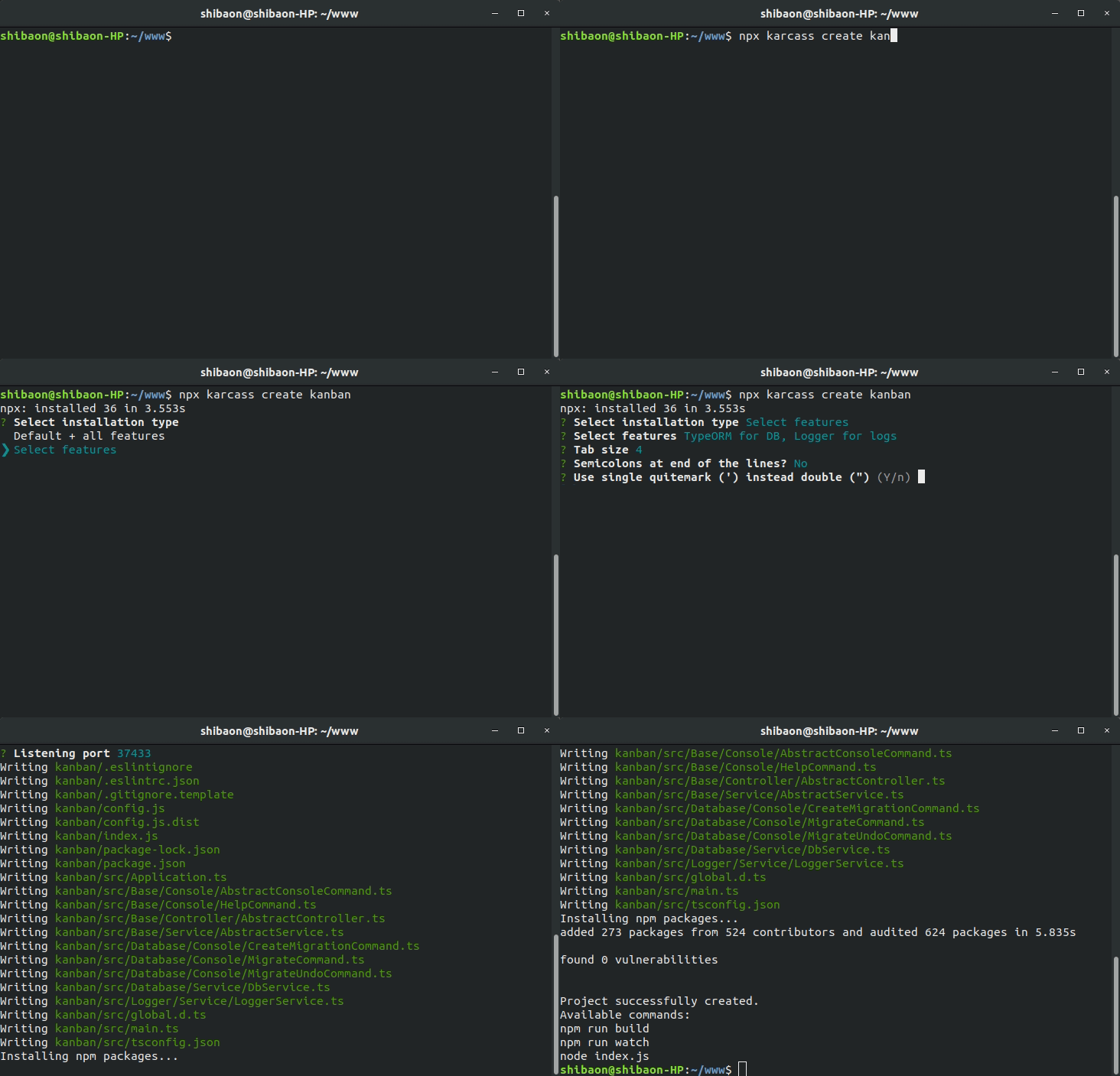
Обработка исходников шаблона в соответствии с настройками была реализована набором условий и реплэйсов. Поддерживать это было невозможно, посмотрите сами.
Сам шаблон представлял из себя сплошной антипаттерн, позволявший быстро писать монолиты: класс Application являлся контейнером, доступным в любом сервисе, контроллере или консольной команде. Что угодно могло обращаться к чему угодно без указания конкретных зависимостей, например:
import Express from 'express' import { AbstractConsoleCommand } from './Base/Console/AbstractConsoleCommand' import { DbService } from './Database/Service/DbService' import { HelpCommand } from './Base/Console/HelpCommand' import { LoggerService } from './Logger/Service/LoggerService' import { IssueService } from './Project/Service/IssueService' import { GitlabService } from './Gitlab/Service/GitlabService' import { LocalCacheService } from './Base/Service/LocalCacheService' import { ProjectService } from './Project/Service/ProjectService' import { GroupService } from './Project/Service/GroupService' import { UserService } from './User/Service/UserService' import { UpdateProjectsCommand } from './Gitlab/Console/UpdateProjectsCommand' import { CreateMigrationCommand } from './Database/Console/CreateMigrationCommand' import { MigrateCommand } from './Database/Console/MigrateCommand' import { MigrateUndoCommand } from './Database/Console/MigrateUndoCommand' import IssueController from './Project/Controller/IssueController' import fs from 'fs' export class Application { public http!: Express.Express // Services public localCacheService!: LocalCacheService public loggerService!: LoggerService public dbService!: DbService public gitlabService!: GitlabService public issueService!: IssueService public projectService!: ProjectService public groupService!: GroupService public userService!: UserService // Commands public helpCommand!: HelpCommand public createMigrationCommand!: CreateMigrationCommand public migrateCommand!: MigrateCommand public migrateUndoCommand!: MigrateUndoCommand public updateProjectsCommand!: UpdateProjectsCommand // Controllers public issueController!: IssueController public constructor(public readonly config: IConfig) { if (config.columns.length < 2) { throw new Error('There are too few columns :-(') } } public async run() { this.initializeServices() if (process.argv[2]) { this.initializeCommands() for (const command of Object.values(this) .filter((c: any) => c instanceof AbstractConsoleCommand) as AbstractConsoleCommand[] ) { if (command.name === process.argv[2]) { await command.execute() process.exit() } } await this.helpCommand.execute() process.exit() } else { this.runWebServer() } } protected runWebServer() { this.initCron() this.http = Express() this.http.use('/', Express.static('vue/dist')) this.http.use((req, res, next) => { if (req.url.indexOf('/api') === -1) { res.header('Cache-Control', 'private, no-cache, no-store, must-revalidate') res.header('Expires', '-1') res.header('Pragma', 'no-cache') return res.send(fs.readFileSync('vue/dist/index.html').toString()) } next() }) this.http.use(Express.urlencoded()) this.http.use(Express.json()) this.http.listen(this.config.listen, () => console.log(`Listening on port ${this.config.listen}`)) this.initializeControllers() } protected initCron() { if (this.config.gitlab.updateInterval) { setInterval(async () => { if (!this.updateProjectsCommand) { this.updateProjectsCommand = new UpdateProjectsCommand(this) } await this.updateProjectsCommand.execute() }, this.config.gitlab.updateInterval * 1000) } } protected initializeServices() { this.localCacheService = new LocalCacheService(this) this.gitlabService = new GitlabService(this) this.loggerService = new LoggerService(this) this.dbService = new DbService(this) this.issueService = new IssueService(this) this.projectService = new ProjectService(this) this.groupService = new GroupService(this) this.userService = new UserService(this) } protected initializeCommands() { this.helpCommand = new HelpCommand(this) this.createMigrationCommand = new CreateMigrationCommand(this) this.migrateCommand = new MigrateCommand(this) this.migrateUndoCommand = new MigrateUndoCommand(this) this.updateProjectsCommand = new UpdateProjectsCommand(this) } protected initializeControllers() { this.issueController = new IssueController(this) } }
import { AbstractService } from '../../Base/Service/AbstractService' import { Project } from '../Entity/Project' export class ProjectService extends AbstractService { public get projectRepository() { return this.app.dbService.connection.getRepository(Project) } public async updateProjects(allTime = false) { await this.app.groupService.updateGroups() for (const data of await this.app.gitlabService.getProjects()) { let project = await this.getProject(data.id) if (!project) { project = this.projectRepository.create({ id: data.id }) } project.name = data.name project.url = data.web_url project.updatedTimestamp = Math.round(new Date(data.last_activity_at).getTime() / 1000) project.groupId = data.namespace && data.namespace.kind === 'group' ? data.namespace.id : null await this.projectRepository.save(project) await this.app.issueService.updateProjectIssues(project, allTime) } } public async getProject(id: number): Promise<Project|undefined> { return id ? this.app.localCacheService.get(`project.${id}`, () => this.projectRepository.findOne(id)) : undefined } }
Разумеется, в новой версии шаблона, который предназначался бы уже не только для меня, предлагать такую архитектуру было бы просто неприлично. Поэтому я посвятил некоторое время разработке простенького, но функционального DI-контейнера, а на его основе сделал класс для работы с cli.
Теперь в Application.ts появился контейнер, который может инициализировать зависимости по запросу или «на месте». При этом контейнер может создавать экземпляр зависимости сам или получать его из коллбэка.
import CreateExpress, { Express } from 'express'; import { TwingEnvironment, TwingLoaderFilesystem } from 'twing'; import { Container } from '@karcass/container'; import { Cli } from '@karcass/cli'; import { Connection, createConnection } from 'typeorm'; import { CreateMigrationCommand, MigrateCommand, MigrateUndoCommand } from '@karcass/migration-commands'; import { createLogger } from './routines/createLogger'; import { Logger } from 'winston'; import { FrontPageController } from './SampleBundle/Controller/FrontPageController'; import { Message } from './SampleBundle/Entity/Message'; import { MessagesService } from './SampleBundle/Service/MessagesService'; export class Application { private container = new Container(); private console = new Cli(); private controllers: object[] = []; private http!: Express; public constructor(public readonly config: IConfig) { } public async run() { await this.initializeServices(); if (process.argv[2]) { this.initializeCommands(); await this.console.run(); } else { this.runWebServer(); } } protected runWebServer() { this.http = CreateExpress(); this.http.use('/public', CreateExpress.static('public')); this.http.use(CreateExpress.urlencoded()); this.http.listen(this.config.listen, () => console.log(`Listening on port ${this.config.listen}`)); this.container.add<Express>('express', () => this.http); this.container.add(TwingEnvironment, () => new TwingEnvironment(new TwingLoaderFilesystem('src'))); this.initializeControllers(); } protected async initializeServices() { await this.container.addInplace<Logger>('logger', () => createLogger(this.config.logdir)); const typeorm = await this.container.addInplace(Connection, () => createConnection({ type: 'sqlite', database: 'db/sample.sqlite', entities: ['build/**/Entity/*.js'], migrations: ['build/**/Migrations/*.js'], logging: ['error', 'warn', 'migration'], })); this.container.add('Repository<Message>', () => typeorm.getRepository(Message)); this.container.add(MessagesService); } protected initializeCommands() { this.console.add(CreateMigrationCommand, () => new CreateMigrationCommand()); this.console.add(MigrateCommand, async () => new MigrateCommand(await this.container.get(Connection))); this.console.add(MigrateUndoCommand, async () => new MigrateUndoCommand(await this.container.get(Connection))); } protected async initializeControllers() { this.controllers.push( await this.container.inject(FrontPageController), ); } }
Использование TypeScript позволяет указывать зависимости с помощью декоратора:
import { Express } from 'express'; import { Dependency } from '@karcass/container'; import { TwingEnvironment } from 'twing'; import { AbstractController, QueryData } from './AbstractController'; import { MessagesService } from '../Service/MessagesService'; export class FrontPageController extends AbstractController { public constructor( @Dependency('express') protected express: Express, @Dependency(TwingEnvironment) protected twing: TwingEnvironment, @Dependency(MessagesService) protected messagesService: MessagesService, ) { super(express); this.onQuery('/', 'get', this.frontPageAction); this.onQuery('/', 'post', this.sendMessageAction); } public async sendMessageAction(data: QueryData) { await this.messagesService.addMessage(data.params.text); data.res.redirect('/'); } public async frontPageAction() { if (await this.messagesService.isEmpty()) { await this.messagesService.createSampleMessages(); } return this.twing.render('SampleBundle/Views/front.twig', { messages: await this.messagesService.getMessages(), }); } }
В случае с JavaScript, экземпляр придётся создавать «вручную»:
protected async initializeControllers() { this.controllers.push( new FrontPageController( await this.container.get('express'), await this.container.get(TwingEnvironment), await this.container.get(MessagesService), ), ); }
Если раньше шаблон располагался в директории template самого karcass, то теперь я решил вынести шаблон в отдельный проект: так разработка и отладка становится проще. Соответственно, появилась необходимость в интерфейсе общения между установщиком и самим шаблоном.
После нескольких недель вечерних изысканий я пришёл к следующему варианту реализации: в корне любого шаблона должен быть файл TemplateReducer.ts или TemplateReducer.js, который должен экспортировать класс TemplateReducer, реализующий такой интерфейс:
interface TemplateReducerInterface { getConfigParameters(): Promise<ConfigParametersResult> getConfig(): Record<string, any> setConfig(config: Record<string, any>): void getDirectoriesForRemove(): Promise<string[]> getFilesForRemove(): Promise<string[]> getDependenciesForRemove(): Promise<string[]> getFilesContentReplacers(): Promise<ReplaceFileContentItem[]> finish(): Promise<void> getTestConfigSet(): Promise<Record<string, any>[]> }
На этом этапе меня, наконец, осенило, что я работаю не над реализацией какого-то скелета приложения, что karcass не должен стать очередным ненужным никому фреймворком, но он может стать хорошим инструментом для работы с шаблонами приложений на JavaScript/TypeScript. Это могут быть шаблоны бэкэнд-приложений. Кто-то сможет его использовать для создания приложений на основе своей выстраданной конфигурации webpack. Возможно, какой-то шаблон может стать хорошей альтернативой create-react-app с блекдж… с настройками на этапе установки, как у vue create.
Не буду нудить описанием каждого метода TemplateReducerInterface, тем более, что пример реализации можно посмотреть на гитхабе. Вместо этого предлагаю небольшой туториал по созданию простейшего шаблона для karcass:
В пустую директорию hello поместим файл index.js незатейливого содержания:
console.log('Hello, [replacethisname]!')
Рядом с ним кладём файл TemplateReducer.js, который расскажет karcass’у как настроить шаблон и выполнит соответствующие изменения в процессе установки:
const reducer = require('@karcass/template-reducer') const Type = reducer.ConfigParameterType class TemplateReducer extends reducer.AbstractTemplateReducer { getConfigParameters() { return [ { name: 'name', description: 'Please enter your name', type: Type.string }, ] } async getFilesContentReplacers() { return [ { filename: 'index.js', replacer: (content) => { return content.replace('[replacethisname]', this.config.name) } }, ] } async finish() { console.log(`Application installed, to launch it execute\n cd ${this.directoryName} && node index.js`)it.`) } } module.exports = { TemplateReducer }
Как можно заметить, у любого шаблона есть, как минимум, одна зависимость — @karcass/template-reducer, нужно не забыть её установить, создав перед этим package.json:
npm init && npm install @karcass/template-reducer
Не нужно беспокоиться о том, чтобы убрать эту зависимость в методе getDependenciesForRemove, её karcass уберёт сам.
Теперь можно посмотреть как karcass справится с созданием приложения из нашего шаблона. Делать это нужно не в директории шаблона, иначе неизбежна рекурсия при копировании директории шаблона саму в себя.
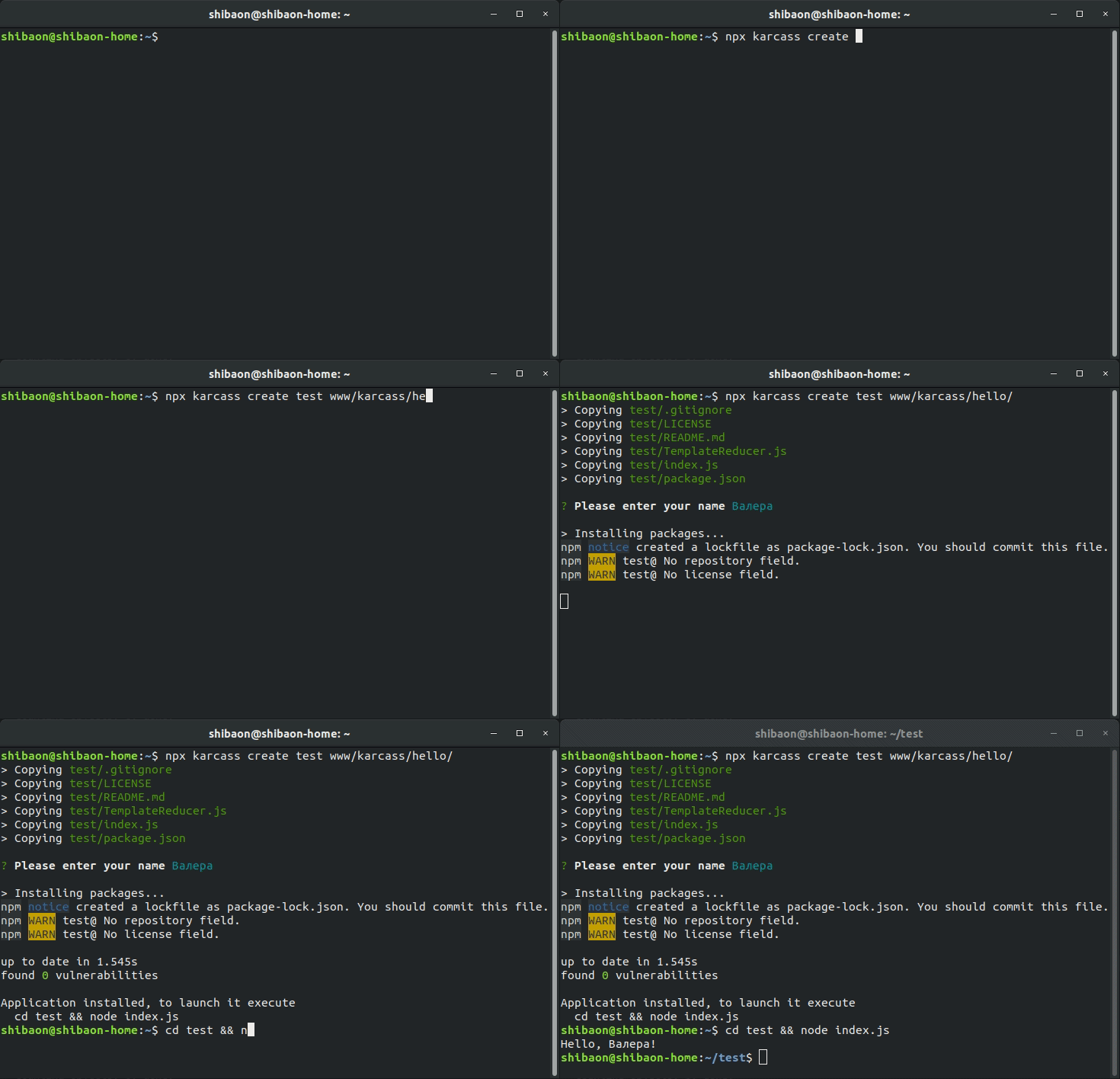
Всё это было бы бессмысленно, если бы кроме установки из локальной директории karcass не мог устанавливать приложения из общедоступных источников. Пока поддерживается только github.com, можете попробовать:
npx karcass create helloworld https://github.com/karcass-ts/hello-world
Ненавязчиво предложу попробовать и мой дефолтный шаблон, который устанавливается по-умолчанию, если не указать путь до шаблона:
npx karcass create ooohhhh-ok-show-it
Тестирование? У шаблона есть возможность задавать пресеты конфигурации для тестирования, в TemplateReducer нашего helloworld-шаблона можно было бы добавить такой метод:
getTestConfigSet() { return [ { name: 'testname1' }, { name: 'testname2' }, ] }
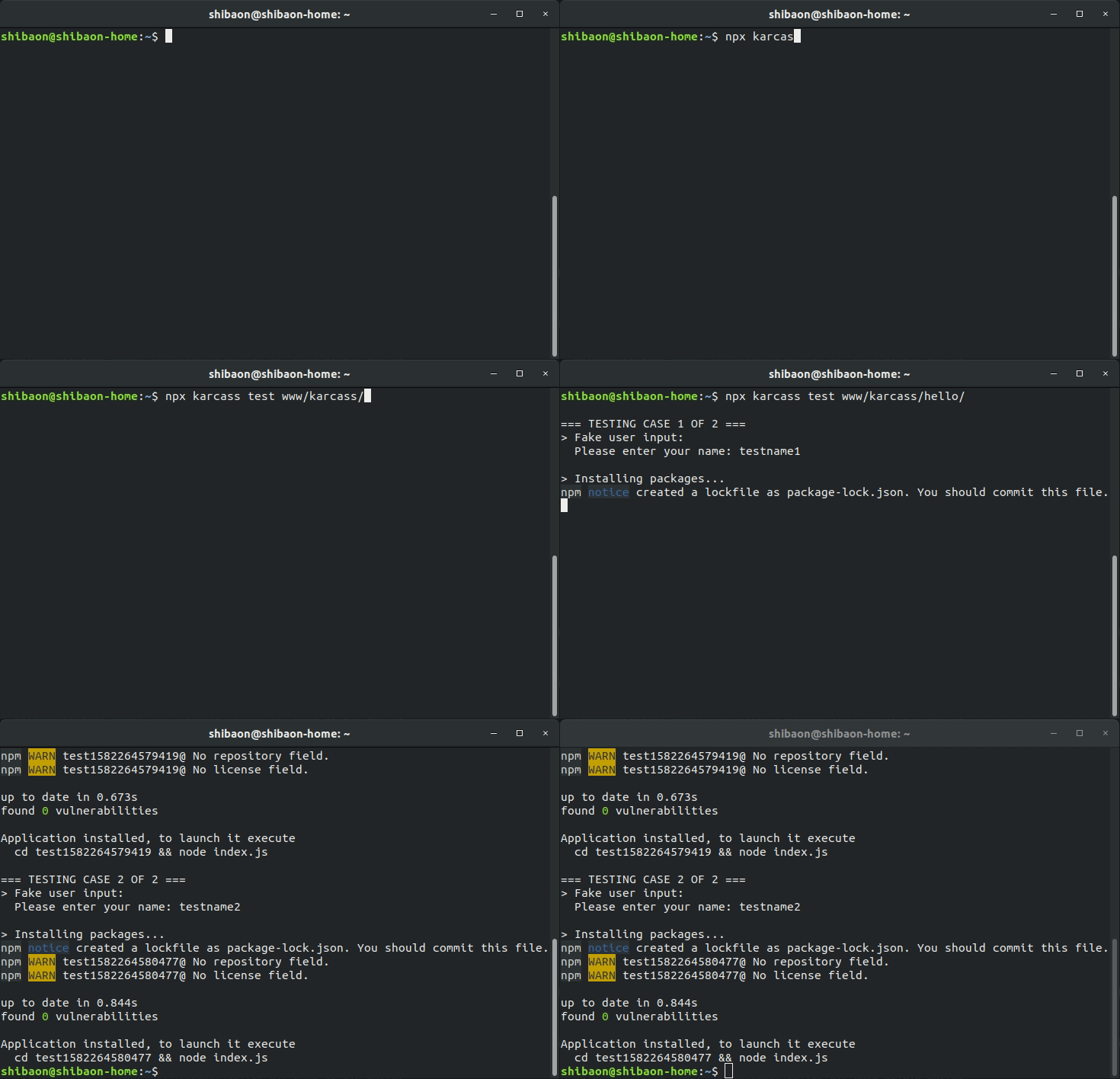
Само тестирование запускается так:
npx karcass test www/karcass/hello
Процесс тестирования — это просто поочерёдная установка шаблона с заданной конфигурацией. Примитивно, но ничего лучше я не придумал, по крайней мере, пока:
Я решил не делать лонгрид с описанием всех особенностей karcass, а сделать небольшую ознакомительную заметку с целью презентации и сбора фидбека: любой отзыв будет мне полезен, чтобы понять, куда двигаться дальше и стоит ли. Пока же в приоритете написание документации.
ссылка на оригинал статьи https://habr.com/ru/post/487648/
Добавить комментарий