Добрый день!
Сегодня я бы хотел Вам представить небольшую программку, которая использует формулу Даламбера:
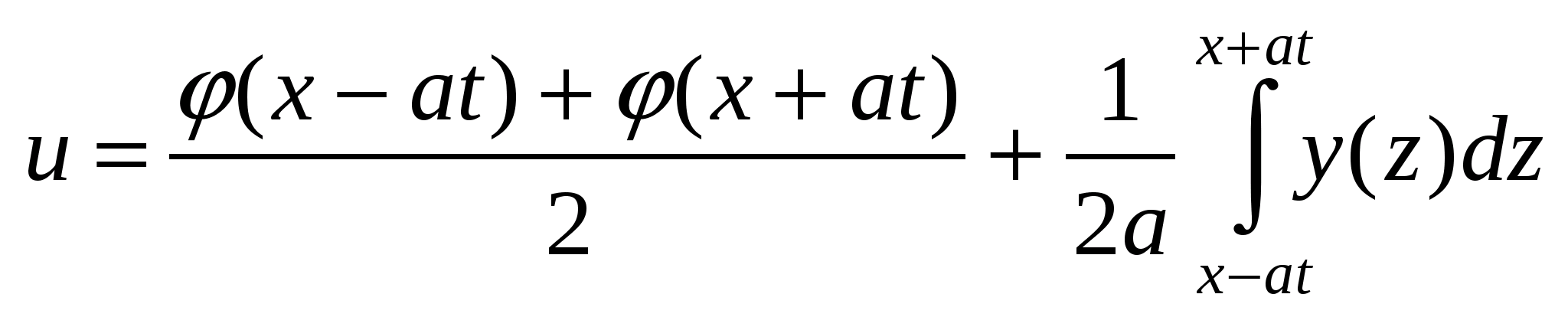
На мой взгляд, здесь происходит смещение функции одной относительно другой, за счет чего образуется волна(wave). Аргументы функции здесь x и t, можно еще использовать и ускорение a. Две функции fi и ksi, точнее y(вместо ksi).
Программа написана с использованием браузера и WebGL.
Файл Wave.html:
<!DOCTYPE html> <html lang="en"> <head> <meta charset="utf-8" /> <title>Draw a Wave</title> </head> <body onload="main()"> <canvas id="webgl" width="1600" height="1000"> Please use a browser that supports "canvas" </canvas> <script src="webgl-utils.js"></script> <script src="webgl-debug.js"></script> <script src="cuon-utils.js"></script> <script src="Wave.js"></script> </body> </html> Вам необходимо положить webgl-utils.js webgl-debug.js cuon-utils.js к файлу Wave.html либо найти их в сети и подключить.
Файл Wave.js:
// Vertex shader program var VSHADER_SOURCE = 'attribute vec4 a_Position;\n' + 'void main() {\n' + ' gl_Position = a_Position;\n' + '}\n'; // Fragment shader program var FSHADER_SOURCE = 'void main() {\n' + ' gl_FragColor = vec4(1.0, 0.0, 0.0, 1.0);\n' + '}\n'; var xx=0; function main() { // Retrieve <canvas> element var canvas = document.getElementById('webgl'); // Get the rendering context for WebGL var gl = getWebGLContext(canvas); if (!gl) { console.log('Failed to get the rendering context for WebGL'); return; } // Initialize shaders if (!initShaders(gl, VSHADER_SOURCE, FSHADER_SOURCE)) { console.log('Failed to intialize shaders.'); return; } // Write the positions of vertices to a vertex shader var n = initVertexBuffers(gl); if (n < 0) { console.log('Failed to set the positions of the vertices'); return; } // Specify the color for clearing <canvas> gl.clearColor(0, 0, 0, 1); var tick = function() { draw(gl, n); // Draw function requestAnimationFrame(tick, canvas); // Request that the browser calls tick }; tick(); } function draw(gl, n) { // Clear <canvas> gl.clear(gl.COLOR_BUFFER_BIT); initVertexBuffers(gl); // function gl.drawArrays(gl.LINE_STRIP, 0, n); } function fi(x) { return Math.cos(x); } function ksi(x) { return Math.sin(3*x); } function Dalamber(x,t) { return 0.5*(fi(x-t) + fi(x+t))+0.5*(ksi(x+t)-ksi(x-t)); } function initVertexBuffers(gl) { var vertices = new Float32Array(400); var i=0; for(var t=-1.0;t<1.0;t+=0.01) { vertices[i]=t; vertices[i+1]=Dalamber(t,xx)/2; //document.write("x=",vertices[i],"y=",vertices[i+1]+"<br>"); i+=2; } xx+=0.01; var n = vertices.length/2; // Create a buffer object var vertexBuffer = gl.createBuffer(); if (!vertexBuffer) { console.log('Failed to create the buffer object'); return -1; } // Bind the buffer object to target gl.bindBuffer(gl.ARRAY_BUFFER, vertexBuffer); // Write date into the buffer object gl.bufferData(gl.ARRAY_BUFFER, vertices, gl.STATIC_DRAW); var a_Position = gl.getAttribLocation(gl.program, 'a_Position'); if (a_Position < 0) { console.log('Failed to get the storage location of a_Position'); return -1; } // Assign the buffer object to a_Position variable gl.vertexAttribPointer(a_Position, 2, gl.FLOAT, false, 0, 0); // Enable the assignment to a_Position variable gl.enableVertexAttribArray(a_Position); return n; } Можете поэкспериментировать с функциями fi и ksi, изменять параметры и добавлять другие функции, делать из них сумму, умножать.
Результат:
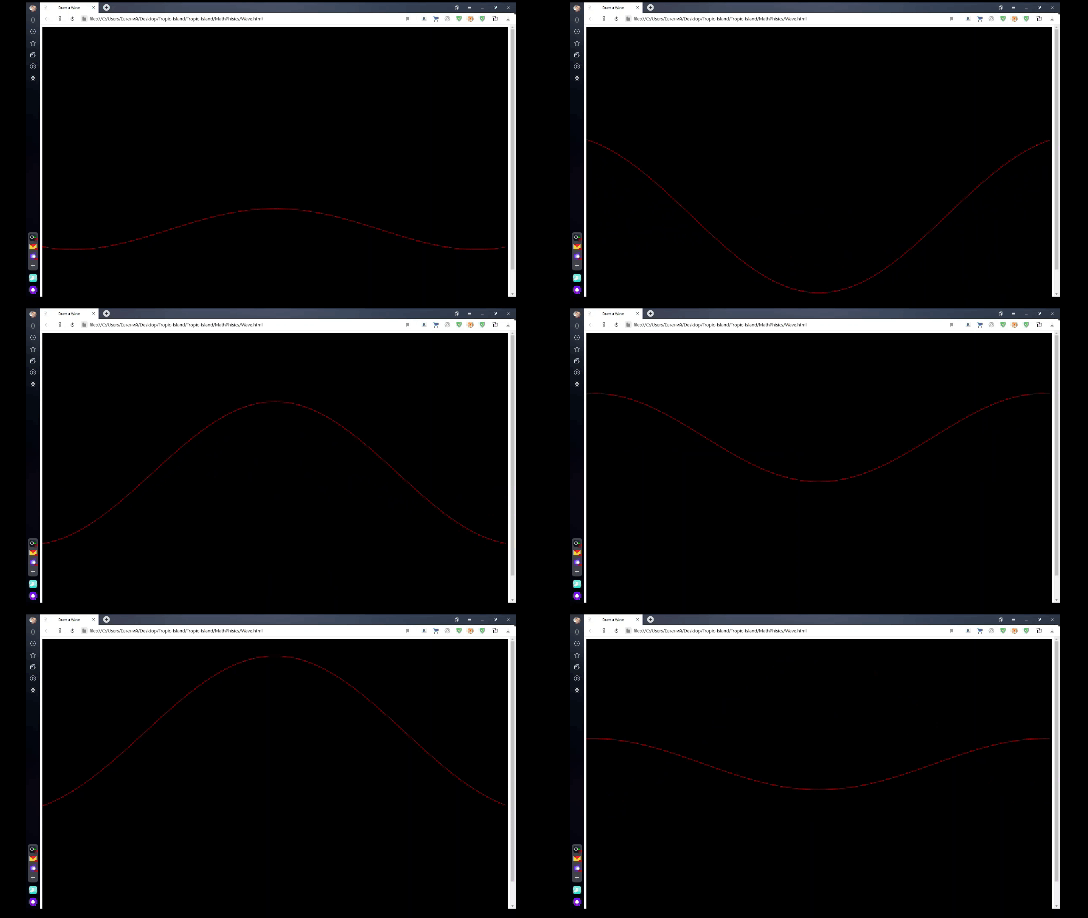
Не судите строго и благодарю за внимание!
ссылка на оригинал статьи https://habr.com/ru/post/545426/
Добавить комментарий