AmoCRM одна из самых популярных CRM, при этом ее API один из самых странных, по моему субъективному мнению. Понадобилось передавать данные формы с сайта в crm. Использовать CRM Формы вместо своих дизайнерских не хочется. Было бы здорово открыть статейку в гугле, подставить ключ и не париться особо, но на удивление не нашел ни одной статьи с актуальной инфой, где-то версия api уже не актуальна, где-то вместо использования дефолтных полей контакта, создаются кастомные. В общем решил поделиться своим решением, для тех, кому сложно/лень вникать в их API.
В этой статье я буду создавать сделку в «Неразобранном», контакт и компанию.
Создаем файлы интеграции
Создаем папку amo, например в корне сайта.
Файлы внутри:
amo.php
access.php
config.php
get.php
cookie.txt
tokens.txt
Названия могут быть произвольными.
Получение ключей
Открываем AmoCRM, заходим в Настройки > Интеграции.
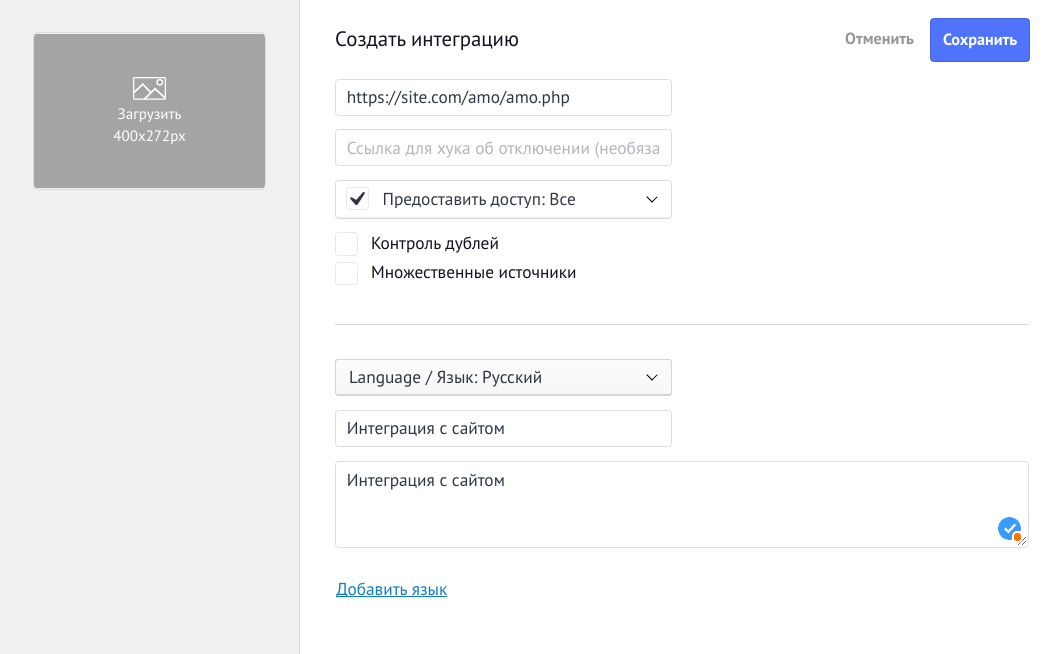
Жмем «+ Создать интеграцию» и создаем внешнюю интеграцию
Указываем ссылку на наш amo.php файл, ставим галочку предоставления доступа и вводим произвольное название и описание:
P.S. Перед сохранением прочтите этот раздел до конца
У нас появится 3 ключа и 20 минут, чтоб сделать следующее:
Открываем config.php и вписываем их туда:
<?php $subdomain = ''; // поддомен AmoCRM $client_secret = ''; // Секретный ключ $client_id = ''; // ID интеграции $code = ''; // Код авторизации $token_file = 'tokens.txt'; $redirect_uri = 'https://site.com/amo/amo.php';Поддомен AmoCRM берем из url нашей CRM
В $redirect_uri не забудьте поменять свой домен сайта
Затем идем в файл auth.php и вставим следующее:
<?php require_once 'config.php'; $link = "https://$subdomain.amocrm.ru/oauth2/access_token"; $data = [ 'client_id' => $client_id, 'client_secret' => $client_secret, 'grant_type' => 'authorization_code', 'code' => $code, 'redirect_uri' => $redirect_uri, ]; $curl = curl_init(); curl_setopt($curl,CURLOPT_RETURNTRANSFER, true); curl_setopt($curl,CURLOPT_USERAGENT,'amoCRM-oAuth-client/1.0'); curl_setopt($curl,CURLOPT_URL, $link); curl_setopt($curl,CURLOPT_HTTPHEADER, ['Content-Type:application/json']); curl_setopt($curl,CURLOPT_HEADER, false); curl_setopt($curl,CURLOPT_CUSTOMREQUEST, 'POST'); curl_setopt($curl,CURLOPT_POSTFIELDS, json_encode($data)); curl_setopt($curl,CURLOPT_SSL_VERIFYPEER, 1); curl_setopt($curl,CURLOPT_SSL_VERIFYHOST, 2); $out = curl_exec($curl); $code = curl_getinfo($curl, CURLINFO_HTTP_CODE); curl_close($curl); $code = (int)$code; $errors = [ 301 => 'Moved permanently.', 400 => 'Wrong structure of the array of transmitted data, or invalid identifiers of custom fields.', 401 => 'Not Authorized. There is no account information on the server. You need to make a request to another server on the transmitted IP.', 403 => 'The account is blocked, for repeatedly exceeding the number of requests per second.', 404 => 'Not found.', 500 => 'Internal server error.', 502 => 'Bad gateway.', 503 => 'Service unavailable.' ]; if ($code < 200 || $code > 204) die( "Error $code. " . (isset($errors[$code]) ? $errors[$code] : 'Undefined error') ); $response = json_decode($out, true); $arrParamsAmo = [ "access_token" => $response['access_token'], "refresh_token" => $response['refresh_token'], "token_type" => $response['token_type'], "expires_in" => $response['expires_in'], "endTokenTime" => $response['expires_in'] + time(), ]; $arrParamsAmo = json_encode($arrParamsAmo); $f = fopen($token_file, 'w'); fwrite($f, $arrParamsAmo); fclose($f); print_r($arrParamsAmo);Тут мы отправляем запрос в AmoCRM для получения токенов. Токены сохраняются в файл (45-57 строки), вы можете сохранять их в БД.
Запустите файл, https://site.com/amo/auth.php
Как результат в файле tokens.txt должны появится данные.
Обновление токена
Access token является временным и требует обновления.
Открываем файл access.php и добавляем следующее:
<?php require_once 'config.php'; $dataToken = file_get_contents($token_file); $dataToken = json_decode($dataToken, true); if ($dataToken["endTokenTime"] < time()) { $link = "https://$subdomain.amocrm.ru/oauth2/access_token"; $data = [ 'client_id' => $client_id, 'client_secret' => $client_secret, 'grant_type' => 'refresh_token', 'refresh_token' => $dataToken["refresh_token"], 'redirect_uri' => $redirect_uri, ]; $curl = curl_init(); curl_setopt($curl, CURLOPT_RETURNTRANSFER, true); curl_setopt($curl, CURLOPT_USERAGENT, 'amoCRM-oAuth-client/1.0'); curl_setopt($curl, CURLOPT_URL, $link); curl_setopt($curl, CURLOPT_HTTPHEADER, ['Content-Type:application/json']); curl_setopt($curl, CURLOPT_HEADER, false); curl_setopt($curl, CURLOPT_CUSTOMREQUEST, 'POST'); curl_setopt($curl, CURLOPT_POSTFIELDS, json_encode($data)); curl_setopt($curl, CURLOPT_SSL_VERIFYPEER, 1); curl_setopt($curl, CURLOPT_SSL_VERIFYHOST, 2); $out = curl_exec($curl); $code = curl_getinfo($curl, CURLINFO_HTTP_CODE); curl_close($curl); $code = (int)$code; $errors = [ 301 => 'Moved permanently.', 400 => 'Wrong structure of the array of transmitted data, or invalid identifiers of custom fields.', 401 => 'Not Authorized. There is no account information on the server. You need to make a request to another server on the transmitted IP.', 403 => 'The account is blocked, for repeatedly exceeding the number of requests per second.', 404 => 'Not found.', 500 => 'Internal server error.', 502 => 'Bad gateway.', 503 => 'Service unavailable.' ]; if ($code < 200 || $code > 204) die( "Error $code. " . (isset($errors[$code]) ? $errors[$code] : 'Undefined error') ); $response = json_decode($out, true); $arrParamsAmo = [ "access_token" => $response['access_token'], "refresh_token" => $response['refresh_token'], "token_type" => $response['token_type'], "expires_in" => $response['expires_in'], "endTokenTime" => $response['expires_in'] + time(), ]; $arrParamsAmo = json_encode($arrParamsAmo); $f = fopen($token_file, 'w'); fwrite($f, $arrParamsAmo); fclose($f); $access_token = $response['access_token']; } else { $access_token = $dataToken["access_token"]; }Если вы сохраняли данные предыдущего запроса в БД, пропишите получение их из БД (59-61 строки).
Переходим к интеграции
Не буду приводить пример html формы, нужно обработать форму и передать в amo.php необходимые данные. Открываем amo.php и добавляем:
<?php require_once 'access.php'; $name = 'Имя клиента'; $phone = '+380123456789'; $email = 'email@gmail.com'; $target = 'Цель'; $company = 'Название компании'; $custom_field_id = 454021; $custom_field_value = 'тест'; $ip = '1.2.3.4'; $domain = 'site.com'; $price = 0; $pipeline_id = 5059931; $user_amo = 0; $utm_source = ''; $utm_content = ''; $utm_medium = ''; $utm_campaign = ''; $utm_term = ''; $utm_referrer = ''; $data = [ [ "name" => $phone, "price" => $price, "responsible_user_id" => $user_amo, "pipeline_id" => $pipeline_id, "_embedded" => [ "metadata" => [ "category" => "forms", "form_id" => 1, "form_name" => "Форма на сайте", "form_page" => $target, "form_sent_at" => strtotime(date("Y-m-d H:i:s")), "ip" => $ip, "referer" => $domain ], "contacts" => [ [ "first_name" => $name, "custom_fields_values" => [ [ "field_code" => "EMAIL", "values" => [ [ "enum_code" => "WORK", "value" => $email ] ] ], [ "field_code" => "PHONE", "values" => [ [ "enum_code" => "WORK", "value" => $phone ] ] ], [ "field_id" => $custom_field_id, "values" => [ [ "value" => $custom_field_value ] ] ] ] ] ], "companies" => [ [ "name" => $company ] ] ], "custom_fields_values" => [ [ "field_code" => 'UTM_SOURCE', "values" => [ [ "value" => $utm_source ] ] ], [ "field_code" => 'UTM_CONTENT', "values" => [ [ "value" => $utm_content ] ] ], [ "field_code" => 'UTM_MEDIUM', "values" => [ [ "value" => $utm_medium ] ] ], [ "field_code" => 'UTM_CAMPAIGN', "values" => [ [ "value" => $utm_campaign ] ] ], [ "field_code" => 'UTM_TERM', "values" => [ [ "value" => $utm_term ] ] ], [ "field_code" => 'UTM_REFERRER', "values" => [ [ "value" => $utm_referrer ] ] ], ], ] ]; $method = "/api/v4/leads/complex"; $headers = [ 'Content-Type: application/json', 'Authorization: Bearer ' . $access_token, ]; $curl = curl_init(); curl_setopt($curl, CURLOPT_RETURNTRANSFER, true); curl_setopt($curl, CURLOPT_USERAGENT, 'amoCRM-API-client/1.0'); curl_setopt($curl, CURLOPT_URL, "https://$subdomain.amocrm.ru".$method); curl_setopt($curl, CURLOPT_CUSTOMREQUEST, 'POST'); curl_setopt($curl, CURLOPT_POSTFIELDS, json_encode($data)); curl_setopt($curl, CURLOPT_HTTPHEADER, $headers); curl_setopt($curl, CURLOPT_HEADER, false); curl_setopt($curl, CURLOPT_COOKIEFILE, 'amo/cookie.txt'); curl_setopt($curl, CURLOPT_COOKIEJAR, 'amo/cookie.txt'); curl_setopt($curl, CURLOPT_SSL_VERIFYPEER, 0); curl_setopt($curl, CURLOPT_SSL_VERIFYHOST, 0); $out = curl_exec($curl); $code = curl_getinfo($curl, CURLINFO_HTTP_CODE); $code = (int) $code; $errors = [ 301 => 'Moved permanently.', 400 => 'Wrong structure of the array of transmitted data, or invalid identifiers of custom fields.', 401 => 'Not Authorized. There is no account information on the server. You need to make a request to another server on the transmitted IP.', 403 => 'The account is blocked, for repeatedly exceeding the number of requests per second.', 404 => 'Not found.', 500 => 'Internal server error.', 502 => 'Bad gateway.', 503 => 'Service unavailable.' ]; if ($code < 200 || $code > 204) die( "Error $code. " . (isset($errors[$code]) ? $errors[$code] : 'Undefined error') ); $Response = json_decode($out, true); $Response = $Response['_embedded']['items']; $output = 'ID добавленных элементов списков:' . PHP_EOL; foreach ($Response as $v) if (is_array($v)) $output .= $v['id'] . PHP_EOL; return $output; В самом начале у нас список переменных, куда необходимо передать данные из формы, например: $name = $_POST['name'];
В $pipeline_id необходимо записать id воронки, его можно получить из url crm:
Открываем раздел «Сделки», берем id открывшейся воронки (число в конце url), либо переключаемся на другую.
К $user_amo вернемся чуть позже. Заполняем остальные переменные.
Массив $data заполните информацией на свое усмотрение, согласно документации.
Получение id полей
Получение идентификаторов полей, пользователей и всего остального реализовано через GET запросы. Подробнее можно ознакомиться в документации, а для наших целей я подготовил отдельный файл, нужные эти данные. Открываем файл get.php и добавляем в него:
<?php require_once 'config.php'; function printLink($method, $title, $subdomain) { echo '<br>'; echo "<a href='https://$subdomain.amocrm.ru/$method' target='_blank'>$title</a>"; echo '<br>'; } printLink('api/v4/leads/custom_fields', 'Список utm меток', $subdomain); printLink('api/v4/users', 'Список пользователей', $subdomain); printLink('api/v4/contacts/custom_fields', 'Список полей контакта', $subdomain); echo '<br>'; echo "<a href='https://www.amocrm.ru/developers/content/crm_platform/custom-fields' target='_blank'>Документация</a>"; echo '<br>';Запустите файл: https://site.com/amo/get.php
Вы увидите перечень ссылок, перейдя по которым получаете список id и других параметров полей для utm меток, пользователей, контактов. По аналогии можно просмотреть остальное.
Вернемся к переменной $user_amo. Сюда нужно вписать id пользователя, ответственного за сделку.
Вывод
На этом все, если все сделано правильно, лиды будут приходить в неразобранное, создаваться контакт, подтягиваться в него имя, телефон, а также кастомные поля, utm метки, которые были указаны в $data и название компании.
ссылка на оригинал статьи https://habr.com/ru/post/650019/
Добавить комментарий