Введение
Понадобилось мне в приложении меню которое появляется по нажатию на floating button. Начал смотреть, что там такого есть в этих ваших интернетах. Мне хотелось как в самсунге меню для стилуса. Поскольку я не придумал, как это гуглить правильно, я не нашел такого меню готового. Поэтому решил сделать его сам.

Анимация
Поскольку анимации во флаттере я до этого не делал, я нашел пример подобной анимации. По-началу я думал что надо будет просто поменять расположение всплывающих кнопок и траектории их движения, но оказалось, кнопки выплывают из-за края экрана. Мне же нужно чтобы кнопки прятались под floating action button. Посмотрел код, и такое скрытие кнопок получается из-за использования виджета Column, но ведь есть Stack.

Для начала располагаем всплывающие кнопки по кругу переводом из полярных координат в декартовы. Анимировать выезд кнопок будем с помощью изменения радиуса. Для этого нам потребуются объекты классов AnimationController и Tween. В AnimationController укажем продолжительностьанимации, а в Tween поставим изменение радиуса от 0 до некоторого максимального. Максимальный радиус и время действия анимации передадим извне. Последним элементом в Stack передадим FloatingActionButton, по нажатию на которую будет отрабатывать анимация.
class FloatingMenu extends StatefulWidget { const FloatingMenu(this.duration, this.radius, {Key? key}) : super(key: key); final int duration; final double radius; @override _FloatingMenuState createState() => _FloatingMenuState(); } class _FloatingMenuState extends State<FloatingMenu> with SingleTickerProviderStateMixin { late AnimationController _animationController; late Animation<double> _buttonAnimatedIcon; late Animation<double> _translateButton; bool _isExpanded = false; @override initState() { _animationController = AnimationController( vsync: this, duration: Duration(milliseconds: widget.duration)) ..addListener(() { setState(() {}); }); _buttonAnimatedIcon = Tween<double>(begin: 0.0, end: 1.0).animate(_animationController); _translateButton = Tween<double>( begin: 0, end: widget.radius, ).animate(CurvedAnimation( parent: _animationController, curve: Curves.easeInOut, )); super.initState(); } @override dispose() { _animationController.dispose(); super.dispose(); } _toggle() { if (_isExpanded) { _animationController.reverse(); } else { _animationController.forward(); } _isExpanded = !_isExpanded; } @override Widget build(BuildContext context) { return Stack( children: [ Transform( transform: Matrix4.translationValues( cos(pi) * _translateButton.value, -1 * sin(pi) * _translateButton.value, 0, ), child: FloatingActionButton( backgroundColor: Colors.blue, onPressed: () { /* Do something */ }, child: const Icon( Icons.photo_camera, ), ), ), Transform( transform: Matrix4.translationValues( cos(3 * pi / 4) * _translateButton.value, -1 * sin(3 * pi / 4) * _translateButton.value, 0, ), child: FloatingActionButton( backgroundColor: Colors.red, onPressed: () { /* Do something */ }, child: const Icon( Icons.video_camera_back, ), ), ), Transform( transform: Matrix4.translationValues( cos(pi / 2) * _translateButton.value, -1 * sin(pi / 2) * _translateButton.value, 0, ), child: FloatingActionButton( backgroundColor: Colors.amber, onPressed: () { /* Do something */ }, child: const Icon(Icons.photo), ), ), Transform( transform: Matrix4.translationValues( cos(pi / 4) * _translateButton.value, -1 * sin(pi / 4) * _translateButton.value, 0, ), child: FloatingActionButton( backgroundColor: Colors.deepPurpleAccent, onPressed: () { /* Do something */ }, child: const Icon( Icons.people_alt_outlined, ), ), ), Transform( transform: Matrix4.translationValues( cos(0) * _translateButton.value, -1 * sin(0) * _translateButton.value, 0, ), child: FloatingActionButton( backgroundColor: Colors.tealAccent, onPressed: () { /* Do something */ }, child: const Icon( Icons.settings, ), ), ), child: FloatingActionButton( onPressed: _toggle, child: AnimatedIcon( icon: AnimatedIcons.menu_close, progress: _buttonAnimatedIcon, ), ), ], ); } } Ура, анимация делает именно то что мне нужно! Но появляется другая проблема, кнопки то появились, но нажать на них невозможно.

Следствие вели
Итак, ищем проблему. Первое что приходит в голову, что стэк дает нажиматься только первому элементу а остальным отключает эту возможность. В самом стэке нет никаких флагов, но в флаттере такую функцию выполняет класс IgnorePointer. Пробуем обернуть кнопки и включать возможность нажатия, когда они «выплыли». Не работает.
... IgnorePointer( ignoring: !_isExpanded, child: Transform( transform: Matrix4.translationValues( cos(0) * _translateButton.value, -1 * sin(0) * _translateButton.value, 0, ), child: FloatingActionButton( backgroundColor: Colors.tealAccent, onPressed: () { /* Do something */ }, child: const Icon( Icons.settings, ), ), ), ), ... Дальше я обнаружил, что возможно, класс Transform перемещает не всю кнопку, а только ее изображение и в итоге нажать ее не возможно. Пробуем заменить ее на Positioned, но нажатия все так же не проходят.
Positioned( left: cos(3 * pi / 4) * _translateButton.value, bottom: sin(3 * pi / 4) * _translateButton.value, child: FloatingActionButton( backgroundColor: Colors.red, onPressed: () { print("bbb"); }, child: const Icon( Icons.video_camera_back, ), ), ), Продолжая искать, обнаруживаю, что у каждого контейнера есть область действия. У стека получается, что область действия размером с самый широкий элемент в нем и во время анимации эта область не изменяется. Попробуем обернуть стэк в контейнер c шириной и высотой 200. Для наглядности сделаем его зеленого цвета а не прозрачным.
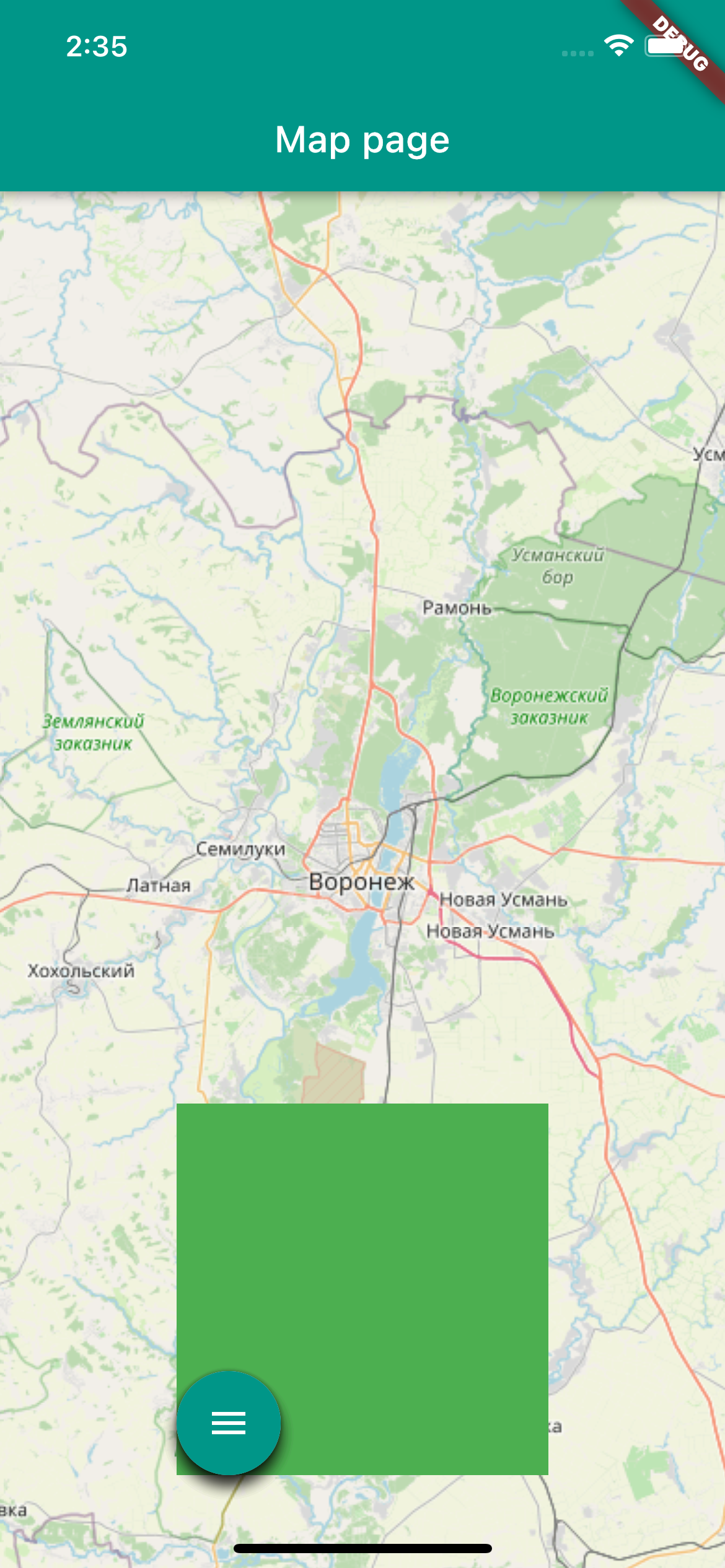
Теперь кнопки, которые находятся в зеленой зоне нажимаются! Размещаем теперь кнопку-меню по центру и подгоняем размер зеленой области по размеру.

ВЖУХ и все работает.

import 'dart:math'; import 'package:flutter/material.dart'; import 'package:latlong2/latlong.dart'; class FloatingMenu extends StatefulWidget { const FloatingMenu(this.duration, this.radius, {Key? key}) : super(key: key); final int duration; final double radius; @override _FloatingMenuState createState() => _FloatingMenuState(); } class _FloatingMenuState extends State<FloatingMenu> with SingleTickerProviderStateMixin { late AnimationController _animationController; late Animation<double> _buttonAnimatedIcon; late Animation<double> _translateButton; bool _isExpanded = false; @override initState() { _animationController = AnimationController( vsync: this, duration: Duration(milliseconds: widget.duration)) ..addListener(() { setState(() {}); }); _buttonAnimatedIcon = Tween<double>(begin: 0.0, end: 1.0).animate(_animationController); _translateButton = Tween<double>( begin: 0, end: widget.radius, ).animate(CurvedAnimation( parent: _animationController, curve: Curves.easeInOut, )); super.initState(); } @override dispose() { _animationController.dispose(); super.dispose(); } _toggle() { if (_isExpanded) { _animationController.reverse(); } else { _animationController.forward(); } _isExpanded = !_isExpanded; } @override Widget build(BuildContext context) { double width = widget.radius * 2 + 60; double height = widget.radius + 60; double center = width/2-30; return Container( height: height, width: width, child: Stack( clipBehavior: Clip.none, children: [ Positioned( left: center + cos(pi) * _translateButton.value, bottom: sin(pi) * _translateButton.value, child: FloatingActionButton( backgroundColor: Colors.blue, onPressed: () { print("aaa"); }, child: const Icon( Icons.photo_camera, ), ), ), Positioned( left: center + cos(3 * pi / 4) * _translateButton.value, bottom: sin(3 * pi / 4) * _translateButton.value, child: FloatingActionButton( backgroundColor: Colors.red, onPressed: () { print("bbb"); /* Do something */ }, child: const Icon( Icons.video_camera_back, ), ), ), Positioned( left: center + cos(pi / 2) * _translateButton.value, bottom: sin(pi / 2) * _translateButton.value, child: FloatingActionButton( backgroundColor: Colors.amber, onPressed: () { print("ccc"); /* Do something */ }, child: const Icon(Icons.photo), ), ), Positioned( left: center + cos(pi / 4) * _translateButton.value, bottom: sin(pi / 4) * _translateButton.value, child: FloatingActionButton( backgroundColor: Colors.deepPurpleAccent, onPressed: () { print("ddd"); /* Do something */ }, child: const Icon( Icons.people_alt_outlined, ), ), ), Positioned( left: center + cos(0) * _translateButton.value, bottom: sin(0) * _translateButton.value, child: FloatingActionButton( backgroundColor: Colors.tealAccent, onPressed: () { print("eee"); /* Do something */ }, child: const Icon( Icons.settings, ), ), ), Positioned( left: center, bottom: 0, child: FloatingActionButton( onPressed: _toggle, child: AnimatedIcon( icon: AnimatedIcons.menu_close, progress: _buttonAnimatedIcon, ), ), ) ], )); } }
ссылка на оригинал статьи https://habr.com/ru/post/690180/
Добавить комментарий