Всем привет сегодня мы разработаем простое приложение для летней кафешки и добавим tableHeaderView и viewForHeaderInSection
Для начала посмотрим как наше приложение должно выглядеть

У нас есть tableHeaderView в котором лежит коллекция мы можем ее прокручивать по горизонтали
Ниже у нас располагается viewForHeaderInSection который так же может прокручиваться
Когда мы спускаемся ниже по товарам банеры уходят за view а наш хедер с категориями продуктов прилипает к верхней части экрана

И так начнем мы с создания класса баннера и подпишем его под протокол UIView по причине того что метод который добавит наш баннер наверх tableView требует UIView

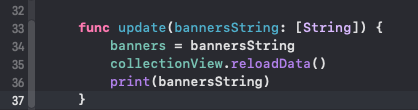
final class BannersView: UIView { private var banners = [String]() private lazy var collectionView: UICollectionView = { let collectionView = UICollectionView(frame: .zero, collectionViewLayout: createCompositionalLayout()) collectionView.dataSource = self collectionView.register(BannersCell.self, forCellWithReuseIdentifier: BannersCell.reuseID) collectionView.backgroundColor = .systemBackground return collectionView }() override init(frame: CGRect) { super.init(frame: frame) self.setupViews() } required init?(coder: NSCoder) { fatalError("init(coder:) has not been implemented") } func update(bannersString: [String]) { banners = bannersString collectionView.reloadData() print(bannersString) } private func setupViews() { addSubview(collectionView) collectionView.snp.makeConstraints { make in make.edges.equalToSuperview() } } private func createCompositionalLayout() -> UICollectionViewLayout { return UICollectionViewCompositionalLayout(section: createPromotionsView()) } private func createPromotionsView() -> NSCollectionLayoutSection { let itemSize = NSCollectionLayoutSize(widthDimension: .fractionalWidth(1.0), heightDimension: .fractionalHeight(1.0)) let item = NSCollectionLayoutItem(layoutSize: itemSize) item.contentInsets = NSDirectionalEdgeInsets(top: 0, leading: 0, bottom: 0, trailing: 16) let rowHeight = NSCollectionLayoutDimension.fractionalHeight(1) let rowSize = NSCollectionLayoutSize(widthDimension: .fractionalWidth(0.8), heightDimension: rowHeight) let row = NSCollectionLayoutGroup.horizontal(layoutSize: rowSize, subitems: [item]) let section = NSCollectionLayoutSection(group: row) section.contentInsets = NSDirectionalEdgeInsets(top: 0, leading: 16, bottom: 0, trailing: 0) section.orthogonalScrollingBehavior = .continuousGroupLeadingBoundary return section } } extension BannersView: UICollectionViewDataSource { func collectionView(_ collectionView: UICollectionView, numberOfItemsInSection section: Int) -> Int { print(banners) return banners.count } func collectionView(_ collectionView: UICollectionView, cellForItemAt indexPath: IndexPath) -> UICollectionViewCell { guard let cell: BannersCell = collectionView.dequeueReusableCell(withReuseIdentifier: BannersCell.reuseID, for: indexPath) as? BannersCell else { return UICollectionViewCell()} print(banners) let banner = banners[indexPath.row] cell.configure(string: banner) return cell } }И так обычный класс подписанный под UIView на который мы добавили collectionView. В методе update мы будем пополнять массив с банерами и передавать это все дело в ячейки

CollectionView готов теперь займемся ячейками. Создаем класс BannersCell: UICollectionViewCell и добовляем на него imageView
import UIKit import SnapKit final class BannersCell: UICollectionViewCell { static let reuseID = "BannersCell" private let imageView: UIImageView = { let image = UIImageView() image.image = UIImage(named: "banner1") image.contentMode = .center image.contentMode = .scaleAspectFill return image }() override init(frame: CGRect) { super.init(frame: frame) setupView() } required init?(coder: NSCoder) { fatalError("init(coder:) has not been implemented") } func configure(string: String) { imageView.image = UIImage(named: string) } private func setupView() { backgroundColor = .systemBackground imageView.clipsToBounds = true imageView.layer.cornerRadius = 10 addSubview(imageView) imageView.snp.makeConstraints { make in make.edges.equalToSuperview() } } }В данной функции мы сделали конфигуратор для обновления картинок

Ячейки готовы collectionView готов теперь переходим в главный экран на котором будут располагаться все наши элементы «class MenuVC: UIViewController»
import UIKit class MenuVC: UIViewController { private let productsAPI = ProductsAPI() private var products: [Products] = [] //MARK: - TableView private lazy var tableView: UITableView = { let tableView = UITableView() tableView.register(ProductCell.self, forCellReuseIdentifier: ProductCell.reuseID) tableView.dataSource = self tableView.delegate = self tableView.tableHeaderView = bannerHeaderView tableView.separatorStyle = .none return tableView }() lazy var bannerHeaderView: BannersView = { let width = UIView.screenWidth let height = width * 0.3 let bannerView = BannersView(frame: CGRect(x: 0, y: 0, width: width, height: height)) return bannerView }() override func viewDidLoad() { super.viewDidLoad() setupViews() fetchProducts() } override func viewWillLayoutSubviews() { super.viewWillLayoutSubviews() tableView.rowHeight = view.bounds.height / 5 } private func fetchProducts() { Task { do { let result = try await productsAPI.fetchCollection() //Запрос в сеть products = result.items //получение товаров bannerHeaderView.update(bannersString: result.banners) //передача банеров в хедер tableView.reloadData() } catch { print(error) } } } private func setupViews(){ view.backgroundColor = .systemBackground view.addSubview(tableView) tableView.snp.makeConstraints { make in make.edges.equalToSuperview() } } } extension MenuVC: UITableViewDataSource, UITableViewDelegate { func tableView(_ tableView: UITableView, numberOfRowsInSection section: Int) -> Int { return products.count } func tableView(_ tableView: UITableView, cellForRowAt indexPath: IndexPath) -> UITableViewCell { guard let cell = tableView.dequeueReusableCell(withIdentifier: ProductCell.reuseID, for: indexPath) as? ProductCell else { return UITableViewCell() } let products = products[indexPath.row] cell.configure(model: products) return cell } } И так у нас есть private let productsAPI = ProductsAPI() сервис для запросов в сеть
private var products: [Products] = [] место куда мы положим ответ с сервера с продуктами
Обратим внимание на создание tableView и bannerHeaderView. Мы как обычно создаем наш tableView и добавляем хедер методом tableView.tableHeaderView
headerView мы создали ниже задав ему высоту и ширину

Теперь когда все готово делаем метод запроса в сеть и пропихиваем данные в наш bannerheaderView

Мок данные подготовленные для данного туториала
{ "items":[ { "id":0, "name":"Латте", "category":"coffee", "description":"1/4 взбитой молочной пены, 2/4 горячего молока, 1/4 эспрессо", "image":"latte", "cinnamon":false, "sugar":false, "variant":"hot", "size":"Regular", "price":150 }, { "id":1, "name":"Капучино", "category":"ice coffe", "description":"1/3 взбитой молочной пены, 1/3 горячего молока, 1/3 эспрессо", "image":"cappuccino", "cinnamon":false, "sugar":false, "variant":"hot", "size":"Regular", "price":300 }, { "id":2, "name":"Пицца", "category":"pizza", "description":"Ветчина, шампиньоны, увеличенная порция моцареллы, томатный соус", "image":"pizza", "cinnamon":false, "sugar":false, "variant":"hot", "size":"Regular", "price":2500 } ], "categories":["Coffee", "Non Coffee", "Pastry", "Special"], "banners":["banner1","banner2"] //НАШИ БАННЕРЫ }И проверяем что получилось

Отлично теперь время заняться нашими категориями товаров! Создадим класс CategoriesView и подписываем его под UITableViewHeaderFooterView протокол добавляем collectionView и вся та же самая обычная настройка элементов
import UIKit final class CategoriesView: UITableViewHeaderFooterView { private var categories: [String] lazy var collectionView: UICollectionView = { let collectionView = UICollectionView(frame: .zero, collectionViewLayout: createCompositionalLayout()) collectionView.dataSource = self collectionView.delegate = self collectionView.register(CategoryCell.self, forCellWithReuseIdentifier: CategoryCell.reuseID) collectionView.backgroundColor = .systemBackground return collectionView }() init(categories: [String]) { self.categories = categories super.init(reuseIdentifier: CategoryCell.reuseID) self.setupViews() } required init?(coder: NSCoder) { fatalError("init(coder:) has not been implemented") } private func setupViews() { addSubview(collectionView) collectionView.snp.makeConstraints { make in make.edges.equalToSuperview() } } private func createCompositionalLayout() -> UICollectionViewLayout { return UICollectionViewCompositionalLayout(section: createButtonView()) } private func createButtonView() -> NSCollectionLayoutSection { let itemSize = NSCollectionLayoutSize(widthDimension: .fractionalWidth(1.0), heightDimension: .fractionalHeight(1.0)) let item = NSCollectionLayoutItem(layoutSize: itemSize) item.contentInsets = NSDirectionalEdgeInsets(top: 0, leading: 8, bottom: 0, trailing: 8) let rowHeight = NSCollectionLayoutDimension.fractionalHeight(1) let rowSize = NSCollectionLayoutSize(widthDimension: .fractionalWidth(0.26), heightDimension: rowHeight) let row = NSCollectionLayoutGroup.horizontal(layoutSize: rowSize, subitems: [item]) let section = NSCollectionLayoutSection(group: row) section.contentInsets = NSDirectionalEdgeInsets(top: 10, leading: 16, bottom: 10, trailing: 0) section.orthogonalScrollingBehavior = .continuousGroupLeadingBoundary return section } } extension CategoriesView: UICollectionViewDataSource { func collectionView(_ collectionView: UICollectionView, numberOfItemsInSection section: Int) -> Int { return categories.count } func collectionView(_ collectionView: UICollectionView, cellForItemAt indexPath: IndexPath) -> UICollectionViewCell { let cell: CategoryCell = collectionView.dequeueReusableCell(withReuseIdentifier: CategoryCell.reuseID, for: indexPath) as! CategoryCell cell.titleLabel.text = categories[indexPath.row] return cell } }Добавляем ему инициализатор

Затем создаем ячейки
import UIKit import SnapKit final class BannersCell: UICollectionViewCell { static let reuseID = "BannersCell" private let imageView: UIImageView = { let image = UIImageView() image.image = UIImage(named: "banner1") image.contentMode = .center image.contentMode = .scaleAspectFill return image }() override init(frame: CGRect) { super.init(frame: frame) setupView() } required init?(coder: NSCoder) { fatalError("init(coder:) has not been implemented") } func configure(string: String) { imageView.image = UIImage(named: string) } private func setupView() { backgroundColor = .systemBackground imageView.clipsToBounds = true imageView.layer.cornerRadius = 10 addSubview(imageView) imageView.snp.makeConstraints { make in make.edges.equalToSuperview() } } }конфигуратор

И так все подготовительные элементы готовы доповляем теперь все это дело опять же на наш главный экран
Функция для получения категорий из json

в viewForHeaderInSection мы создаем экземпляр categoriesView и в наш инициализатор пропихиваем категории полученные с метода описанного выше.
Затем мы устанавливаем высоту хедера

Запускаем наш проект и радуемся

ссылка на оригинал статьи https://habr.com/ru/post/698574/
Добавить комментарий