Каждый раз при поиске информации касающейся CollectionView я сталкиваюсь с тем, что большая часть основана на использовании сторибордов, но умение работать программно это, как минимум, плюс к карме, поэтому мне хочется поделиться тем как создать вложенный CollectionView, в конце статьи для удобства прикреплю ссылку на гитхаб.
Что должно получиться:
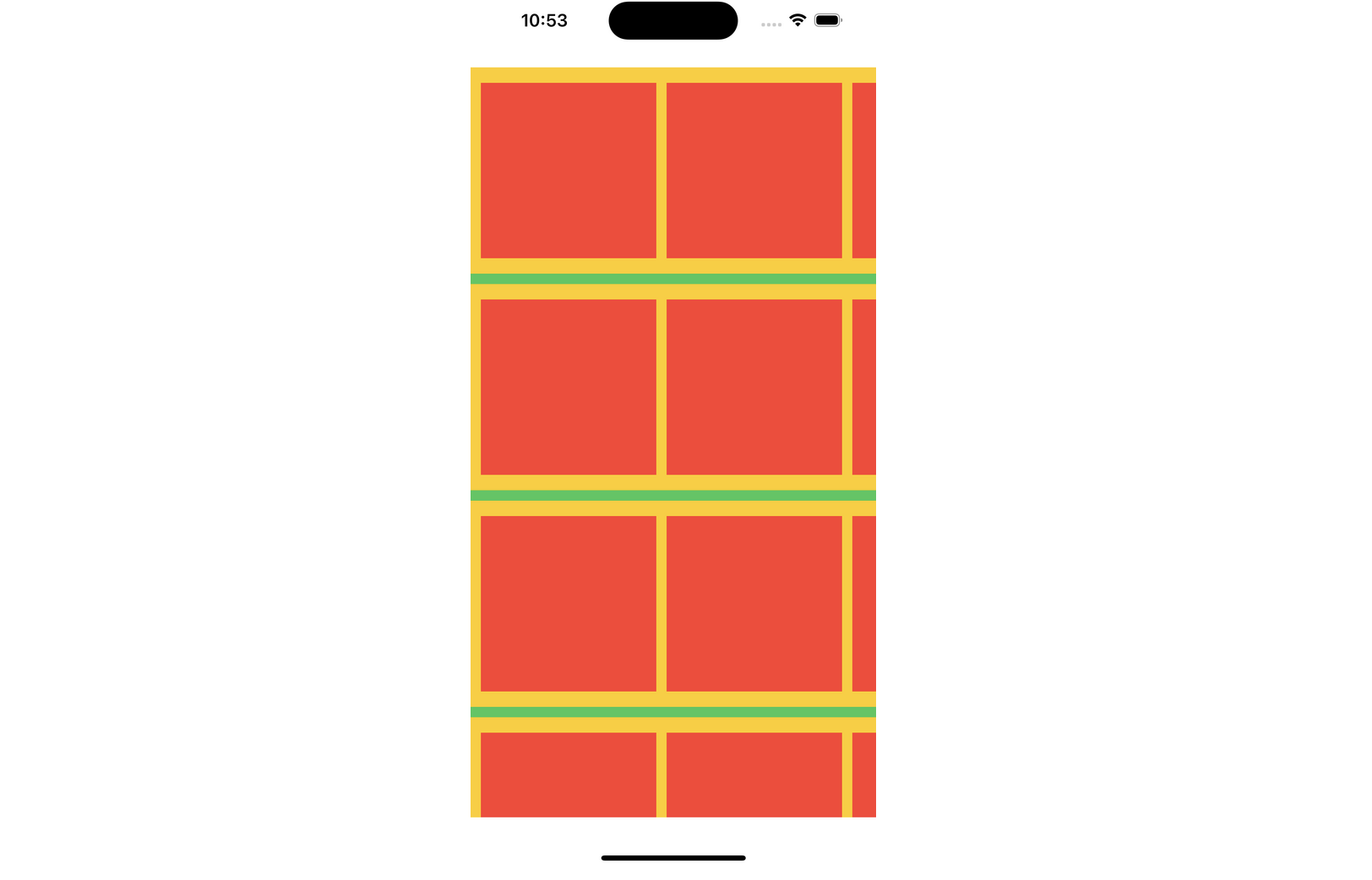
Ну что, приступим, для начала разберемся с основной коллекцией во ViewController
-
создаем collectionView
-
добавляем на вью
-
выставляем констрейнты
class ViewController: UIViewController { lazy var collectionView: UICollectionView = { let layout = UICollectionViewFlowLayout() let collection = UICollectionView(frame: .zero, collectionViewLayout: layout) collection.backgroundColor = .systemGreen collection.translatesAutoresizingMaskIntoConstraints = false return collection }() override func viewDidLoad() { super.viewDidLoad() setupViews() setupConstraints() } func setupViews() { view.addSubview(collectionView) } func setupConstraints() { let safeArea = view.safeAreaLayoutGuide NSLayoutConstraint.activate([ collectionView.leadingAnchor.constraint(equalTo: view.leadingAnchor), collectionView.trailingAnchor.constraint(equalTo: view.trailingAnchor), collectionView.topAnchor.constraint(equalTo: safeArea.topAnchor, constant: 16), collectionView.bottomAnchor.constraint(equalTo: safeArea.bottomAnchor, constant: -16) ]) } }Запускаем — видим, что все появилось

Далее, нам нужно создать ячейку-контейнер, в которую мы положим еще один CollectionView, все делаем стандартно
-
создаем коллекцию
-
добавляем горизонтальную прокрутку
-
определяем размеры
-
добавляем коллекцию в ячейку
-
выставляем констрейнты
class CollectionContainerViewCell: UICollectionViewCell { static let id = "CollectionContainerViewCell" lazy var collectionView: UICollectionView = { let layout = UICollectionViewFlowLayout() layout.scrollDirection = .horizontal layout.itemSize = CGSize(width: 170, height: 170) let collection = UICollectionView(frame: .zero, collectionViewLayout: layout) collection.backgroundColor = .systemYellow collection.translatesAutoresizingMaskIntoConstraints = false return collection }() override init(frame: CGRect) { super.init(frame: frame) setupViews() setupConstraints() } required init?(coder: NSCoder) { fatalError("init(coder:) has not been implemented") } func setupViews() { contentView.addSubview(collectionView) } func setupConstraints() { NSLayoutConstraint.activate([ collectionView.leadingAnchor.constraint(equalTo: contentView.leadingAnchor), collectionView.trailingAnchor.constraint(equalTo: contentView.trailingAnchor), collectionView.topAnchor.constraint(equalTo: contentView.topAnchor), collectionView.bottomAnchor.constraint(equalTo: contentView.bottomAnchor) ]) } }Готово, теперь добавляем этот контейнер в нашу основную коллекцию
-
регистрируем ячейку в collectionView
-
реализуем протоколы
-
устанавливаем размеры лэйаута, необходимое количество секций/элементов в секции
class ViewController: UIViewController { lazy var collectionView: UICollectionView = { let layout = UICollectionViewFlowLayout() let collection = UICollectionView(frame: .zero, collectionViewLayout: layout) collection.backgroundColor = .systemGreen collection.translatesAutoresizingMaskIntoConstraints = false collection.register(CollectionContainerViewCell.self, forCellWithReuseIdentifier: CollectionContainerViewCell.id) collection.delegate = self collection.dataSource = self return collection }() override func viewDidLoad() { super.viewDidLoad() setupViews() setupConstraints() } func setupViews() { view.addSubview(collectionView) } func setupConstraints() { let safeArea = view.safeAreaLayoutGuide NSLayoutConstraint.activate([ collectionView.leadingAnchor.constraint(equalTo: view.leadingAnchor), collectionView.trailingAnchor.constraint(equalTo: view.trailingAnchor), collectionView.topAnchor.constraint(equalTo: safeArea.topAnchor, constant: 16), collectionView.bottomAnchor.constraint(equalTo: safeArea.bottomAnchor, constant: -16) ]) } } extension ViewController: UICollectionViewDelegate { func numberOfSections(in collectionView: UICollectionView) -> Int { return 3 } } extension ViewController: UICollectionViewDataSource { func collectionView(_ collectionView: UICollectionView, numberOfItemsInSection section: Int) -> Int { return 7 } func collectionView(_ collectionView: UICollectionView, cellForItemAt indexPath: IndexPath) -> UICollectionViewCell { let cell = collectionView.dequeueReusableCell(withReuseIdentifier: CollectionContainerViewCell.id, for: indexPath) as! CollectionContainerViewCell return cell } } extension ViewController: UICollectionViewDelegateFlowLayout { func collectionView(_ collectionView: UICollectionView, layout collectionViewLayout: UICollectionViewLayout, sizeForItemAt indexPath: IndexPath) -> CGSize { switch indexPath.section { case 0: return CGSize(width: UIScreen.main.bounds.width, height: 200) case 1: return CGSize(width: UIScreen.main.bounds.width, height: 200) case 2: return CGSize(width: UIScreen.main.bounds.width, height: 200) default: return CGSize(width: 0, height: 0) } } }Смотрим что получилось — все как и хотелось

Продолжаем, нам осталось создать финальную ячейку которую мы положим в ранее созданный контейнер
class InnerCollectionViewCell: UICollectionViewCell { static let id = "InnerCollectionViewCell" override init(frame: CGRect) { super.init(frame: frame) setupViews() setupConstraints() } required init?(coder: NSCoder) { fatalError("init(coder:) has not been implemented") } func setupViews() { contentView.backgroundColor = .systemRed } func setupConstraints() { } }И теперь, наконец-то мы добавляем ее в наш контейнер, все по классике: регистрируем, реализуем протоколы, устанавливаем отступы, кастомизируем в соответствии с требованиями
class CollectionContainerViewCell: UICollectionViewCell { static let id = "CollectionContainerViewCell" lazy var collectionView: UICollectionView = { let layout = UICollectionViewFlowLayout() layout.scrollDirection = .horizontal layout.itemSize = CGSize(width: 170, height: 170) let collection = UICollectionView(frame: .zero, collectionViewLayout: layout) collection.backgroundColor = .systemYellow collection.translatesAutoresizingMaskIntoConstraints = false collection.register(InnerCollectionViewCell.self, forCellWithReuseIdentifier: InnerCollectionViewCell.id) collection.delegate = self collection.dataSource = self return collection }() override init(frame: CGRect) { super.init(frame: frame) setupViews() setupConstraints() } required init?(coder: NSCoder) { fatalError("init(coder:) has not been implemented") } func setupViews() { contentView.addSubview(collectionView) } func setupConstraints() { NSLayoutConstraint.activate([ collectionView.leadingAnchor.constraint(equalTo: contentView.leadingAnchor), collectionView.trailingAnchor.constraint(equalTo: contentView.trailingAnchor), collectionView.topAnchor.constraint(equalTo: contentView.topAnchor), collectionView.bottomAnchor.constraint(equalTo: contentView.bottomAnchor) ]) } } extension CollectionContainerViewCell: UICollectionViewDelegate, UICollectionViewDataSource { func collectionView(_ collectionView: UICollectionView, numberOfItemsInSection section: Int) -> Int { return 7 } func collectionView(_ collectionView: UICollectionView, cellForItemAt indexPath: IndexPath) -> UICollectionViewCell { let cell = collectionView.dequeueReusableCell(withReuseIdentifier: InnerCollectionViewCell.id, for: indexPath) as! InnerCollectionViewCell return cell } } extension CollectionContainerViewCell: UICollectionViewDelegateFlowLayout { func collectionView(_ collectionView: UICollectionView, layout collectionViewLayout: UICollectionViewLayout, insetForSectionAt section: Int) -> UIEdgeInsets { return UIEdgeInsets(top: 10, left: 10, bottom: 10, right: 10) } }Смотрим что получилось

ссылка на оригинал статьи https://habr.com/ru/articles/755774/
Добавить комментарий