Архитектура приложения
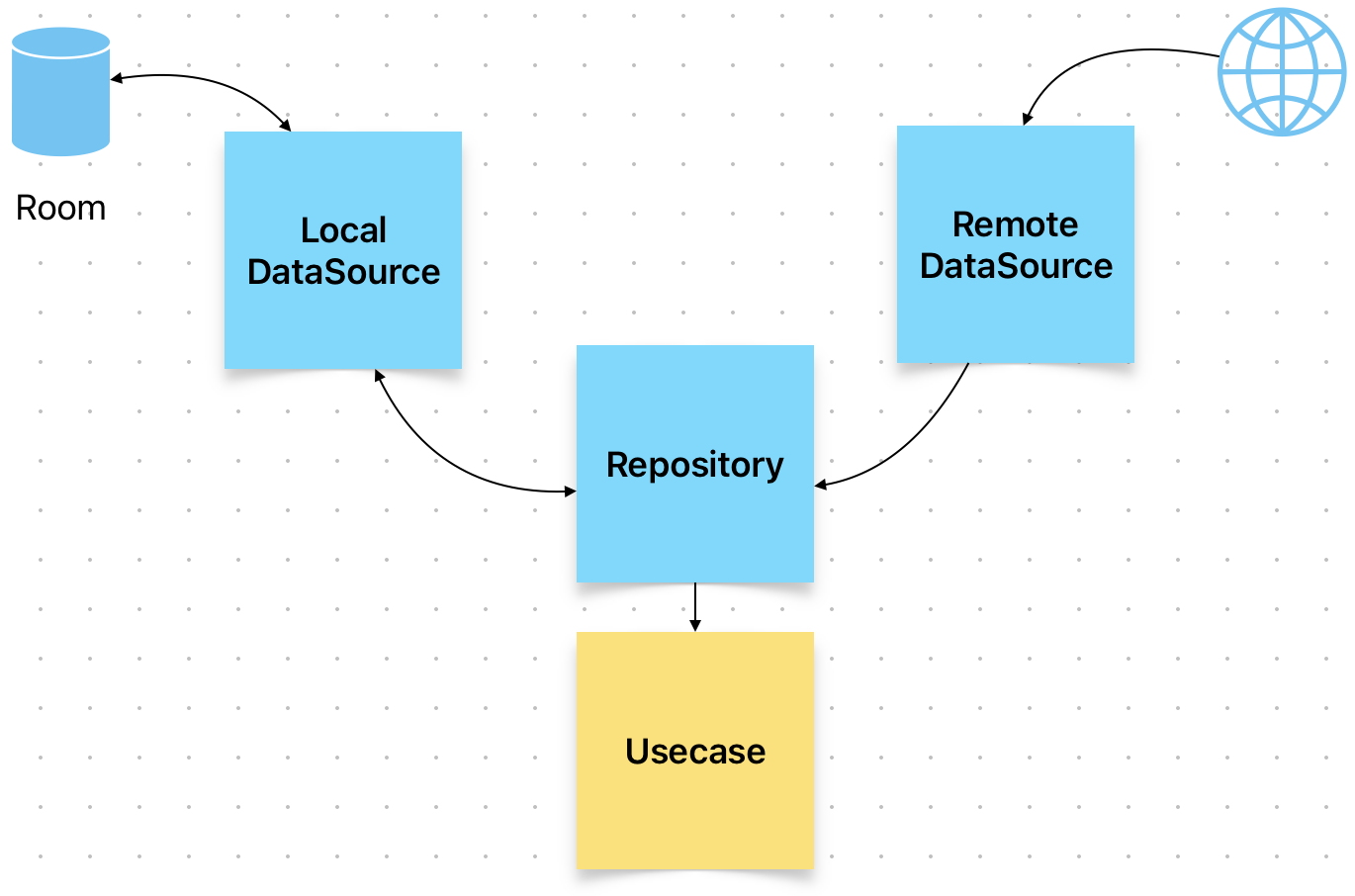
Приложение состоит из одной Activity в которой создается GetFalconInfoUseCase.
@AndroidEntryPoint class MainActivity : ComponentActivity() { @Inject lateinit var getFalconInfoUseCase: GetFalconInfoUseCaseДалее этот UseCase передается в экран построения списка элементов. Используется producestate для преобразования non-Compose state into Compose state. Еще про «Побочные эффекты» возникающие при построении композиции можно посмотреть тут SideEffect. https://habr.com/ru/companies/joydev/articles/743048/
FalconInfoItemsScreen
@Composable fun FalconInfoItemsScreen(getFalconInfoUseCase: GetFalconInfoUseCase) { produceState<ResponseResult<List<FalconInfo>>>(initialValue = ResponseResult.Loading, getFalconInfoUseCase) { try { getFalconInfoUseCase.getFalconInfo().collect { value = it } } catch (e: DataSourceException) { value = ResponseResult.Error(e) } }.let { when (it.value) { is ResponseResult.Loading -> ShowStatusScreen("Loading...") is ResponseResult.Success -> { it.value.onSuccess { rockets -> FalconInfoListView(rockets) } } is ResponseResult.Error -> it.value.onError { error -> ShowStatusScreen(error.getError(LocalContext.current)) } } } }Запроса можно выполнить используя rememberCoroutineScope и mutableStateOf
mutableStateOf — Создает State при изменении которого compose функция перезапускается
remember — сохраняет этот State при каждом перезапуске функции
Для типа переменной результата потребуется аннотация @Stable если структура не удовлетворяет требованиям контракта
Skipping if the inputs haven’t changed
If a composable is already in the Composition, it can skip recomposition if all the inputs are stable and haven’t changed.
A stable type must comply with the following contract:
-
The result of
equalsfor two instances will forever be the same for the same two instances. -
If a public property of the type changes, Composition will be notified.
-
All public property types are also stable.
There are some important common types that fall into this contract that the compose compiler will treat as stable, even though they are not explicitly marked as stable by using the @Stable annotation:
-
All primitive value types:
Boolean,Int,Long,Float,Char, etc. -
Strings
-
All Function types (lambdas)
All of these types are able to follow the contract of stable because they are immutable. Since immutable types never change, they never have to notify Composition of the change, so it is much easier to follow this contract.
Note: All deeply immutable types can safely be considered stable types.
One notable type that is stable but is mutable is Compose’s MutableState type. If a value is held in a MutableState, the state object overall is considered to be stable as Compose will be notified of any changes to the .value property of State.
When all types passed as parameters to a composable are stable, the parameter values are compared for equality based on the composable position in the UI tree. Recomposition is skipped if all the values are unchanged since the previous call.
Key Point: Compose skips the recomposition of a composable if all the inputs are stable and haven’t changed. The comparison uses the equals method.
Compose considers a type stable only if it can prove it. For example, an interface is generally treated as not stable, and types with mutable public properties whose implementation could be immutable are not stable either.
If Compose is not able to infer that a type is stable, but you want to force Compose to treat it as stable, mark it with the @Stable annotation.
Альтернативный способ получения данных и формирования экрана
fun FalconInfoItemsScreen(getFalconInfoUseCase: GetFalconInfoUseCase) { val scope = rememberCoroutineScope() var result: ResponseResult<List<FalconInfo>> by remember { mutableStateOf(ResponseResult.Loading) } LaunchedEffect(key1 = true) { scope.launch { try { getFalconInfoUseCase.getFalconInfo().collect { result = it } } catch (e: DataSourceException) { result = ResponseResult.Error(e) } } } when (result) { is ResponseResult.Loading -> ShowStatusScreen(stringResource(R.string.loading)) is ResponseResult.Success -> { result.onSuccess { FalconInfoListView(it) Timber.d("size = ${it.size}") } } is ResponseResult.Error -> result.onError { error -> ShowStatusScreen(error.getError(LocalContext.current)) } } Навигация
Настройка навигации заключается в установке пары route как строковой константы и compose элемента отрисовки. Также указываем первый экран startDestination.
val navController = rememberNavController() NavHost(navController = navController, startDestination = LOGIN_SCREEN) { composable(HOME_SCREEN) { HomeScreen() } composable(ROCKETS_SCREEN) { FalconInfoItemsScreen(getFalconInfoUseCase) } composable(LOGIN_SCREEN) { LoginScreen() } }Навигация по экранам в зависимости от выбранного таба
when (selectedTabIndex) { HOME_TAB -> navigate(navController, Constants.HOME_SCREEN) ROCKETS_TAB -> navigate(navController, Constants.ROCKETS_SCREEN) LOGIN_TAB -> navigate(navController, Constants.LOGIN_SCREEN) }Хак для выталкивания экрана, как фрагмента из BackStack при переходе, чтобы не хранить предыдущие экраны в стеке и сразу выйти из приложения по нажатию Back.
fun navigate(navController: NavController, route: String) { navController.navigate(route) { popUpTo(0) } }Refactoring
sealed class Screen( val tabIndex: Int, val route: String, @StringRes val textResId: Int, val selectedItem: ImageVector, val unselectedItem: ImageVector, val popUp: Boolean = true ) { data object Home : Screen(HOME_TAB, HOME_SCREEN, R.string.home, Icons.Filled.Home, Icons.Outlined.Home) data object Rockets : Screen(ROCKETS_TAB, ROCKETS_SCREEN, R.string.rockets, Icons.Filled.Rocket, Icons.Outlined.Rocket) data object Login : Screen(LOGIN_TAB, LOGIN_SCREEN, R.string.login, Icons.Filled.AccountCircle, Icons.Outlined.AccountCircle) companion object { const val HOME_SCREEN = "homeScreen" const val ROCKETS_SCREEN = "rocketsScreen" const val LOGIN_SCREEN = "loginScreen" const val HOME_TAB = 0 const val ROCKETS_TAB = 1 const val LOGIN_TAB = 2 } } @Composable private fun initTabItems(): List<TabItem> { val items = listOf(Screen.Home, Screen.Rockets, Screen.Login) return items.map { TabItem(title = stringResource(it.textResId), unselectedItem = it.unselectedItem, selectedItem = it.selectedItem) } }Ktorfit
Традиционно используемый Retrofit заменен на Ktorfit. Поскольку даже названия двух клиентов похожи применение выглядит также. В описании так и написано — inspired by Retrofit. Аннотации сохранены без изменений. В проекте используется @GET.
Ktorfit is a HTTP client/Kotlin Symbol Processor for Kotlin Multiplatform ( Android, iOS, Js, Jvm, Linux) using KSP and Ktor clients inspired by Retrofit.
@Singleton @Provides fun provideKtorfit(): Ktorfit { val ktorfit = ktorfit { baseUrl(Constants.BASE_URL) httpClient(HttpClient { // install(HttpCache) install(ContentNegotiation) { json( Json { prettyPrint = true isLenient = true ignoreUnknownKeys = true } ) } }) converterFactories( FlowConverterFactory(), CallConverterFactory(), ) } return ktorfit } @Singleton @Provides fun provideApiServices(ktorfitClient: Ktorfit): ApiService { return ktorfitClient.create<ApiService>() } Интеграция в проект выглядит похожей на Retrofit. HttpClient и json serializer поставляются из Ktor пакета. Под капотом там package kotlinx.serialization.json. Converters гибко настраивается при желании. Например ниже список встроенных парсеров.
Provides a list of standard subtypes of an application content type
public val Any: ContentType = ContentType("application", "*") public val Atom: ContentType = ContentType("application", "atom+xml") public val Cbor: ContentType = ContentType("application", "cbor") public val Json: ContentType = ContentType("application", "json") public val HalJson: ContentType = ContentType("application", "hal+json") public val JavaScript: ContentType = ContentType("application", "javascript") public val OctetStream: ContentType = ContentType("application", "octet-stream") public val Rss: ContentType = ContentType("application", "rss+xml") public val Xml: ContentType = ContentType("application", "xml") public val Xml_Dtd: ContentType = ContentType("application", "xml-dtd") public val Zip: ContentType = ContentType("application", "zip") public val GZip: ContentType = ContentType("application", "gzip") На GitHub Ktorfit есть два примера использования AndroidOnlyExample и MultiplatformExample. В проект добавлен первый вариант. В будущем можно перейти на использование KMM (Kotlin Multiplatform Mobile).
Кэширование результата запроса Ktorfit в Room
Логика выглядит так — Сначала проверяется пустая ли база данных. Если нет то данные извлекаются из нее. Если пустая то делается запрос в сеть и после перемапливания responseToDomain() отдается на уровень Domain и следом идет сохранение insertAllRocketsInfo() в базу данных для последующих запросов. Кэширование на уровне HTTP больше не требуется install(HttpCache). Работает такое кэширование с Базой данных значительное быстрее, поскольку не требуется Json парсинг.
class FalconRepositoryImpl @Inject constructor( private val remoteDataSource: RemoteDataSource, private val localDataSource: LocalDataSource ) : FalconRepository { override fun getFalconInfo(): Flow<ResponseResult<List<FalconInfo>>> { return flow { if (localDataSource.getAllRocketsInfo().isNotEmpty()) { emit(ResponseResult.Success( DataMapper.entryToDomain(localDataSource.getAllRocketsInfo()))) } else { remoteDataSource.getFalconInfo().run { when (this) { is ResponseResult.Success -> { emit(ResponseResult.Success(DataMapper.responseToDomain(response))) localDataSource .insertAllRocketsInfo( DataMapper.responseToEntry(response)) } is ResponseResult.Error -> { emit(ResponseResult.Error(exception)) } else -> {} } } } }.flowOn(Dispatchers.IO).onFlowStarts() } } onFlowStart() это extension для установки начального состояния ResponseResult.Loading перед тем как запустится Flow.
/** extension function for Flow Class to emit loading state before the flow starts */ fun <T> Flow<ResponseResult<T>>.onFlowStarts() = onStart { emit(ResponseResult.Loading) }.catch { e: Throwable -> e.printStackTrace() emit(ResponseResult.Error(DataSourceException.Unexpected(R.string.error_client_unexpected_message))) }Карточки
Для отображения элементов используется Card. Предпросмотр показывает как выглядит один элемент, он растянут по высоте и ширине и будет занимать все выделенное ей пространство в LazyVerticalGrid.
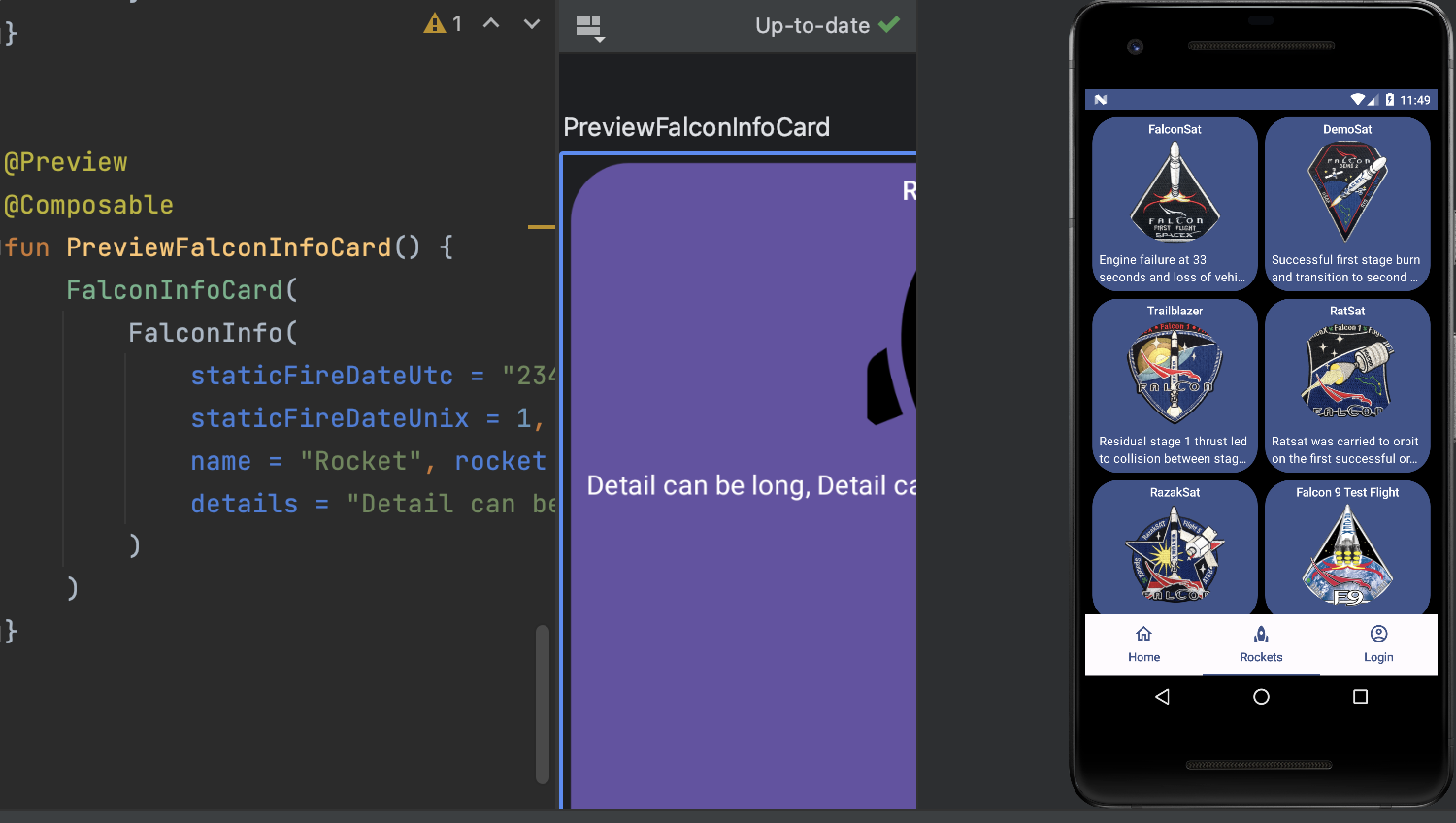
Есть несколько других типов карточек ElevatedCard и OutlinedCard. Первая задает тень, вторая очерченная как это следует из перевода.
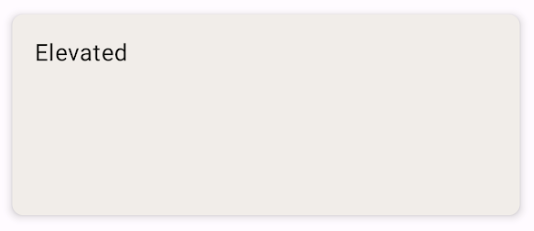
material3 package-summary полный список дополнений Material Design 3.
LazyVerticalGrid
Код в спойлере
@Composable fun FalconInfoCard(falconInfo: FalconInfo) { Card(modifier = Modifier .fillMaxSize() .padding(4.dp), colors = CardDefaults.cardColors( containerColor = MaterialTheme.colorScheme.primary ), shape = RoundedCornerShape(30.dp),) { Row( modifier = Modifier .padding(4.dp) .fillMaxWidth(), horizontalArrangement = Arrangement.Center, ) { Text( maxLines = 1, text = falconInfo.name, style = MaterialTheme.typography.titleSmall ) } Row(modifier = Modifier .fillMaxWidth(), horizontalArrangement = Arrangement.Center) { AsyncImage( placeholder = rememberVectorPainter(Icons.Filled.Rocket), model = falconInfo.links?.patch?.small, contentDescription = null, contentScale = ContentScale.FillWidth, modifier = Modifier .size(120.dp) .clip(CircleShape) ) } Spacer(modifier = Modifier .height(1.dp)) Row( modifier = Modifier .wrapContentHeight() .padding(8.dp) ) { falconInfo.details?.let { Text( maxLines = 2, overflow = TextOverflow.Ellipsis, text = it, style = MaterialTheme.typography.bodyMedium ) } } } } LazyVerticalGrid позволяет отрисовывать таблицы. Параметр columns устанавливает количество колонок. В моем случае их две columns = GridCells.Fixed(2). Цвет карточки задается через параметр containerColor. Используйте цвета из настроек вашей MaterialTheme, а не константы такие как Const.Blue и т.д. Например primary цвет для карточки задается так — containerColor = MaterialTheme.colorScheme.primary.
База данных Room
Для простоты миграции при изменении версии базы она очищается. Метод cleanRockets() так же можно использовать для сброса кэша, например через WorkManager через временные интервалы или принудительно по своей кнопке в настройках.
override fun onDestructiveMigration(db: SupportSQLiteDatabase) { super.onDestructiveMigration(db) INSTANCE?.let { scope.launch { it.dao().cleanRockets() } } } ... @Query("DELETE FROM FalconInfo") fun cleanRockets() Класс-Таблица описания Базы Данных помечаем @Entityаннотацией.
@Entity(tableName = "FalconInfo")База данных имеет вложенную структуру, поэтому вложенные таблицы надо также отметить @Embeddedаннотацией. Room также поддерживает каскадное удаление. Этот функционал в проекте не используется.
@Embedded("links") var linksEntry : LinksEntry? = LinksEntry(),Простой запрос всех записей из Базы данных выглядит так.
@Query("SELECT * FROM FalconInfo") fun getAllRocketsInfo(): List<FalconInfoEntity>Оптимизации
Когда новый элемент добавляется в конец списка рекомпозиции сцены не происходит. Но если новый элемент добавить в середину, начало, удалился или возникло переупорядочивание элементов списка произойдет перекомпоновка всех элементов
Из документации:
https://developer.android.com/jetpack/compose/lifecycle
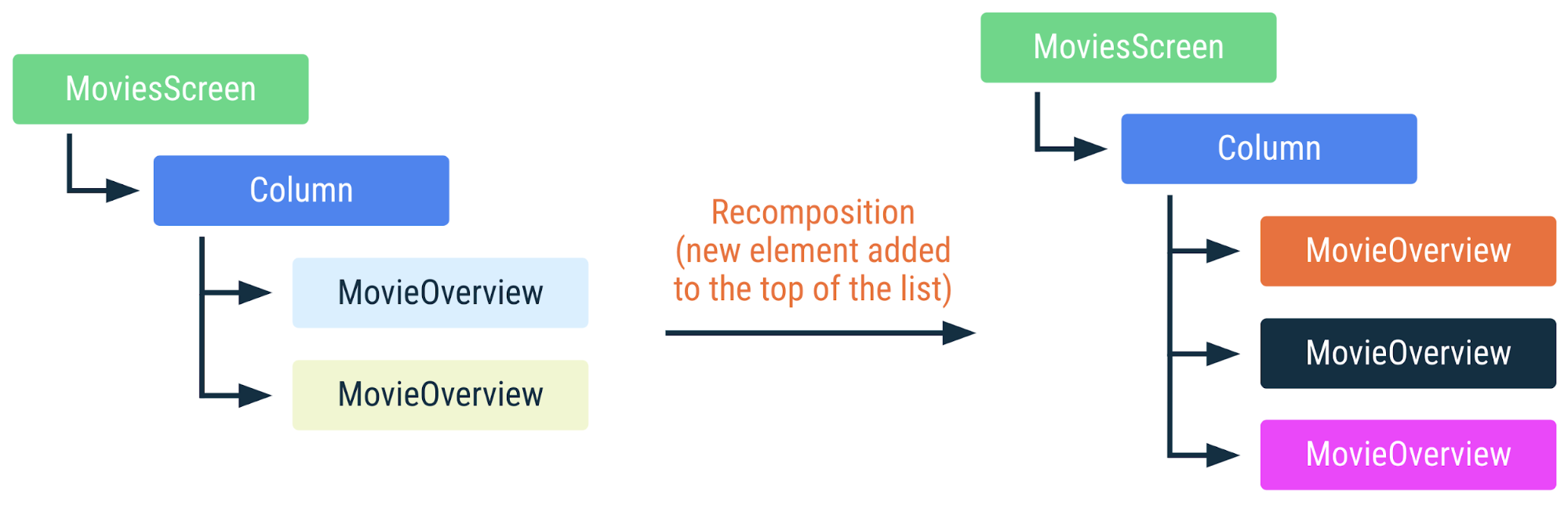
Если мы изменим порядок списка элементов, в идеале мы должны аналогичным образом изменить порядок экземпляров в дереве композиции вместо того, чтобы перекомпоновывать каждый компонент MovieOverview с другим экземпляром элемента списка.
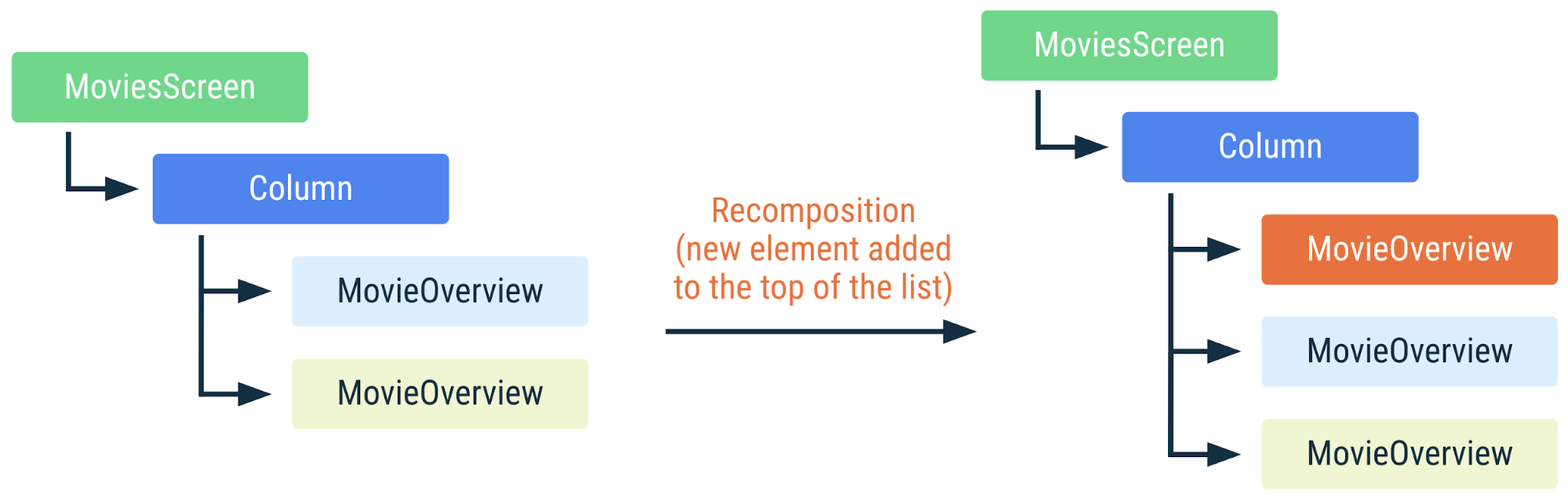
Compose предоставляет нам возможность сообщить среде выполнения, какие значения мы хотим использовать для идентификации данной части дерева с помощью ключа
Оптимизация списка проекта выдлядит следующим образом:
columns = GridCells.Fixed(2), content = { items(falconInfoEntries, key = {falconInfo -> falconInfo.id}) { falconInfo -> FalconInfoCard(falconInfo) } })Links
Исходный код проекта
Исходный код всего проекта можно посмотреть на GitHub в ветке architecture.
Первая версия проекта описана в статье https://habr.com/ru/articles/763980/
ссылка на оригинал статьи https://habr.com/ru/articles/765416/
Добавить комментарий