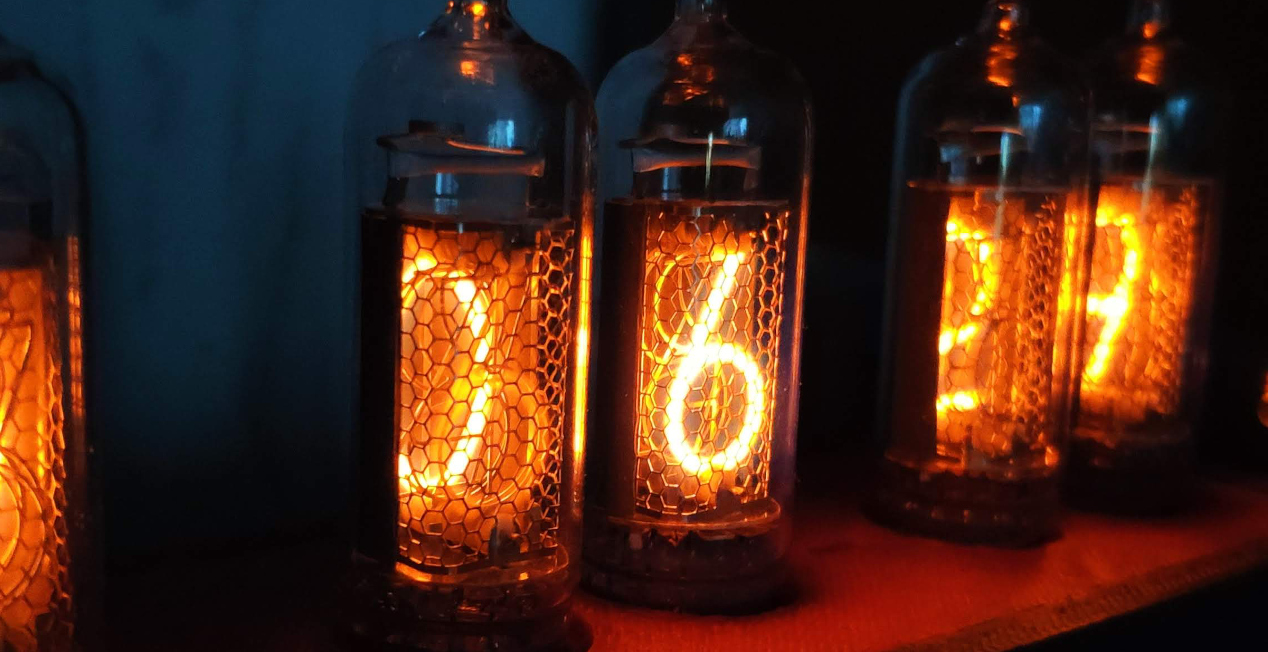
Радиолампы, словно артефакты из прошлого, олицетворяют нечто большее, чем просто технологию. Они несут в себе определенную магию, отражающую уникальное сочетание технического мастерства и эстетики. Не удивительно, что часы на неоновых индикаторах занимают довольно уникальную нишу в мире дизайна и интерьера. Они представляют собой не просто инструмент для отображения времени, но и элемент декора, который может значительно изменить атмосферу помещения. Этой статье я расскажу о своем опыте создания Nixie Clock на базе драйвера собственной разработки.
❯ С чего всё началось
Однажды, на предприятии где я работал, на складе обнаружилось много неликвидного материала, который хранился там ещё с советских времен.
 Неликвид состоял из электронных компонентов, которые нам отдали безвозмездно для использования в личных целях, чтобы не тратить средства на утилизацию. На самом деле, там было очень много ценных компонентов, среди которых оказались неоновые индикаторные лампы марки ИН-12. В итоге я их забрал себе. С радиолампами знаком еще с детства, увлекаясь радиоконструированием, я часто собирал различные схемы, в том числе и на лампах. А тут такой флешбэк.
❯ Разработка часов
По состоянию на 2016 год, было много различных схем часов на лампах, но мне не нравилась их схемотехника, она казалась мне избыточной и не эффективной. Хотелось реализовать что-то простое, питающееся от стандартного USB порта, без использования модуля RTC и светодиодной подсветки, которая, по моему мнению, только портит всю эстетику ламп. На тот момент большинство схем работало на Arduino и микроконтроллерах от компании Atmel. Годом ранее, компания Espressif Systems выпустила на рынок свой микроконтроллер ESP8266, который произвел революцию. Так как на тот момент, широкополосный интернет уже был достаточно распространен, в том числе и домашние сети Wi-Fi, я решил отказаться от применения RTC модуля в своей схеме часов и использовать NTP серверы для синхронизации времени. Как вы могли догадаться, в своей схеме я применил модуль ESP8266. Далее я поделился в Twitter своим опытом применения нового модуля ESP8266 в своем проекте. Мой твит вызвал интерес, и мне предложили написать статью на Hackaday.io. Я последовал совету и опубликовал свою статью там.
Но в этой статье я хочу описать реализацию часов с применением шести индикаторов ИН-14 с использованием улучшенного драйвера. Как выглядят эти лампы, вы можете увидеть ниже.

Давайте приступим
Ниже изображена схема драйвера часов:

Схема подключения ламп:

Согласно документации, индикаторная лампа работает от напряжения в 170В (напряжение возникновения разряда), для стабильной работы нам потребуется напряжение в 200В. Как вы можете видеть из схемы, для повышения напряжения до 200В применен set-up преобразователь на базе ШИМ контроллера МАХ1771 в связке с L2, D1 и Q1. Так как нам недостаточно выводов ESP8266 для управления лампами, то будем «размножать» пины управления с помощью дешифраторов CD4028BM96. Данный модифицированный драйвер позволяет управлять десятью газоразрядными индикаторными лампами. Выше описанный драйвер имеет динамический метод управления индикацией, то есть в определенный момент времени загорается только одна лампа, но переключение выполняется настолько быстро, что человеческий глаз практически не воспринимает переключение ламп и кажется что все лампы горят одновременно. Данный режим переводит работу ламп в импульсный режим, что положительно сказывается на их срок службы.
Разработка платы
Разработка платы велась в Sprint-Layout 5.0, так как мне это было удобнее для изготовления платы в домашних условиях.
Плата драйвера:

Плата для установки ламп:

Изготовление печатной платы выполнялось с применение фотошаблона и фоторезиста:

Засветка фоторезиста платы драйвера:

Засветка фоторезиста платы крепления ламп:

Травление платы драйвера:

Пайка компонентов:
Плата драйвера в собранном виде:

Монтаж ламп на плату управления:

Тест работы схемы часов с небольшой отладкой:

Для управления высоким напряжением используются оптроны TLP627 от компании TOSHIBA.
TLP627 — высоковольтный транзисторный оптрон со схемой Дарлингтона на выходе.
Корпус часов
Корпус часов не предполагает какой либо сложной конструкции, разработка выполнялась во FreeCAD:

Далее корпус был распечатан на 3D принтере, с использованием HIPS пластика. Данный пластик при печати создает структуру стенки, которая чем-то похоже на дерево и не обладает глянцевым эффектом как другие виды пластика типа PLA, ABS и т. п.
Монтаж электроники
После изготовления корпуса, необходимо смонтировать все компоненты. Ниже показан монтаж платы драйвера с применением, всеми любимого, термоклея. 🙂

В итоге мы получаем следующее:

Часы в работе:

Часы в данный момент находятся на моём на рабочем столе, естественно, в живую они выглядят гораздо красивее:

❯ Давайте поговорим о прошивке часов
Для разработки прошивки часов, я использовал среду разработки Arduino IDE. Ниже представлен код прошивки:
#include <TimeLib.h> #include <ESP8266WiFi.h> #include <WiFiClient.h> #include <ESP8266WebServer.h> #include <ESP8266mDNS.h> #include <ESP8266HTTPUpdateServer.h> #include <WiFiUdp.h> #include <EEPROM.h> #include <ESP8266SSDP.h> const char* host = "retroclock"; const char *ap_ssid = "NixieClock"; const char *ap_password = "EsPnEtWoRk"; int statusCode; String st; String content; // NTP Servers: String ntpServerName2; int timeZone = 0; // Time zone ESP8266WebServer httpServer(80); ESP8266HTTPUpdateServer httpUpdater; WiFiUDP Udp; unsigned int localPort = 8888; // local port to listen for UDP packets time_t getNtpTime(); void digitalClockDisplay(); void printDigits(int digits); void sendNTPpacket(IPAddress &address); /* const int D_A0 = 16; const int D_A1 = 12; const int D_A2 = 13; const int D_A3 = 14; */ const int D_A0 = 13; //A const int D_A1 = 16; //B const int D_A2 = 14; //C const int D_A3 = 12; //D //digits multiplex const int D_M1 = 5; //A const int D_M2 = 2; //B const int D_M3 = 0; //C const int D_M4 = 4; //D const int LED1 = 1; //used Tx pin 1 const int LED2 = 3; //used Rx pin 3 int counter = 0; int counter2 = 0; uint32_t ms, ms1 = 0; //for timer uint32_t ms2, ms3 = 0; uint32_t ms4, ms5 = 0; uint32_t ms6, ms7 = 0; void setup() { EEPROM.begin(512); timeZone = read_EEPROM(32,96).toInt(); ntpServerName2 = read_EEPROM(0,32); pinMode(D_A0, OUTPUT); //A0 pinMode(D_A1, OUTPUT); //A1 pinMode(D_A2, OUTPUT); //A2 pinMode(D_A3, OUTPUT); //A3 pinMode(D_M1, OUTPUT); //1 pinMode(D_M2, OUTPUT); //2 pinMode(D_M3, OUTPUT); //3 pinMode(D_M4, OUTPUT); //4 pinMode(LED1, OUTPUT); //LED1 pinMode(LED2, OUTPUT); //LED2 httpServer.on("/", rootPageHandler); httpServer.on("/wlan_config", wlanPageHandler); httpServer.on("/setting", setting); httpServer.on("/time.html", timess); httpServer.on("/times.html", testpage); httpServer.onNotFound(handleNotFound); WiFi.mode(WIFI_STA); WiFi.begin(); for (int x = 0; x < 100; x ++){ if (WiFi.status() == WL_CONNECTED){ break; } delay(500); } if(WiFi.status() != WL_CONNECTED) { delay(500); WiFi.mode(WIFI_AP_STA); WiFi.softAP(ap_ssid, ap_password); } WiFi.hostname("IoT Nixie Clock IN-14"); MDNS.begin(host); httpUpdater.setup(&httpServer); //httpServer.begin(); MDNS.addService("http", "tcp", 80); delay(2000); HTTP_init(); //настраиваем HTTP интерфейс SSDP_init(); //запускаем SSDP сервис Udp.begin(localPort); setSyncProvider(getNtpTime); setSyncInterval(300); } time_t prevDisplay = 0; void loop() { httpServer.handleClient(); ms4 = micros(); if((ms4-ms5) >= 800 ) { counter++; ms5 = ms4; } if(counter > 30){ counter = 0; } if (millis() > 20000) { switchs(); } else { demo(); } } void displayig(){ if (counter == 1 or counter == 5 or counter == 10 or counter == 15 or counter == 20 or counter == 25) { multiplex(7); } if (counter == 3 or counter == 4 or counter == 2){ // 1-я цифра //секунды десятые int times = second() /10; digitfunction(times); multiplex(1); } if (counter == 8 or counter == 9 or counter == 7){ // 2-я цифра /скунды ед int times = second() %10; digitfunction(times); multiplex(2); } if (counter == 13 or counter == 14 or counter == 12 ){ // 1-я цифра //минуты десятые int times = minute() /10; digitfunction(times); multiplex(4); } if (counter == 18 or counter == 19 or counter == 17){ // 2-я цифра //минуты ед int times = minute() % 10; digitfunction(times); multiplex(3); } if (counter == 23 or counter == 24 or counter == 22){ // 3-я цифра int times = hour()% 10;; digitfunction(times); multiplex(5); } if (counter == 28 or counter == 29 or counter == 27){ // 4-я цифра int times = hour()/10; digitfunction(times); multiplex(6); } } void multiplex_sw(int M1, int M2, int M3, int M4) { digitalWrite(D_M1, M1); digitalWrite(D_M2, M2); digitalWrite(D_M3, M3); digitalWrite(D_M4, M4); } void multiplex(int chanel){ switch (chanel) { case 1: multiplex_sw(HIGH, LOW, HIGH, LOW); break; case 2: multiplex_sw(HIGH, LOW, LOW, HIGH); break; case 3: multiplex_sw(LOW, HIGH, HIGH, LOW); break; case 4: multiplex_sw(HIGH, HIGH, LOW, LOW); break; case 5: multiplex_sw(HIGH, LOW, LOW, LOW); break; case 6: multiplex_sw(LOW, LOW, LOW, HIGH); break; case 7: multiplex_sw(LOW, LOW, LOW, LOW); break; } } void changeMux(int AO, int A1, int A2, int A3) { digitalWrite(D_A0, AO); digitalWrite(D_A1, A1); digitalWrite(D_A2, A2); digitalWrite(D_A3, A3); } void digitfunction(int times){ switch (times) { case 0: changeMux(LOW, LOW, LOW, LOW); break; case 1: changeMux(HIGH, LOW, LOW, LOW); break; case 2: changeMux(LOW, HIGH, LOW, LOW); break; case 3: changeMux(HIGH, HIGH, LOW, LOW); break; case 4: changeMux(LOW, LOW, HIGH, LOW); break; case 5: changeMux(HIGH, LOW, HIGH, LOW); break; case 6: changeMux(LOW, HIGH, HIGH, LOW); break; case 7: changeMux(HIGH, HIGH, HIGH, LOW); break; case 8: changeMux(LOW, LOW, LOW, HIGH); break; case 9: changeMux(HIGH, LOW, LOW, HIGH); break; } } void switchs() { ms2 = second(); if(( ms2 ) >= 0 && ( ms2 ) <= 44){ displayig(); int pww = 1024; ms = millis(); if(( ms - ms1 ) >= 0 && ( ms - ms1 ) <= 500){analogWrite(LED1, pww);} if(( ms - ms1 ) >= 250 && ( ms - ms1 ) <= 500){analogWrite(LED2, pww);} if(( ms - ms1 ) >= 500){analogWrite(LED1, 0); analogWrite(LED2, 0);} if(( ms - ms1 ) >= 1000){ ms1 = ms;} } if(( ms2 ) >= 45 && ( ms2 ) <= 60){ displayig(); int pww = 1024; ms = millis(); if(( ms - ms1 ) >= 0 && ( ms - ms1 ) <= 500){analogWrite(LED1, pww); analogWrite(LED2, pww);} //if(( ms - ms1 ) >= 250 && ( ms - ms1 ) <= 500){analogWrite(LED2, pww);} if(( ms - ms1 ) >= 500){analogWrite(LED1, 0); analogWrite(LED2, 0);} if(( ms - ms1 ) >= 1000){ ms1 = ms;} } } /*-------- NTP code ----------*/ const int NTP_PACKET_SIZE = 48; // NTP time is in the first 48 bytes of message byte packetBuffer[NTP_PACKET_SIZE]; //buffer to hold incoming & outgoing packets time_t getNtpTime(){ IPAddress ntpServerIP; // NTP server's ip address char char_var_resp[ntpServerName2.length()]; ntpServerName2.toCharArray(char_var_resp, ntpServerName2.length()+1); while (Udp.parsePacket() > 0) ; // discard any previously received packets WiFi.hostByName(char_var_resp, ntpServerIP); sendNTPpacket(ntpServerIP); uint32_t beginWait = millis(); while (millis() - beginWait < 1500) { int size = Udp.parsePacket(); if (size >= NTP_PACKET_SIZE) { Udp.read(packetBuffer, NTP_PACKET_SIZE); // read packet into the buffer unsigned long secsSince1900; // convert four bytes starting at location 40 to a long integer secsSince1900 = (unsigned long)packetBuffer[40] << 24; secsSince1900 |= (unsigned long)packetBuffer[41] << 16; secsSince1900 |= (unsigned long)packetBuffer[42] << 8; secsSince1900 |= (unsigned long)packetBuffer[43]; return secsSince1900 - 2208988800UL + timeZone * SECS_PER_HOUR; } } return 0; // return 0 if unable to get the time } // send an NTP request to the time server at the given address void sendNTPpacket(IPAddress &address){ // set all bytes in the buffer to 0 memset(packetBuffer, 0, NTP_PACKET_SIZE); // Initialize values needed to form NTP request // (see URL above for details on the packets) packetBuffer[0] = 0b11100011; // LI, Version, Mode packetBuffer[1] = 0; // Stratum, or type of clock packetBuffer[2] = 6; // Polling Interval packetBuffer[3] = 0xEC; // Peer Clock Precision // 8 bytes of zero for Root Delay & Root Dispersion packetBuffer[12] = 49; packetBuffer[13] = 0x4E; packetBuffer[14] = 49; packetBuffer[15] = 52; // all NTP fields have been given values, now // you can send a packet requesting a timestamp: Udp.beginPacket(address, 123); //NTP requests are to port 123 Udp.write(packetBuffer, NTP_PACKET_SIZE); Udp.endPacket(); } void demo(){ ms6 = millis(); if ((ms6-ms7) >= 2) { counter2++; ms7 = ms6; } if (counter2 > 0 && counter2 < 1000){ // 4-я цифра multiplex(2); if(counter2 == 100) { digitfunction(9);} if(counter2 == 200) { digitfunction(8);} if(counter2 == 300) { digitfunction(7);} if(counter2 == 400) { digitfunction(6);} if(counter2 == 500) { digitfunction(5);} if(counter2 == 600) { digitfunction(4);} if(counter2 == 700) { digitfunction(3);} if(counter2 == 800) { digitfunction(2);} if(counter2 == 900) { digitfunction(1);} if(counter2 == 1000) { digitfunction(0);} } if (counter2 >1100 && counter2 < 2100){ // 3-я цифра multiplex(1); if(counter2 == 1100) { digitfunction(9);} if(counter2 == 1200) { digitfunction(8);} if(counter2 == 1300) { digitfunction(7);} if(counter2 == 1400) { digitfunction(6);} if(counter2 == 1500) { digitfunction(5);} if(counter2 == 1600) { digitfunction(4);} if(counter2 == 1700) { digitfunction(3);} if(counter2 == 1800) { digitfunction(2);} if(counter2 == 1900) { digitfunction(1);} if(counter2 == 2000) { digitfunction(0);} } if (counter2 >2100 && counter2 < 3100){ // 2-я цифра multiplex(3); if(counter2 == 2100) { digitfunction(9);} if(counter2 == 2200) { digitfunction(8);} if(counter2 == 2300) { digitfunction(7);} if(counter2 == 2400) { digitfunction(6);} if(counter2 == 2500) { digitfunction(5);} if(counter2 == 2600) { digitfunction(4);} if(counter2 == 2700) { digitfunction(3);} if(counter2 == 2800) { digitfunction(2);} if(counter2 == 2900) { digitfunction(1);} if(counter2 == 3000) { digitfunction(0);} } if (counter2 >3100 && counter2 < 4100){ // 4-я цифра multiplex(4); if(counter2 == 3100) { digitfunction(9);} if(counter2 == 3200) { digitfunction(8);} if(counter2 == 3300) { digitfunction(7);} if(counter2 == 3400) { digitfunction(6);} if(counter2 == 3500) { digitfunction(5);} if(counter2 == 3600) { digitfunction(4);} if(counter2 == 3700) { digitfunction(3);} if(counter2 == 3800) { digitfunction(2);} if(counter2 == 3900) { digitfunction(1);} if(counter2 == 4000) { digitfunction(0);} } if (counter2 >4100 && counter2 < 5100){ // 5-я цифра multiplex(5); if(counter2 == 4100) { digitfunction(9);} if(counter2 == 4200) { digitfunction(8);} if(counter2 == 4300) { digitfunction(7);} if(counter2 == 4400) { digitfunction(6);} if(counter2 == 4500) { digitfunction(5);} if(counter2 == 4600) { digitfunction(4);} if(counter2 == 4700) { digitfunction(3);} if(counter2 == 4800) { digitfunction(2);} if(counter2 == 4900) { digitfunction(1);} if(counter2 == 5000) { digitfunction(0);} } if (counter2 >5100 && counter2 < 6100){ // 6-я цифра multiplex(6); if(counter2 == 5100) { digitfunction(9);} if(counter2 == 5200) { digitfunction(8);} if(counter2 == 5300) { digitfunction(7);} if(counter2 == 5400) { digitfunction(6);} if(counter2 == 5500) { digitfunction(5);} if(counter2 == 5600) { digitfunction(4);} if(counter2 == 5700) { digitfunction(3);} if(counter2 == 5800) { digitfunction(2);} if(counter2 == 5900) { digitfunction(1);} if(counter2 == 6000) { digitfunction(0);} } } //web interface/////////====================================== /* WLAN page allows users to set the WiFi credentials */ String twoDigits(int digits){ if(digits < 10) { String i = '0'+String(digits); return i; } else { return String(digits); } } void wlanPageHandler(){ if (httpServer.hasArg("ssid")){ if (httpServer.hasArg("password")){ WiFi.begin(httpServer.arg("ssid").c_str(), httpServer.arg("password").c_str()); }else{ WiFi.begin(httpServer.arg("ssid").c_str()); } while (WiFi.status() != WL_CONNECTED){ delay(500); } delay(500); } String response_message = ""; response_message +="<head>"; response_message +="<title>Wi-Fi конфигурация</title>"; response_message += "<meta http-equiv=\"Content-Type\" content=\"text/html; charset=utf-8;\" />"; response_message += "<style type=\"text/css\">body{background-color: #7D8EE2;color:#FFF;}a {color:#73B9FF;}.blockk {border:solid 1px #2d2d2d;text-align:center;background:#0059B3;padding:10px 10px 10px 10px;-moz-border-radius: 5px;-webkit-border-radius: 5px;border-radius: 5px;}"; response_message += ".blockk{border:double 2px #000000;-moz-border-radius: 5px;-webkit-border-radius: 5px;border-radius: 5px;}"; response_message +="</style><style type=\"text/css\" media=\'(min-width: 810px)\'>body{font-size:18px;}.blockk {width: 400px;}</style>"; response_message +="<style type=\"text/css\" media=\'(max-width: 800px) and (orientation:landscape)\'>body{font-size:8px;}</style></head>"; response_message += "<body><center><div class=\"blockk\">"; response_message += "Настройка беспроводного соединения<br><hr>"; if (WiFi.status() == WL_CONNECTED){ IPAddress ip = WiFi.localIP(); String ipStr = String(ip[0]) + '.' + String(ip[1]) + '.' + String(ip[2]) + '.' + String(ip[3]); response_message += "Статус: Модуль подключен к сети "+String(WiFi.SSID())+"<br><hr>"; response_message += "Уровень сигнала: "+String(WiFi.RSSI())+" dBi <br><hr>"; response_message += "IP адрес подключения: "+String(ipStr)+"<br><hr>"; }else{ response_message += "Статус: Модуль отключен от сети<br><hr>"; } response_message += "<p>Для подключения к WiFi сети, пожалуйста выберите сеть...</p><br><hr>"; // Get number of visible access points int ap_count = WiFi.scanNetworks(); if (ap_count == 0){ response_message += "Не найдено ниодной беспроводной сети.<br><hr>"; }else{ response_message += "<form method=\"get\">"; // Show access points for (uint8_t ap_idx = 0; ap_idx < ap_count; ap_idx++){ response_message += "<input type=\"radio\" name=\"ssid\" value=\"" + String(WiFi.SSID(ap_idx)) + "\">"; response_message += String(WiFi.SSID(ap_idx)) + " [Уровень сигнала: " + WiFi.RSSI(ap_idx) +" dBi]"; (WiFi.encryptionType(ap_idx) == ENC_TYPE_NONE) ? response_message += " " : response_message += "[защищена]"; response_message += "<br><br>"; } response_message += "WiFi пароль доступа (если сеть защищена):<br>"; response_message += "<input type=\"text\" name=\"password\"><br><hr>"; response_message += "<input type=\"submit\" value=\"Подключиться\">"; response_message += "</form>"; } response_message += "</body></html>"; response_message += "<a href=\"/\">Вернуться назад</a><br><hr>"; httpServer.send(200, "text/html", response_message); } /* Called if requested page is not found */ void handleNotFound(){ String message = "Файл не найден\n\n"; message += "URI: "; message += httpServer.uri(); message += "\nMethod: "; message += (httpServer.method() == HTTP_GET)?"GET":"POST"; message += "\nArguments: "; message += httpServer.args(); message += "\n"; for (uint8_t i = 0; i < httpServer.args(); i++){ message += " " + httpServer.argName(i) + ": " + httpServer.arg(i) + "\n"; } httpServer.send(404, "text/plain", message); } /* Root page for the webserver */ //================================================================================ void rootPageHandler() { String response_message = "<html>"; response_message +="<head>"; response_message +="<title>Интерфейс неоновых часов</title>"; response_message += "<meta http-equiv=\"Content-Type\" content=\"text/html; charset=utf-8;\" />"; response_message += "<style type=\"text/css\">body{background-color: #7D8EE2;color:#FFF;}a {color:#73B9FF;}.blockk {border:solid 1px #2d2d2d;text-align:center;background:#0059B3;padding:10px 10px 10px 10px;-moz-border-radius: 5px;-webkit-border-radius: 5px;border-radius: 5px;}"; response_message += ".blockk{border:double 2px #000000;-moz-border-radius: 5px;-webkit-border-radius: 5px;border-radius: 5px;}"; response_message +="</style><style type=\"text/css\" media=\'(min-width: 810px)\'>body{font-size:18px;}.blockk {width: 400px;}</style>"; response_message +="<style type=\"text/css\" media=\'(max-width: 800px) and (orientation:landscape)\'>body{font-size:8px;}</style>"; response_message +="<script>\n"; response_message +="setInterval(server_time,1000);\n"; response_message +="function server_time(){\n"; response_message +="var req = new XMLHttpRequest();\n"; response_message +="req.open(\"GET\",\"times.html\",true);\n"; response_message +="req.onreadystatechange = function(){\n"; response_message +="document.getElementById(\"xz\").innerHTML = req.responseText;\n"; response_message +=" }\n"; response_message +=" req.send();\n"; response_message +="}\n"; response_message +="</script>"; response_message +="<script>\n"; response_message +="setInterval(server_time1,1000);\n"; response_message +="function server_time1(){\n"; response_message +="var req1 = new XMLHttpRequest();\n"; response_message +="req1.open(\"GET\",\"time.html\",true);\n"; response_message +="req1.onreadystatechange = function(){\n"; response_message +="document.getElementById(\"xzy\").innerHTML = req1.responseText;\n"; response_message +=" }\n"; response_message +=" req1.send();\n"; response_message +="}\n"; response_message +="</script>"; response_message +="</head>"; response_message += "<body><center><div class=\"blockk\">"; response_message += "Интерфейс неоновых часов <br><hr>"; //time display response_message += "<b>Идентификатор устройства: "+String(ESP.getChipId())+" </b><hr>"; //time int times =(millis()/1000); int timehour =(((times) % 86400L) / 3600); if ( ((times % 3600) / 60) < 10 ) { // In the first 10 minutes of each hour, we'll want a leading '0' int timehour = 0; } int timeminuts=((times % 3600) / 60); // print the minute (3600 equals secs per minute) if ( (times % 60) < 10 ) { // In the first 10 seconds of each minute, we'll want a leading '0' int timeminuts = 0; } int timeseconds=(times % 60); // print the second response_message += "<div id=\"content3\">Время работы модуля: <br>"; response_message += "<body>"; response_message += "<div id=\"xz\"></div>"; response_message += "</body>"; response_message += "<center>NTP сервер: "+String(ntpServerName2)+" <br></center>"; response_message += "<center>Часовой пояс: </center>"; response_message += "<center>"; if(timeZone==5){ response_message += "UTC/GMT+5 (Екатеринбург)"; } if(timeZone==3){ response_message += "UTC/GMT+3 (Москва)"; } if(timeZone==4){ response_message += "UTC/GMT+4 (Самара, Ижевск)"; } if(timeZone==6){ response_message += "UTC/GMT+6 (Омск)"; } if(timeZone==7){ response_message += "UTC/GMT+7 (Красноярск)"; } if(timeZone==8){ response_message += "UTC/GMT+8 (Иркутск)"; } if(timeZone==9){ response_message += "UTC/GMT+9 (Якутск)"; } if(timeZone==10){ response_message += "UTC/GMT+10 (Владивосток)"; } if(timeZone==11){ response_message += "UTC/GMT+11 (Камчатка)"; } if(timeZone==1){ response_message += "UTC/GMT+1(Центральная Европа)"; } if(timeZone==-2){ response_message += "UTC/GMT-2 (Среднеатлантическое время)"; } if(timeZone==-3){ response_message += "UTC/GMT-3 (Аргентина)"; } if(timeZone==-4){ response_message += "UTC/GMT-4 (Канада)"; } if(timeZone==-5){ response_message += "UTC/GMT-5 (Нью-Йорк)"; } if(timeZone==-6){ response_message += "UTC/GMT-6 (Чикаго)"; } if(timeZone==-7){ response_message += "UTC/GMT-7 (Денвер)"; } if(timeZone==-8){ response_message += "UTC/GMT-8 (Лос-Анджелес)"; } response_message += "</center>"; String timenow = String(hour())+":"+twoDigits(minute())+":"+twoDigits(second()); response_message += "<hr>Время сети: <div id=\"xzy\">"+String(timenow)+"</div>"; if (WiFi.status() == WL_CONNECTED){ IPAddress ip = WiFi.localIP(); String ipStr = String(ip[0]) + '.' + String(ip[1]) + '.' + String(ip[2]) + '.' + String(ip[3]); response_message += "<hr>Статус: подключен к сети "+String(WiFi.SSID())+"<br>"; response_message += "Уровень сигнала: "+String(WiFi.RSSI())+" dBi <br><hr>"; response_message += "IP адрес подключения: "+String(ipStr)+"<br><hr>"; }else{ response_message += "<br><hr>WLAN статус: Отключено<br><hr>"; } response_message += "</p><form method='get' action='setting'><label>NTP сервер: <br></label><input name='ssid' length=32><br><label>Часовой пояс</label><br>"; response_message += "<select name='pass'>"; response_message += "<option disabled>Выберите часовой пояс</option>"; response_message += "<option selected value = '5'>UTC/GMT+5 (Екатеринбург)</option>"; response_message += "<option value = '3'>UTC/GMT+3 (Москва)</option>"; response_message += "<option value = '4'> UTC/GMT+4 (Самара, Ижевск)</option>"; response_message += "<option value = '6'> UTC/GMT+6 (Омск)</option>"; response_message += "<option value = '7'> UTC/GMT+7 (Красноярск)</option>"; response_message += "<option value = '8'> UTC/GMT+8 (Иркутск)</option>"; response_message += "<option value = '9'> UTC/GMT+9 (Якутск)</option>"; response_message += "<option value = '10'> UTC/GMT+10 (Владивосток)</option>"; response_message += "<option value = '11'> UTC/GMT+11 (Камчатка)</option>"; response_message += "<option value = '1'> UTC/GMT+1(Центральная Европа)</option>"; response_message += "<option value = '0'> UTC/GMT-0 (Гринвич)</option>"; response_message += "<option value = '-2'> UTC/GMT-2 (Среднеатлантическое время)</option>"; response_message += "<option value = '-3'> UTC/GMT-3 (Аргентина)</option>"; response_message += "<option value = '-4'> UTC/GMT-4 (Канада)</option>"; response_message += "<option value = '-5'> UTC/GMT-5 (Нью-Йорк)</option>"; response_message += "<option value = '-6'> UTC/GMT-6 (Чикаго)</option>"; response_message += "<option value = '-7'> UTC/GMT-7 (Денвер)</option>"; response_message += "<option value = '-8'> UTC/GMT-8 (Лос-Анджелес)</option>"; response_message += "</select>"; response_message += "<br><br><input type='submit'></form>"; response_message += "<a href=\"/wlan_config\">Настройки беспроводного соединения</a><br><hr>"; response_message += "<a href=\"/update\">Обновление прошивки (OTA)</a><br><hr>"; response_message += "</div></center></body></html>"; httpServer.send(200, "text/html", response_message); } ///==================================================== void setting() { String response_message = "<html>"; response_message +="<head>"; response_message +="<title>Интерфейс неоновых часов</title>"; response_message += "<meta http-equiv=\"Content-Type\" content=\"text/html; charset=utf-8;\" />"; response_message += "<style type=\"text/css\">body{background-color: #7D8EE2;color:#FFF;}a {color:#73B9FF;}.blockk {border:solid 1px #2d2d2d;text-align:center;background:#0059B3;padding:10px 10px 10px 10px;-moz-border-radius: 5px;-webkit-border-radius: 5px;border-radius: 5px;}"; response_message += ".blockk{border:double 2px #000000;-moz-border-radius: 5px;-webkit-border-radius: 5px;border-radius: 5px;}"; response_message +="</style><style type=\"text/css\" media=\'(min-width: 810px)\'>body{font-size:18px;}.blockk {width: 400px;}</style>"; response_message +="<style type=\"text/css\" media=\'(max-width: 800px) and (orientation:landscape)\'>body{font-size:8px;}</style></head>"; response_message += "<body><center><div class=\"blockk\">"; response_message += "Интерфейс Smart Power Switch <br><hr>"; //time display response_message += "<b>Идентификатор устройства: "+String(ESP.getChipId())+" </b><hr>"; //time int times =(millis()/1000); int timehour =(((times) % 86400L) / 3600); if ( ((times % 3600) / 60) < 10 ) { int timehour = 0; } int timeminuts=((times % 3600) / 60); // print the minute (3600 equals secs per minute) if ( (times % 60) < 10 ) { int timeminuts = 0; } int timeseconds=(times % 60); // print the second response_message += "<div id=\"content3\">"+String(timehour)+":"+String(timeminuts)+":"+String(timeseconds)+"</div>"; if (WiFi.status() == WL_CONNECTED){ IPAddress ip = WiFi.localIP(); String ipStr = String(ip[0]) + '.' + String(ip[1]) + '.' + String(ip[2]) + '.' + String(ip[3]); response_message += "<br><hr>Статус: подключен к сети "+String(WiFi.SSID())+"<br>"; response_message += "Уровень сигнала: "+String(WiFi.RSSI())+" dBi <br><hr>"; response_message += "IP адрес подключения: "+String(ipStr)+"<br><hr>"; }else{ response_message += "<br><hr>WLAN статус: Отключено<br><hr>"; } ///==== String qsid = httpServer.arg("ssid"); String qpass = httpServer.arg("pass"); if (qsid.length() > 0 && qpass.length() > 0) { timeZone = qpass.toInt(); for (int i = 0; i < 96; ++i) { EEPROM.write(i, 0); } for (int i = 0; i < qsid.length(); ++i) { EEPROM.write(i, qsid[i]); } for (int i = 0; i < qpass.length(); ++i) { EEPROM.write(32+i, qpass[i]); } EEPROM.commit(); timeZone = qpass.toInt(); ntpServerName2 = string_to_char(qsid); response_message += "Выполнено! Сохранено в памяти... перезагрузите устройство для активации изменений <br>"; statusCode = 200; } else { response_message += "Ошибка! Отсутствуют данныее <br>"; statusCode = 404; } ////=== response_message += "<a href=\"/wlan_config\">Настройки беспроводного соединения</a><br><hr>"; response_message += "<a href=\"/update\">Обновление прошивки (OTA)</a><br><hr>"; response_message += "<a href=\"/\">Главная</a><br><hr>"; response_message += "</div></center></body></html>"; httpServer.send(200, "text/html", response_message); } void timess(){ String response_message = ""; String timenow = String(hour())+":"+twoDigits(minute())+":"+twoDigits(second()); response_message += String(timenow); httpServer.send(200, "text/html", response_message); } void testpage(){ String response_message = ""; int times =(millis()/1000); int timehour =(((times) % 86400L) / 3600); if ( ((times % 3600) / 60) < 10 ) { // In the first 10 minutes of each hour, we'll want a leading '0' int timehour = 0; } int timeminuts=((times % 3600) / 60); // if ( (times % 60) < 10 ) { int timeminuts = 0; } int timeseconds=(times % 60); // String timenow = String(timehour)+":"+twoDigits(timeminuts)+":"+twoDigits(timeseconds); response_message += String(timenow); httpServer.send(200, "text/html", response_message); } void SSDP_init(){ SSDP.setName("V.G.C. Smart Device Network"); SSDP.setSchemaURL("description.xml"); SSDP.setHTTPPort(80); SSDP.setName("NixieClock IN-14"); SSDP.setSerialNumber(String(ESP.getChipId())); SSDP.setURL("index.html"); SSDP.setModelName("NixieClock IN-14"); SSDP.setModelNumber("1.1.5"); SSDP.setModelURL("https://cyberex.online"); SSDP.setManufacturer("V.G.C. Smart Electronics"); SSDP.setManufacturerURL("https://cyberex.online"); SSDP.begin(); } void HTTP_init(){ httpServer.on("/index.html", HTTP_GET, [](){ httpServer.send(200, "text/plain", "NixieClock IN-14"); }); httpServer.on("/description.xml", HTTP_GET, [](){ SSDP.schema(httpServer.client()); }); httpServer.begin(); } char* string_to_char(String char_var){ //преобразуем в char char char_var_resp[char_var.length()]; char_var.toCharArray(char_var_resp, char_var.length()+1); return char_var_resp; } // Чтение данных их ячейки String read_EEPROM(int star_t, int end_t){ String data; for(int i = star_t; i < end_t; ++i){ int bu = EEPROM.read(i); if(bu > 31 && bu < 241){ data += char(bu); } } return data; } // запись данных в ячейки String save_EEPROM (String data, int cell_start, int cell_end){ for (int i = cell_start; i < cell_end; ++i) //стираем данные перед записью { EEPROM.write(i, 0); } for (int i = 0; i < data.length(); ++i) //записываем данные в ячейки { EEPROM.write(cell_start+i, data[i]); } EEPROM.commit(); return data; }
После удачной прошивки и первом включении, часы создадут Wi-Fi точку доступа. Для конфигурации часов необходимо подключиться к созданной точке доступа (пароль сети указан в прошивке) и перейдя по IP адресу 192.168.4.1 в браузере вашего устройства, выполнить не сложную настройку часов. Ниже представлен скриншот интерфейса устройства:

Для настройки часов, вам необходимо будет подключиться к вашей Wi-Fi сети, указать NTP сервер и ваш часовой пояс. Затем перезагрузить часы. Всё, часы готовы к использованию.
❯ Что в итоге?
В итоге у нас получились простые в реализации часы на ламповых индикаторах, где не требуется применять антикварные микросхемы типа К155ИД1, вся схема выполнена на современной элементной базе. Часы не нуждаются в ручной настройке времени, синхронизация времени выполняется автоматически с удаленного NTP сервера, что гарантирует постоянную точность времени. Разработанный драйвер показал хорошие результаты надежности, работая уже более пяти лет.
Есть желание собрать часы на базе этого драйвера с применением ламп ИН-18, но пока стоимость ламп меня пугает).
Спасибо, что дочитали до конца! Если статья понравилась, то вы знаете что делать. И как всегда, вопросы, пожелания, осуждение? 🙂 — добро пожаловать в комментарии. До встречи в новых статьях!


Ссылки к статье:
- Модель корпуса часов
- Исходники проекта на GitHub (прошивка и проект платы)
- Моё мобильное приложение для быстрого поиска и доступа к моим(и не только) самодельным устройствам.
Возможно, захочется почитать и это:
- ➤ Нейросеть мне в помощь или как я сделал телеграм бота, который умеет переводить песни
- ➤ DongShan Pi Pico-W: крошечный одноплатник с современным чипсетом за 600 рублей
- ➤ Цифровой термометр на жесткой логике
- ➤ Видеокарта VGA для микроконтроллера. От идеи до мелкой серии
- ➤ История студии Remedy. Судьба под контролем

ссылка на оригинал статьи https://habr.com/ru/articles/777136/
Добавить комментарий